Technical Product Information - ADONIS 19
Overview
Starting with ADONIS 19, the product is delivered to on-premise customers in a fully containerised form. This marks an important step toward improved scalability, portability and operational flexibility. By adopting a modern container-based delivery model, ADONIS can be deployed more efficiently in current and future IT environments while preserving the familiar capabilities of earlier versions.
Architecture
With ADONIS 19, the application is distributed as a set of OCI-compliant container images. This approach maintains the functional architecture of previous ADONIS versions while enabling a flexible and modern deployment model.
The main application components are executed as two separate containers:
web server container
application server container
The corresponding images are made available through an OCI-compliant registry.
ADONIS supports two deployment variants:
Kubernetes deployment, using the supplied Helm chart
Docker Compose deployment, using the supplied Compose configuration
Both deployment options orchestrate the same two containerised application components. Kubernetes offers advanced orchestration capabilities with specialized resource types and integration features and in general enterprise-grade cluster architecture, while Docker Compose provides a simpler setup for environments that do not require full Kubernetes capabilities.
The ADONIS database is typically operated outside the Kubernetes cluster or Docker environment. Customers continue to manage their existing database server independently.
Kubernetes Deployment
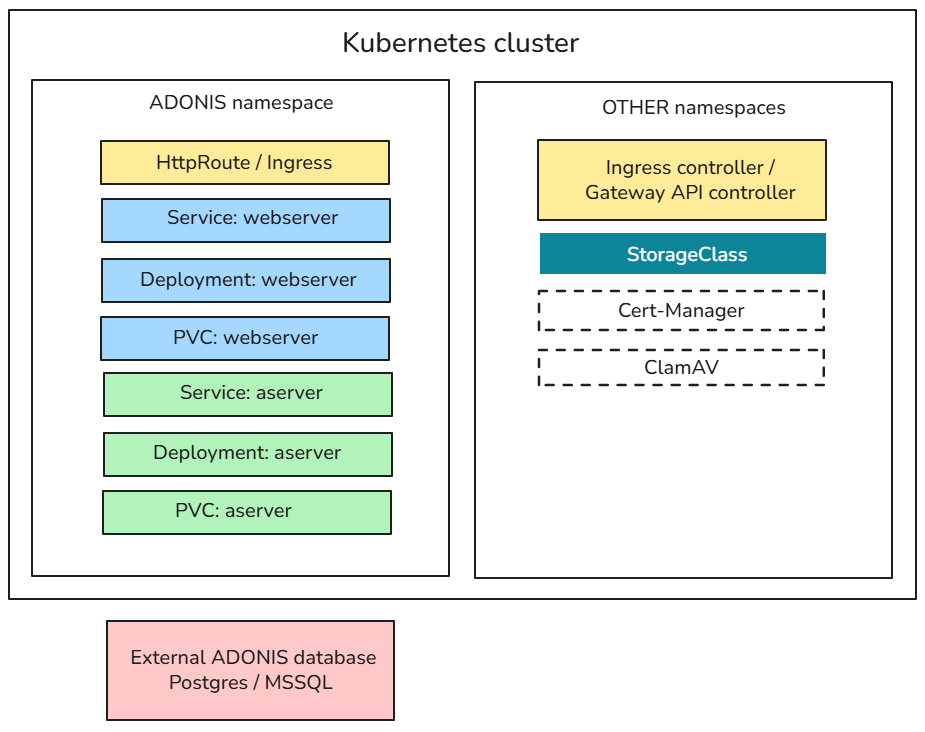
The following diagram illustrates how ADONIS 19 is deployed in a Kubernetes environment. The application components run in a dedicated namespace, while supporting infrastructure components are typically provided in other namespaces.
Prerequisites on Kubernetes
The Kubernetes cluster in which ADONIS will run must provide:
An Ingress controller or Gateway API controller for routing end-user traffic
A StorageClass for provisioning persistent volumes
allowVolumeExpansion=trueis highly recommended
It is recommended that the cluster also provides:
cert-manager for automating TLS certificate handling for ingress or HTTPRoute
ClamAV, exposing a TCP endpoint for malware scanning during file upload/download
Architectural Details
ADONIS Namespace
The ADONIS application components run in their own namespace and consist of:
HttpRoute / Ingress, which acts as the entry point for external traffic into the ADONIS namespace.
web server tier, where the web server is exposed through a Kubernetes service and uses a persistent volume for storing local logs.
application server tier, where the application server runs as a separate deployment with its own service and persistent storage for the full-text search index and local logs.
Other Namespaces
Cluster-level components that support the ADONIS deployment:
Ingress controller / gateway API controller for routing external traffic
StorageClass used to provision persistent volumes
cert-manager (optional) for TLS certificate automation
ClamAV (optional) for malware scanning
Deployment Behaviour
Both the web server and application server deployments support vertical scaling through memory and CPU requests/limits.
From Kubernetes 1.35 onwards, requests and limits can be adjusted at pod level without downtime.
Each deployment uses a single replica; ADONIS 19 does not support horizontal scaling with multiple replicas.
Local logs are required to enable creation of a Support Information Package (SIP) within the application, which is necessary for technical support.
External Database
ADONIS uses an external PostgreSQL or MSSQL database, which runs outside the Kubernetes cluster and is managed independently.
Docker Compose Deployment
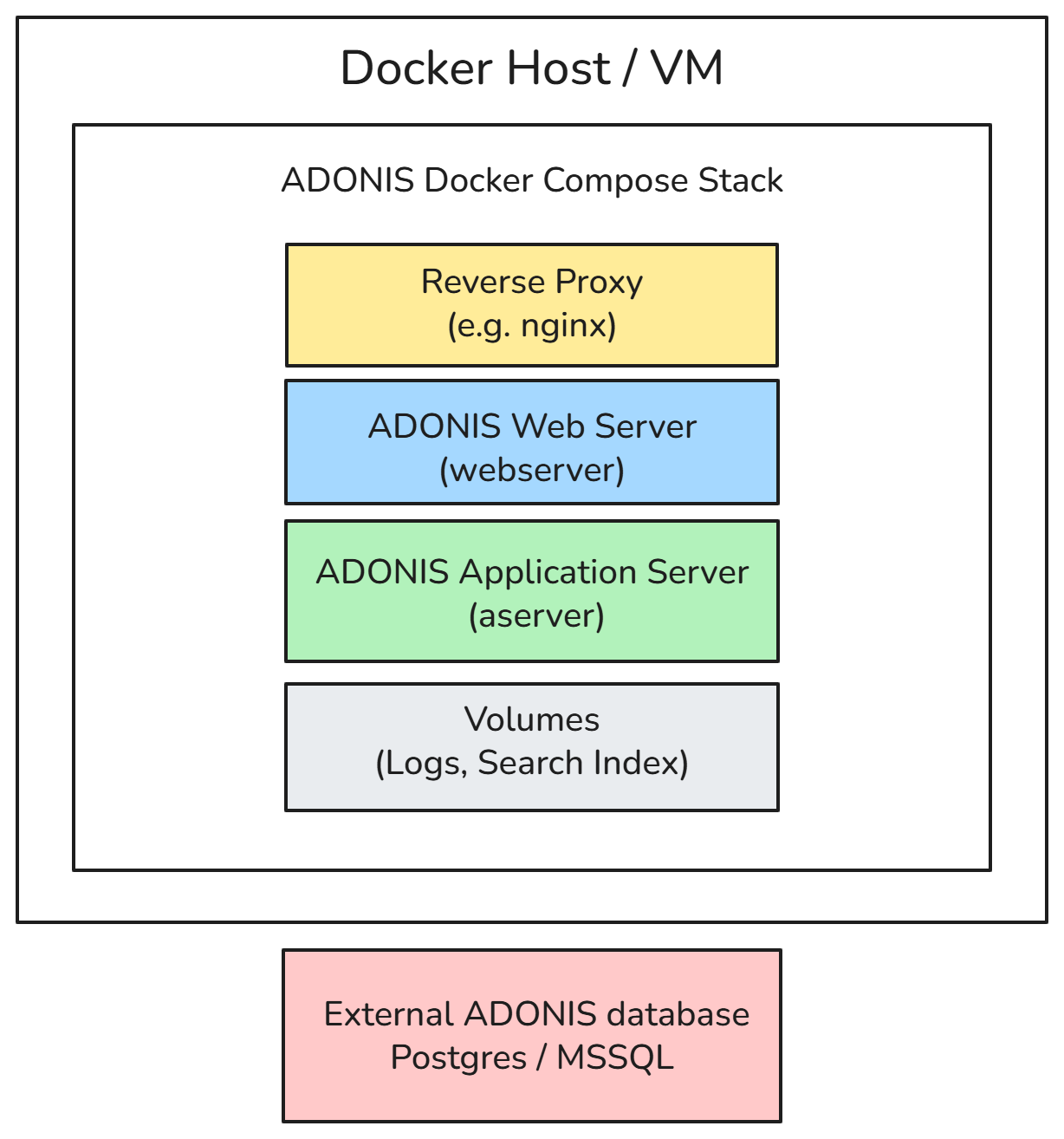
The following diagram illustrates how ADONIS 19 can be deployed on a single host using Docker Compose-compatible tooling such as Docker or Podman.
In this setup, the ADONIS web server and application server containers run on the same machine. Persistent data is stored using Docker volumes, and external access is typically provided through a reverse proxy.
Architectural Details
ADONIS Docker Compose Stack
The Compose stack consists of:
reverse proxy (e.g. nginx), which handles incoming HTTP(S) requests and forwards them to the ADONIS web server
web server container
application server container
volumes, used to store local logs and the full-text search index
Deployment Behaviour
Both the web server and application server run on a single host.
Container volumes ensure persistence for logs and search index data.
Scaling is limited to a single-node setup; multi-replica or distributed deployment is not supported.
Local logs stored in volumes enable the creation of a Support Information Package (SIP) for hotline support.
External Database
ADONIS uses an external PostgreSQL or MSSQL database, which is typically operated outside the Docker host and managed independently.
Registry and Updates
ADONIS 19 is distributed in a container-based format. The following release artefacts are provided.
Container Images
The ADONIS application is distributed as a set of container images, including:
web server image – provides the web interface and handles HTTP(S) requests
application server image – executes the ADONIS application logic and backend operations.
Helm Charts
For Kubernetes-based deployments, ADONIS provides a Helm chart for each released ADONIS version. This chart defines the Kubernetes resources and configuration parameters required to run ADONIS components in a containerised environment.
The delivery includes an umbrella chart that defines the full ADONIS deployment.
The umbrella chart contains a central values.yaml file, which specifies:
container image references
resource settings
service configuration
environment-specific parameters
These values can be customised to suit the target environment.
The Helm chart contains only deployment configuration, such as:
container image definitions
Kubernetes resource specifications
configuration parameters
The Helm chart does not contain or preload application data.
Application data is stored persistently in the configured database and is therefore not affected by deploying, upgrading, or redeploying the Helm chart. This ensures that deployments remain stateless at the application layer, while persistent data is managed independently via the database and configured persistent storage.
Artifact Distribution
Container Registry
All container images and Helm charts are distributed through an official, BOC-managed OCI-compliant registry.
Customers receive an email invitation to onboard to the registry.
Registry access is secured using authenticated, role-based access control.
Once onboarded, customers can manage their own access credentials (e.g. access keys or tokens).
These credentials can be used to securely authenticate and pull the required ADONIS artifacts from the registry via:
container runtimes (e.g. Docker, containerd, Podman)
Kubernetes environments
CI/CD pipelines or deployment automation tools
Air-Gapped Environments
Container images may be mirrored into internal registries to support restricted or air-gapped environments.
Examples of internal registry solutions include:
JFrog Artifactory
Harbor
Nexus Repository
Updates
Updates for container images and Helm charts follow the standard ADONIS release and maintenance process. New versions of the images are published to the OCI container registry as part of official product releases, maintenance updates, or security fixes.
Customers are notified about new releases through the usual communication channels (such as release notes and customer information). Updated images can then be pulled from the registry and deployed according to the customer’s internal deployment and update procedures.
Customers retain full control over when updates are applied in their environments.
System Requirements
Client Requirements
The software requirements for the ADONIS web client remain unchanged compared to previous ADONIS versions.
Supported Browsers
| Browser Type | Supported Browser |
|---|---|
| Desktop Browser (64-bit) | Microsoft Edge (latest) on Windows |
| Mozilla Firefox (latest) on Windows | |
| Google Chrome (latest) on Windows | |
| Safari (latest) on macOS | |
| Mobile Browser | Safari (latest) on iPad (graphical modelling is not supported on the iPad) |
Using the latest browser versions is recommended to ensure full functionality and security.
Server Requirements
Container Runtime
ADONIS 19 supports OCI-compliant container runtimes on AMD64 (x86_64) architecture. The following platforms are supported or expected to work:
| Platform | Status |
|---|---|
| Kubernetes (x86_64) | Supported |
| Docker / containerd / Podman environments (x86_64) | Supported |
| Kubernetes-based cloud environments | Supported |
| Red Hat OpenShift (x86_64) | Not officially validated |
| Other OCI-compliant container platforms on AMD64 (x86_64) architecture | Expected to work but not officially validated |
The BOC Group operates ADONIS in its own SaaS environment using Kubernetes. Kubernetes-based deployments are therefore fully validated.
Operating System
ADONIS 19 can run on modern Linux distributions that support Kubernetes or Docker/containerd, such as:
Ubuntu
Debian
Red Hat Enterprise Linux (RHEL)
SUSE Linux Enterprise Server (SLES)
Any modern Linux distribution capable of running the chosen container runtime is expected to be compatible.
Kubernetes and Deployment Tooling
ADONIS 19 deployments are typically performed using Kubernetes and Helm.
| Component | Requirement |
|---|---|
| Kubernetes | Kubernetes version 1.32 and higher |
| Helm | Helm 3.x for deployment |
| Container Registry Access | HTTPS access to OCI registry (port 443) |
Database
ADONIS requires an external database to store all persistent repository data. Database requirements remain unchanged compared to the previous ADONIS version. Supported databases for ADONIS 17 can be taken as a reference.
Persistent Storage
Persistent storage is required for the full-text search index and for application log files. Storage is typically provided using Kubernetes Persistent Volumes (PV) and Persistent Volume Claims (PVC), configured via the delivered Helm chart.
| Storage Component | PVC Required | Backup Required | Purpose | Notes |
|---|---|---|---|---|
| Full-text search index | Yes | No | Storage of the full-text search index used by the application server pod | Requires a dedicated PVC mounted to the application server pod. Storage may be backed by block storage such as Ceph RBD. The index can be recreated at any time. |
| Application logs | Yes | Optional | Storage of application log files and generation of the ADONIS Support Information Package (SIP) | Logs may be written to this persistent volume in addition to, or instead of, the standard container log stream via stdout/stderr. |
Networking
Container images are distributed via an OCI-compliant registry and accessed over HTTPS.
Typical networking requirements include:
| Port | Purpose |
|---|---|
| 443 | Access to container registry |
| 80 / 443 | Web access to ADONIS |
| Database port | Connection to external database |
ADONIS is typically exposed via a Kubernetes Ingress controller, Gateway API controller or an external reverse proxy.
The ADONIS web server container exposes port 8080 and does not terminate HTTPS connections itself.
For encrypted access (HTTPS), TLS termination must therefore be performed by the Ingress/gateway component in Kubernetes or by a reverse proxy in Docker Compose deployments.
Hardware Requirements
General Principles
Hardware requirements for ADONIS 19 running in containers are broadly comparable to previous Windows-based deployments. The hardware sizing recommendations from ADONIS 17 can be used as a baseline.
Containerisation does not reduce the required compute resources; the underlying hosts or virtual machines must provide sufficient CPU and memory capacity.
Typical Component Resources
The following values provide typical CPU and memory requirements for each ADONIS container.
| Component | CPU | Memory |
|---|---|---|
| Web server container | 2 CPUs or more |
|
| Application server container | 3 CPUs or more |
|
| Database server | Unchanged to previous versions | Unchanged to previous versions. |
Actual resource usage depends on factors such as:
number of concurrent users
size and complexity of the repository
modelling and reporting activity
application workload patterns
Example Resource Configuration
The values below show how typical ADONIS sizing can be mapped to Kubernetes resource settings. They are based on the recommended values above and should be adjusted according to real workload.
Web Server Container
| Parameter | Example Value |
|---|---|
| CPU request | 2 CPU |
| CPU limit | 4 CPU |
| Memory request | 4 GB |
| Memory limit | 8 GB |
Application Server Container
| Parameter | Example Value |
|---|---|
| CPU request | 3 CPUs |
| CPU limit | 6 CPUs |
| Memory request | 8 GB |
| Memory limit | 16 GB |
Deployment Configuration and Setup
Configuration Approach
Configuration of ADONIS 19 follows two complementary mechanisms:
Settings and Configuration Stored Within the Application
These settings are managed either individually by users or centrally through the ADONIS Administration. They are stored in the ADONIS database.
Examples include:
authentication configuration
rights administration
REST API settings
application-level preferences
Settings and Configuration Read From the Environment
These settings are read by the application from the runtime environment.
In earlier ADONIS versions, such settings were stored in .properties or .conf files inside the application server (e.g. server.conf) or web application (e.g. adoxx_web.properties) directories.
With ADONIS 19, the application is distributed as container images for the application server and the web server. Because containers are ephemeral, file-based configuration is no longer supported.
Instead, all deployment-specific configuration is now injected via environment variables:
Kubernetes: variables are defined in the
values.yamlfile and passed to containers when the Helm chart is deployed.Docker: variables are defined in
docker-compose.ymland applied when the containers start.
Configuration of the Application Server
Configuration properties for the application server are provided as environment variables via either:
the Helm values.yaml file (Kubernetes deployments), or
the docker-compose.yml file (Docker deployments)
All application server variables are prefixed with ADOXX_.
The following examples show how to configure the database name and the application worker ports.
Kubernetes:
axx:
  aserver:
    env:
      - name: ADOXX_SERVER_DBNAME
        value: adonis19
      - name: ADOXX_SERVER_PORTS
        value: 5432,5432
  ...
Docker:
...
  aserver:
    image: adonis.image/aserver
    container_name: aserver
    ...
    environment:
      - ADOXX_SERVER_DBNAME=adonisdb
      - ADOXX_SERVER_PORTS=54321,54322
      ...
Configuration of the Web Server
Configuration properties for the web server are also provided as environment variables via the values.yaml (Kubernetes) or docker-compose.yml (Docker) files.
Web server variables are prefixed with AXW_PROPERTIES_.
The following examples show how the used application servers and application workers are configured and how the maximum size for REST log files is increased to 300MB.
Kubernetes:
axx:
  ...
  webserver:
    env:
      - name: AXW_PROPERTIES_aservers
        value: AS1:adonis.host
      - name: AXW_PROPERTIES_aworkers
        value: AS1:54321,AS1:54322
      - name: AXW_PROPERTIES_axw_logger_appender_rest_maxfilesize
        value: 300MB
...
Docker:
...
  webserver:
    image: adonis.image/webserver
    container_name: webserver
    ...
    environment:
      - AXW_PROPERTIES_aservers=AS1:adonis.host
      - AXW_PROPERTIES_aworkers=AS1:54321,AS1:54322
      - AXW_PROPERTIES_axw_logger_appender_rest_maxfilesize=300MB
      ...
Detailed documentation of the configuration options will be provided in the official documentation of ADONIS 19.
Kubernetes Configuration Example
The following values.yaml example shows a minimal configuration for deploying ADONIS with:
one application server instance
multiple workers
database connection settings
logging configuration
runtime parameters
It defines the environment variables for both the application server (aserver) and web server (webserver) components, along with resource settings and optional features such as mail and lifecycle endpoints, serving as the input for Kubernetes-based deployment via Helm.
axx:
  aserver:
    env:
    - name: ADOXX_SERVER_DBNAME
      value: adonis19
    - name: ADOXX_SERVER_DBTYPE
      value: PostgreSQL
    - name: ADOXX_SERVER_DBPORT
      value: 5432
    - name: ADOXX_SERVER_DBHOST
      value: postgres.company.com
    - name: ADOXX_SERVER_WEBTIERAUTH_TRUSTED_HOSTS
      value: 127.0.0.*
    - name: ADOXX_LOG_MODE
      value: MIXED
    resources:
      limits:
        memory: 4096Mi
      requests:
        cpu: 500m
        memory: 2048Mi
    workerConf:
      count: 2
  instance:
    name: adonis19
  webserver:
    env:
    - name: AXW_PROPERTIES_mail_enabled
      value: 'true'
    - name: AXW_PROPERTIES_mail_server
      value: smtp.company.com
    - name: AXW_PROPERTIES_mail_server_port
      value: '25'
    - name: AXW_PROPERTIES_mail_sender
      value: ADONIS <no-reply@company.com>
    - name: AXW_PROPERTIES_mail_reply_to
      value: no-reply@company.com
    - name: JAVA_OPTS
      value: -Xms512m -Xmx2048m
    - name: AXW_PROPERTIES_base_url
      value: https://adonis19.company.com
    - name: AXW_PROPERTIES_lifecycleops_endpoint_enable
      value: 'true'
    - name: AXW_PROPERTIES_axw_logger_console_enabled
      value: 'true'
    - name: AXW_PROPERTIES_axw_logger_root_level
      value: INFO
    httpRoute:
      hostnames:
      - adonis19.company.com
    resources:
      limits:
        memory: 4096Mi
      requests:
        cpu: 100m
        memory: 2048Mi
Docker Compose Configuration Example
This Docker Compose setup deploys ADONIS with:
one application server instance
two worker ports
external database connection
local volume-based logging
a shared bridge network
services:
 aserver:
    image: <boc-registry>/adonis/aserver:19.0.0
    container_name: aserver
    user: root
    ports:
      - 54321:54321
      - 54322:54322
    environment:
      - ADOXX_SERVER_PORTS=40180
      - ADOXX_SERVER_DBNAME=<adbname>
      - ADOXX_SERVER_DBTYPE=<PostgreSQL/SQLServer>
      - ADOXX_SERVER_DBHOST=<hostname/IPaddress>
#      - ADOXX_SERVER_DBPORT=5432 (for PostgreSQL)
      - ADOXX_SERVER_WEBTIERAUTH_TRUSTED_HOSTS=*.*.*.*
      - ADOXX_LOG_MODE=MIXED
      - TZ=Europe/Vienna
    volumes:
      - ./logs/aserver:/aserver/logs
    shm_size: "300mb"
    networks:
      aserver_webserver:

 webserver:
    image: <boc-registry>/adonis/webserver:19.0.0
    container_name: webserver
    user: root
    ports:
      - 8888:8080
    environment:
      - JAVA_OPTS=-Xms512m -Xmx2048m -agentlib:jdwp=transport=dt_socket,server=y,suspend=n,address=*:8000
      - AXW_PROPERTIES_aworkers=AS1:54321,AS1:54322
      - AXW_PROPERTIES_aservers=AS1:aserver
      - AXW_PROPERTIES_axw_logger_console_enabled=true
      - AXW_PROPERTIES_axw_webserver_debug_enabled=false
      - AXW_PROPERTIES_axw_logger_root_level=INFO
      - AXW_PROPERTIES_base_url=https://adonis19.company.com
      - AXW_PROPERTIES_lifecycleops_endpoint_enable=true
      - AXW_PROPERTIES_mail_enabled=true
      - AXW_PROPERTIES_mail_server=smtp.company.com
      - AXW_PROPERTIES_mail_server_port=25
      - AXW_PROPERTIES_mail_sender=ADONIS <no-reply@company.com>
      - AXW_PROPERTIES_mail_reply_to=no-reply@company.com
      - TZ=Europe/Vienna
    volumes:
      - ./logs/webserver:/tomcat/logs
    networks:
      aserver_webserver

networks:
  aserver_webserver:
    driver: bridge
    enable_ipv6: true
Authentication and Identity Integration
Authentication in ADONIS is handled at the web application layer and is independent of the underlying operating system. The web application has historically supported operation on multiple platforms, including Linux, Solaris, and Windows.
LDAP and SAML Authentication
LDAP and SAML authentication are unaffected by the migration to a Linux-based, containerised deployment.
Communication with identity systems uses standard network protocols (LDAP, HTTP, HTTPS), which are operating system-agnostic.
Existing LDAP or SAML configurations can be reused without OS-specific changes.
Configuration Impact
Because authentication is handled in the web application and relies on OS-independent communication, the move to containerised deployment introduces no functional changes for supported authentication mechanisms.
Only environment-specific adjustments (e.g. hostnames or network settings) may be required.
Upgrade from ADONIS 16.x/17.x to ADONIS 19
This guide provides a high-level overview of the migration from ADONIS 16.x/17.x to ADONIS 19.
It highlights the main concepts, the key architectural changes, and the essential migration steps.
Major conceptual changes in ADONIS 19
There is a big technical shift: The ADONIS 19 application server no longer runs on Windows; the application server is now a Linux-based, OCI-compliant container.
| Old (≤17.x) | New (19) |
|---|---|
|
|
Migration approach outlined in this guide
The following list summarises the overall migration flow described in this guide (under Upgrade Process):
Export component settings, stop old ADONIS 16.x/17.x services, and backup necessary configuration values.
Continue using the existing database and perform an in-place schema upgrade after taking a backup.
Deploy ADONIS 19 using Kubernetes (Helm) or Docker Compose, and configure all deployment-level values as environment variables based on previously backed-up values.
Perform post-installation tasks within the application (update library, migrate settings, execute scripts).
Of these steps, 1, 2 and 4 follow a similar pattern to previous ADONIS upgrade guides, while step 3 introduces the new container-based deployment model.
Prerequisites
Before starting the migration, ensure that the following conditions are met.
System and environment requirements:
A supported runtime environment must be available (Kubernetes or Docker Compose).
Sufficient resources must be available for both ADONIS 19 containers (CPU, memory, storage).
See section [System Requirements](System Requirements) for more information.
Database and backup requirements:
The existing ADONIS database (SQL Server or PostgreSQL) must be accessible from the runtime environment.
A database backup must be created before making any changes.
Access and credentials:
Administrative access to the old ADONIS 16.x/17.x environment.
Deployment credentials for Kubernetes or Docker Compose.
Database credentials with sufficient privileges to connect to the ADONIS database and execute the ADONIS 19 schema upgrade script.
Container registry credentials for authenticating to the BOC container registry and, optionally, to your organisation’s container registry.
Container images and installation package:
From the BOC container registry:
OCI container images for:
application server
web server
Deployment manifests:
values.yaml(Kubernetes)docker-compose.yml(Docker)
From the installation package (download):
Library file (if you are using the ADONIS BPMS Application Library)
Database upgrade script
Migration script (if upgrading from ADONIS 16.x)
Application Library for ADONIS 19:
You can get started immediately if you are using the default library (ADONIS BPMS Application Library).
Contact your ADONIS consultant if you are using a different application library.
Upgrade Process
The following sections describe the main steps of the migration in the order they should be carried out. They provide a high-level outline of what needs to be done, from shutting down the old system to deploying ADONIS 19 and completing the final tasks inside the application.
Export Component Settings
First, the component settings from your old ADONIS 16.x/17.x environment need to be exported:
Export the component settings now so they can be re-imported later after the application library upgrade.
Export all settings at once, or alternatively, select the settings you want.
Stop Services
With the component settings exported, the old ADONIS 16.x/17.x environment can now be stopped:
Stop the ADONIS application server service on the current host system.
Stop the Tomcat service hosting the existing ADONIS 16.x/17.x web application.
If a monitoring solution is in place, temporarily disable it.
Backup Deployment-Specific Data
Next, back up deployment-specific data from your old ADONIS 16.x/17.x environment. You will need this information later when configuring ADONIS 19.
Back up configuration files that contain environment-specific values (e.g. database name, ports, host/IP settings, customised parameters), such as
server.confandadoxx_web.properties.Keep all backed-up files accessible so you can transfer the relevant values into environment variables in ADONIS 19.
Upgrade Database Schema
Upgrade the existing ADONIS database to the ADONIS 19 schema:
Create a database backup now if you have not already done so.
Run the ADONIS 19 database upgrade script for your database system (SQL Server or PostgreSQL).
Prepare the Runtime Environment
Follow the steps for your target orchestration platform below:
Kubernetes Deployment
Prepare the Kubernetes environment:
Create or select a namespace for ADONIS.
Ensure required StorageClasses are available for persistent volumes.
Ensure an Ingress controller or Gateway API controller is available. The Helm chart supports both Ingress and HTTPRoute.
Docker Compose Deployment
Prepare the Docker environment:
Ensure container runtime is available (e.g. Docker, containerd, Podman)
Prepare Docker volumes for logs and search index.
Ensure a reverse proxy is available for HTTPS termination.
Prepare Configuration (values.yaml or docker-compose.yml)
Prepare the environment variable configuration:
Add the database connection settings.
Configure worker ports, trusted hosts, and environment-specific parameters - transfer the relevant values from your backup configuration files (such as
server.confandadoxx_web.properties).For Kubernetes: enter values in
values.yaml.For Docker: enter values in
docker-compose.yml.
Deploy ADONIS 19
Follow the steps for your target orchestration platform below:
Kubernetes
Deploy ADONIS 19 to your Kubernetes environment using the provided Helm chart and OCI container images:
Ensure the finalised
values.yamlfile is available for the deployment.Run the Helm install command to deploy the chart to your designated namespace.
The chart deploys the application server and web server containers, along with all required Kubernetes resources (Services, Ingress, etc.).
Docker Compose
Deploy ADONIS 19 to your Docker environment using the provided Docker Compose configuration:
Ensure the finalised
docker-compose.ymlfile is available in your working directory.Run
docker-compose up -dto pull the OCI images and initialize the services.
Verify Deployment
After deploying ADONIS 19, verify that the environment is running correctly:
Ensure all containers (Kubernetes pods or Docker services) have started successfully.
Access the ADONIS URL to confirm the application is reachable.
Check logs via persistent volumes or container logs.
Post-Installation Tasks
After ADONIS 19 is running, complete the remaining tasks inside the ADONIS 19 Administration:
Update the application library.
Re-import the component settings exported from your old ADONIS 16.x/17.x environment.
If you are upgrading from ADONIS 16.x, execute the migration script
17.0 - repo.jsto align repository content with the new method.
Final Checks
Perform final checks to ensure ADONIS 19 is fully operational:
Verify that users can access ADONIS as expected.
Confirm that repository content is available and displays correctly.
Run standard operations (e.g. modelling, reporting, search) in ADONIS to validate basic functionality.
Optionally, integrate the deployment into your monitoring solution
Uninstall ADONIS 16.x/17.x
With ADONIS 19 now fully operational, the old ADONIS 16.x/17.x environment can be removed:
Uninstall the ADONIS 16.x/17.x application server through the control panel.
Remove the ADONIS 16.x/17.x web application from Apache Tomcat.
Done! The upgrade to ADONIS 19 is now complete.
Security
Rights and Permissions
ADONIS container images do not require root privileges.
All processes inside the containers run under a predefined non-root user (ADO).
No additional host-level permissions or elevated Kubernetes privileges are required.
Minimal Image Principle
ADONIS container images follow a distroless approach.
Unnecessary operating system components and utilities are removed, reducing the attack surface and enforcing the principle of minimalism.
Cluster Resources
The ADONIS deployment does not require privileged containers or global Kubernetes resources. In particular:
no privileged mode
no NodePorts
no Kubernetes Operators
no cluster-wide access rights
This allows deployment in restrictive enterprise clusters with strict security policies.
Namespaces and Resource Isolation
All required Kubernetes resources can be deployed and operated entirely within a single namespace.
This supports namespace-level isolation, role-based access control (RBAC), and organisation-specific security frameworks.
Storage Permissions
Persistent storage is required only for specific components, such as the full-text search index and application logs.
The required Persistent Volumes and Persistent Volume Claims are defined through the Helm chart and do not require elevated cluster permissions.
Access is limited to the ADONIS application server and web server containers.
Operations
Scaling
Horizontal Pod Autoscaling (HPA) is not supported in ADONIS 19.
Scaling is therefore performed primarily through vertical scaling, by adjusting the CPU and memory resources assigned to the application containers.
The delivered Helm charts support deploying multiple application server instances. As with previous ADONIS releases, running two or more application servers is supported and recommended for high availability.
Resource allocation should be sized according to:
expected workload
number of concurrent users
overall system usage
Logging and Monitoring
Logging
Both the web server and application server containers generate log information for system events and errors.
To enable creation of the Support Information Package (SIP) within ADONIS, log files are written to persistent storage. A dedicated persistent volume is required for these logs.
The SIP is required for support and troubleshooting.
In addition to file-based logging, ADONIS also outputs logs via standard container logging streams (stdout/stderr).
This enables integration with external logging solutions such as central log collectors, SIEM platforms, or data lakes.
Log Storage and Retention
Log files are stored on the configured persistent volume.
Retention, rotation, and rollover behaviour can be configured through the logging setup.
The effective retention period depends on:
logging configuration
customer infrastructure
organisational operational policies
Log Levels
ADONIS uses the following log levels:
| Log Level | Description |
|---|---|
| INFO | General operational information |
| WARN | Warnings indicating potential issues |
| ERROR | Errors that affect functionality |
| SEVERE | Errors that severely affect functionality |
| DEBUG | Detailed diagnostic information (only enabled in debug mode) |
Log levels behave the same way as in previous Windows-based versions of ADONIS (ADONIS 17 and earlier).
Log Configuration
Logging behaviour can be configured using environment variables provided through:
values.yaml(Kubernetes)docker-compose.yml(Docker)
Configurable parameters include:
log level
maximum file size
maximum history
total log size limits
Details on available parameters are described in the configuration section.
Data Protection in Logs
Sensitive values and personal data written to logs are pseudonymised wherever applicable.
This behaviour is consistent with earlier ADONIS versions.
Log Output Format
The general structure of log output remains largely consistent with previous releases.
Some adjustments have been made to improve consistency across different log types.
A detailed schema will be included in the official ADONIS 19 documentation.
Monitoring
Logs Monitoring
ADONIS does not provide a built-in logging stack.
Customers are expected to integrate ADONIS logs into their existing observability or monitoring infrastructure.
ADONIS supports this through:
log output via standard container logging mechanisms (stdout/stderr)
compatibility with common log collection agents (e.g. Fluent Bit)
forwarding logs to systems such as OpenSearch, Elasticsearch, or similar platforms
In Kubernetes environments, container logs are typically stored temporarily on the node and collected by a log processor before being forwarded to the organisation’s central log system.
Metrics and operational monitoring can be integrated into existing tools such as Prometheus, Grafana, or other enterprise monitoring platforms.
Monitoring Endpoints
ADONIS provides built-in monitoring endpoints for platform-level health checks.
The delivered container images include executables used for Kubernetes liveness and readiness probes.
These probes internally call the following endpoints:
| Health check | Endpoint |
|---|---|
| Liveness | /status/health/live |
| Readiness | /status/health/ready |
These endpoints can also be used by external monitoring systems.
More detailed information will be provided in the official ADONIS 19 documentation.
Licensing
Existing ADONIS licensing remains valid for all current usage scenarios.
The deployment model, whether Windows-based or containerised, does not affect the applicable licensing terms.
Support & lifecycle
The introduction of the containerised deployment model does not change the existing ADONIS support or product lifecycle policies.
All support terms, maintenance services, and lifecycle rules continue to apply as they did for previous ADONIS versions.