ADONIS 19.0 Hardware/Software Requirements
Abstract
| ADONIS Web Client | Web browser used to access the ADONIS web application. ADONIS supports the desktop browsers Microsoft Edge, Mozilla Firefox and Google Chrome on Windows and Safari on macOS and on the iPad. |
| ADONIS Web Server | Containerised web server component that exposes the ADONIS web application and handles HTTP(S) traffic from web clients. The web server runs as an OCI‑compliant container and is typically integrated with external components such as an Ingress controller, Gateway API or reverse proxy for HTTPS termination. |
| ADONIS Application Server | Containerised backend component that contains the core ADONIS application logic and provides access to the ADONIS database. The application server runs as an OCI‑compliant container and communicates with the web server over the internal deployment network. |
| ADONIS Database | External database server that stores all persistent ADONIS repository data. ADONIS supports Microsoft SQL Server and PostgreSQL. The database is operated independently from the ADONIS containers and is not deployed as part of the ADONIS runtime. |
Architecture
The architecture of ADONIS is based on a containerised application model.
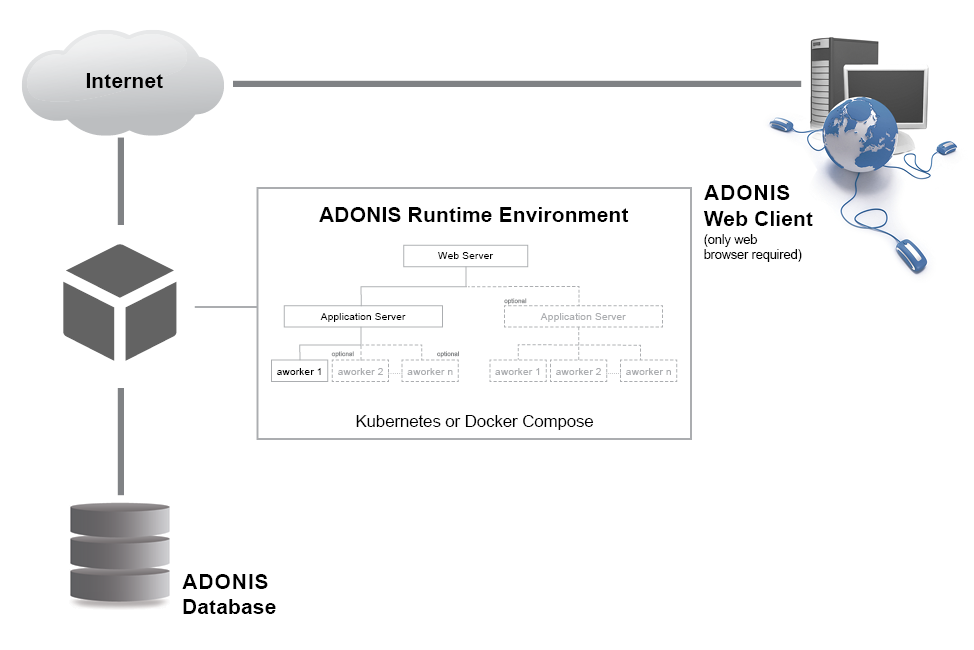
The application is delivered as a set of OCI‑compliant container images and consists of two core server components:
- the ADONIS Web Server
- the ADONIS Application Server
Each component is executed in a dedicated container and the components communicate with each other via an internal deployment network. The web server exposes the ADONIS web application to end users and processes incoming HTTP requests. The application server contains the core ADONIS application logic and provides access to the ADONIS database.
The ADONIS database is not part of the containerised runtime environment. It is operated as an external database server and stores all persistent ADONIS repository data. The database is managed independently from the ADONIS deployment.
ADONIS offers two options for container-based deployment:
- Kubernetes, using the supplied Helm chart
- Docker Compose, using the supplied Compose configuration
The fundamental application architecture remains the same across these environments; differences exist only at the level of orchestration and infrastructure integration.
Software Requirements
ADONIS Web Client
ADONIS is accessed exclusively via a web browser. No additional client‑side software or plugins are required.
| Supported Browsers | Desktop Browser:
|
Server Components
ADONIS is operated in a container-based server environment. All server-side components are provided as OCI‑compliant container images and are executed using a supported container runtime.
The following sections describe the required server-side software environment and infrastructure components that must be provided in order to operate ADONIS.
Container Runtime
ADONIS requires an OCI‑compliant container runtime on an x86_64 (AMD64) architecture. The following container platforms are fully validated and supported:
| Platform | Status |
|---|---|
| Kubernetes (x86_64) | Supported |
| Docker and Docker Compose (x86_64) | Supported |
Other OCI‑compliant container runtimes or Kubernetes‑compatible platforms are expected to be compatible, provided they conform to the respective standards. Such platforms are not individually tested.
ADONIS images are shipped with the requirement that the processes executed in the containers are owned by user 1100. In container orchestration environments with restrictions regarding the runAsUser settings this can result in the containers failing to run. The deployment settings need to be adapted allowing execution as user 1100. In OpenShift, for example, this can be achieved by setting the Security Context Constraint (SCC) on the associated service account to nonroot (see the Red Hat OpenShift Documentation. With this setting, it is still ensured that the actual user is not root, acknowledging that if multiple instances of BOC Group products exist on a node, they are executed with the same UID.
Operating System (Host Level)
ADONIS is designed to run on modern Linux-based operating systems capable of executing the required container runtime.
Examples of supported host operating systems include:
- Ubuntu
- Debian
- Red Hat Enterprise Linux (RHEL)
- SUSE Linux Enterprise Server (SLES)
In general, any current Linux distribution that is supported by the chosen container runtime and deployment platform can be used.
Kubernetes and Deployment Tooling
When operating ADONIS in a Kubernetes environment, the following requirements apply:
| Component | Requirement |
|---|---|
| Kubernetes | Kubernetes version 1.32 and higher |
| Helm | Helm 3.x for deployment |
| Container Registry Access | HTTPS access to OCI registry (port 443) |
The Kubernetes cluster must support standard resource types such as Services, Ingress or Gateway API resources, and Persistent Volume Claims, as required by the ADONIS deployment.
Persistent Storage
Persistent storage is required for the full-text search index and for application log files. Storage is typically provided using Kubernetes Persistent Volumes (PV) and Persistent Volume Claims (PVC), configured via the delivered Helm chart.
| Storage component | PVC required | Backup required | Purpose | Notes |
|---|---|---|---|---|
| Full-text search index | Yes | No | Storage of the full-text search index used by the application server pod | Requires a dedicated PVC mounted to the application server pod. Storage may be backed by block storage such as Ceph RBD. The index can be recreated at any time. |
| Application logs | Yes | Optional | Storage of application log files and generation of the ADONIS Support Information Package (SIP) | Logs may be written to this persistent volume in addition to, or instead of, the standard container log stream via stdout/stderr. |
Server-Side Software Scope
The ADONIS container images include all required application-level dependencies. In particular:
- No separate Java installation is required on the host system.
- No application server or web server software needs to be installed outside the containers.
- Configuration is performed via environment variables supplied at deployment time.
Additional infrastructure components (for example reverse proxies, ingress controllers, or certificate management solutions) are required depending on the chosen deployment environment and are described in the corresponding technical documentation.
Database Server
ADONIS requires an external database system to store all persistent repository and application data. The database is not part of the ADONIS container runtime and must be provided and operated independently.
Supported Database Management Systems
ADONIS supports the following database management systems:
| Supported database management systems | Microsoft SQL Server:
Note: SQL Server Express edition is not recommended for production use. Note: ADONIS does not support SQL Server multi-subnet failover. Any interruption of the database connection causes a restart of database-dependent backend components. PostgreSQL
|
Database Connectivity
- The database must be reachable from the ADONIS Application Server container via the network.
- Appropriate database drivers are included as part of the ADONIS container images; no additional database client software is required on the host system.
- Database connection parameters (host, port, database name, credentials) are provided via environment variables at deployment time.
Database Operation
- The database may be operated on physical or virtual machines or within managed database services, provided network access is ensured.
- Backup, recovery, high availability, and maintenance of the database are the responsibility of the customer.
- ADONIS does not impose specific requirements on database clustering or failover mechanisms beyond standard DBMS support.
Additional Optional Server Components
| SMTP Server |
|
Network Requirements
Operating ADONIS requires reliable network connectivity between the involved components and infrastructure services.
Required Network Connectivity
The following network connections must be available:
| ADONIS Web Client → ADONIS Web Server | End-user access via HTTP or HTTPS.
|
| ADONIS Web Server → ADONIS Application Server | Internal communication within the deployment environment. |
| ADONIS Application Server → Database Server | Persistent database connectivity.
|
| Deployment environment → Container Registry | HTTPS access (typically TCP port 443) to retrieve container images. |
Ports and Protocols
The following ports and protocols are required:
| Port | Purpose |
|---|---|
| 443 | Access to container registry |
| 80 / 443 | HTTP / HTTPS for web access to ADONIS |
| Database-specific ports | Connection to external database; as required by the chosen DBMS |
TLS termination is not performed inside the ADONIS containers. For encrypted access, HTTPS termination must be handled by external components such as an ingress controller, gateway, or reverse proxy.
Hardware Requirements
ADONIS Web Client
The hardware requirements for the ADONIS Web Client depend primarily on the requirements of the operating system and web browser in use.
As a general guideline:
- 4 GB RAM and a screen resolution of 1366 x 768 or higher is recommended for acceptable performance.
- Higher screen resolutions improve usability when working with models and reports.
Server Components
- The total workload size (number of concurrent users, repository size, modelling and reporting activity) is the primary sizing factor for server hardware sizing.
- Adequate resource headroom should be provided to account for peak usage, background processing, and operational overhead.
- When operating ADONIS in Kubernetes, resource requests and limits must be aligned with the available node capacity.
Typical Component Resources
The following values provide typical CPU and memory requirements for each ADONIS container.
| Component | CPU | Memory |
|---|---|---|
| Web server container | 2 CPUs or more |
|
| Application server container | 3 CPUs or more |
|
Example Resource Configuration
The values below show how typical ADONIS sizing can be mapped to Kubernetes resource settings. They are based on the recommended values above and should be adjusted according to real workload.
Web Server Container
| Parameter | Example Value |
|---|---|
| CPU request | 2 CPUs |
| CPU limit | 4 CPUs |
| Memory request | 4 GB |
| Memory limit | 8 GB |
Application Server Container
| Parameter | Example Value |
|---|---|
| CPU request | 3 CPUs |
| CPU limit | 6 CPUs |
| Memory request | 8 GB |
| Memory limit | 16 GB |
Notes on Scaling and Availability
- ADONIS supports multiple Application Server instances for availability purposes, subject to architectural constraints documented separately.
- Horizontal autoscaling is not supported; scaling is primarily achieved by vertical scaling of available resources.
- When multiple nodes are used, the combined available resources across all nodes must meet the required workload capacity.
Database Server
| Disk space |
|
| CPU |
|
| Memory |
|
Authentication Mechanisms of ADONIS
This section describes the different authentication mechanisms of ADONIS. The authentication mechanisms can be used separately or in combination. Depending on the used authentication mechanisms, further installation-specific configuration steps may be necessary. Please consult your ADONIS consultant for further information.
Authentication Mechanisms
| Standard ADONIS users |
|
| LDAP Authentication |
|
| IDM Authentication |
|
| SAML Authentication |
|
| OIDC Authentication |
|
LDAP Support
|
Feature Overview
This table contains a summary of the features of the different authentication mechanisms.
| Standard ADONIS Users | LDAP Authentication | IDM Authentication | SAML Authentication | OIDC Authentication | |
|---|---|---|---|---|---|
| Login with username and password | Yes | Yes | Yes (depending on the IDM solution) | Yes (depending on the SAML IdP) | Yes (depending on the OP) |
| SSO | No | No | Yes (depending on the IDM solution) | Yes (depending on the SAML IdP) | Yes (depending on the OP) |
| On login, synchronize attributes, role and group assignment (with external user management system) | No | Yes | Yes | Yes | Yes |
| Periodically, synchronize attributes, role and group assignment (with external user management system) | No | Yes | Yes (with LDAP coupling) | Yes (with LDAP coupling) | Yes (with LDAP coupling) |
| Create users automatically | No | Yes | Yes | Yes | Yes |