New Features in ADOIT 21.0 LTS
Welcome to ADOIT 21.0 LTS, our latest Long Term Support (LTS) release! This release introduces the AI Assistant chat, extends configurable dashboards and workspaces, and improves ADONIS Connect, with many further enhancements for users and administrators.
For users, highlights include:
AI Assistant chat: Explore and analyse your repository in natural language, with actions that respect your permissions.
Configurable Dashboards: Embed graphical models in dashboards with the new Model Viewer widget.
Read & Explore: Personalise your start page with a configurable dashboard, not only a model.
ADONIS Connect: Consolidate application usage from ADONIS across modelling levels into ArchiMate business processes in ADOIT.
Workspaces: Sorting, refined setup options, and clearer warnings when contract or assessment data is out of date.
For administrators, ADOIT 21.0 LTS adds:
AI Assistant chat configuration, including AI provider, MCP services, and OIDC client setup.
Anthropic as an additional AI provider for the AI Assistant.
The Operations Tool for maintenance, large imports and exports, database initialisation, and more.
Read on to learn more about the new features in ADOIT 21.0 LTS!
ADOIT 21.0 LTS is available for all SaaS and on-premise customers.
ADOIT 20.0 was released as a SaaS-only version for customers hosted on AWS. On-premise customers upgrading from ADOIT 19.x or earlier should follow the migration guidance at the end of this page.
New Features for All Users
AI Assistant Chat
The AI Assistant chat helps you explore and analyse your ADOIT repository and answer questions about your enterprise architecture. Ask questions in natural language, search and retrieve repository information, and discuss enterprise architecture and ArchiMate concepts. The assistant respects the permissions of your user account.
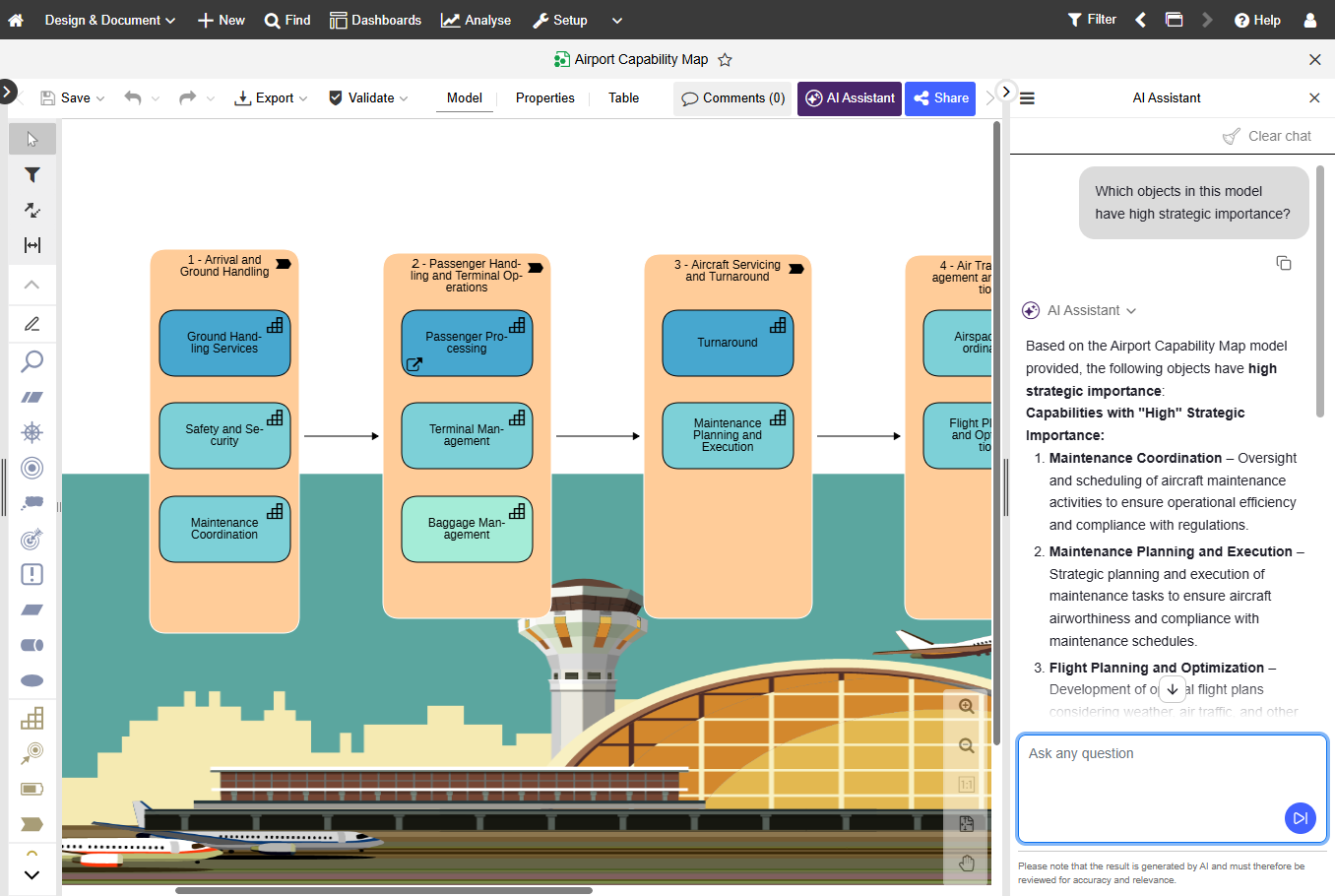
You can open the AI Assistant from the Design & Document and Read & Explore scenario start pages, or from within a model:
Global chat: On the scenario start page, click AI Assistant in the bottom right corner. Your chat history appears in the left-side panel; the current conversation is on the right.
Model-context chat: Open a model in the graphical or tabular editor and click the AI Assistant button. The assistant opens on the right side of the program window in the context of the current model.
Type your questions in the free text field (Ask any question). The AI Assistant can help you in areas such as:
Repository Data & Search: Search the repository for models and objects, browse saved searches, retrieve details, and create objects and relations between objects.
Enterprise Architecture Knowledge: Explain ArchiMate concepts, modelling approaches, architecture principles, governance, and best practices.
Repository Metadata: List available object types, model types, and repository languages.
Practical Support: Help interpret models, answer questions about your architecture landscape, and provide links to open the properties of models and objects.
You can execute found saved searches in the chat, open properties of models and objects from links, and use options such as New chat, Clear Chat, Copy response, and Show MCP usage to see which MCP tools were used for a response.
The AI Assistant can find and analyse existing repository data and create objects with a name and description as well as relations between objects. Other changes to repository data must be made using the corresponding ADOIT components.
The AI Assistant is available in the ADOIT Enterprise Edition. Your ADOIT administrator must enable it and configure an AI provider.
For details, please refer to the chapter "Work with the AI Assistant" in the User Manual.
Configurable Dashboards: Model Viewer Widget
ADOIT 21.0 LTS extends configurable dashboards with a new Model Viewer widget. Display a model directly on a dashboard so you can access and navigate important models without leaving your personalised workspace, alongside charts, tables, and other widgets.
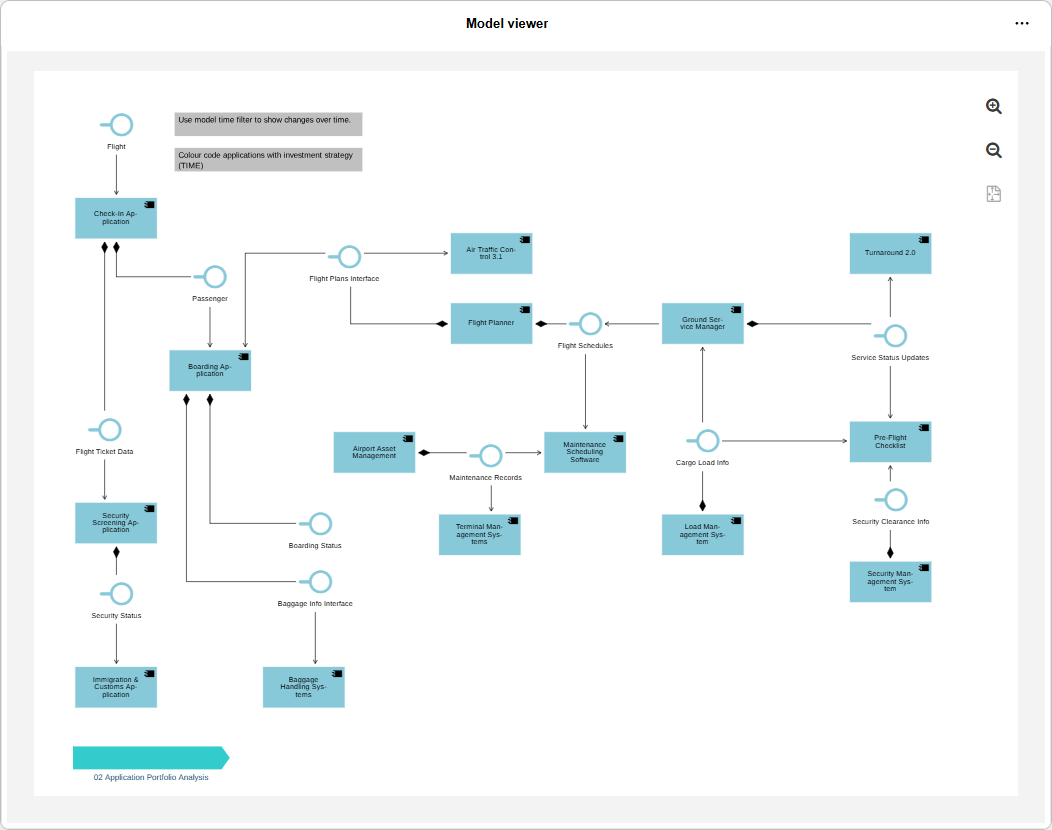
For details, please refer to the section "Configure Model Viewer" in the User Manual.
Personalise the Read & Explore Start Page with a Dashboard
In Read & Explore, you can personalise what you see when you open the scenario. Previously, you could select your own model as start content. You can now also select a configurable dashboard. Like all dashboards, your start page respects read permissions.
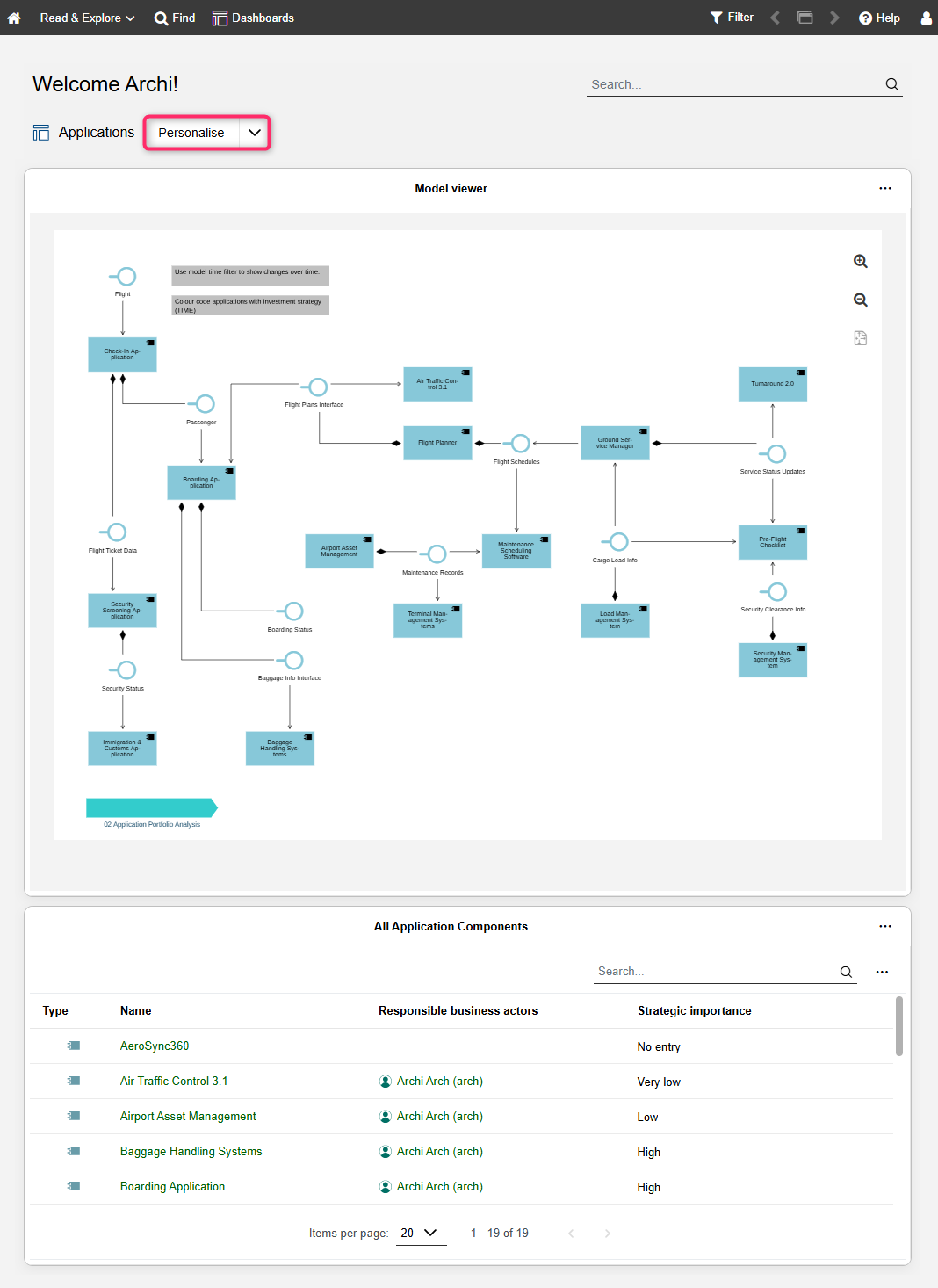
To select a odel or dashboard, click Personalise on the Read & Explore start page.
For details, please refer to the section "Personalise the Start Page" in the User Manual.
ADONIS Connect: Application Usage Across Modelling Levels
ADOIT Connect for ADONIS now analyses application usage across all modelling levels in ADONIS. Whether applications are assigned at the process model, BPMN task, or subprocess level, the connector consolidates that information and synchronises aggregated results to the corresponding ArchiMate business processes in ADOIT. You gain a more complete view of how applications support business processes without additional modelling effort.
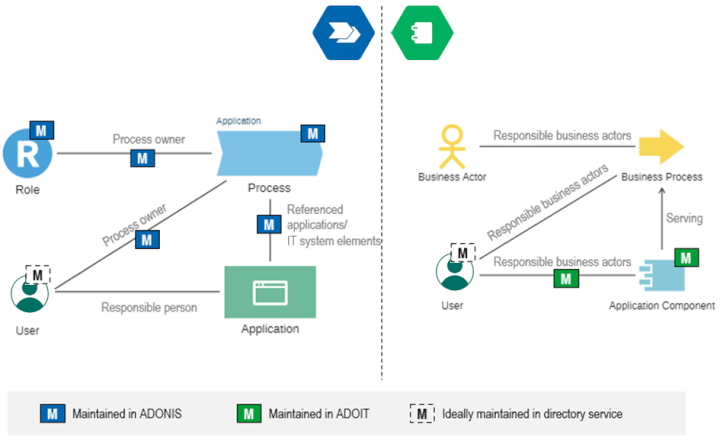
This feature is included with ADOIT 21.0 LTS. ADONIS 19.1 or higher is required.
This feature is only available in the ADOIT Enterprise Edition. The availability of this feature also depends on the licence.
For details, please refer to the section "Synchronisation with ADONIS - Default Mapping" in the User Manual.
Workspace Improvements
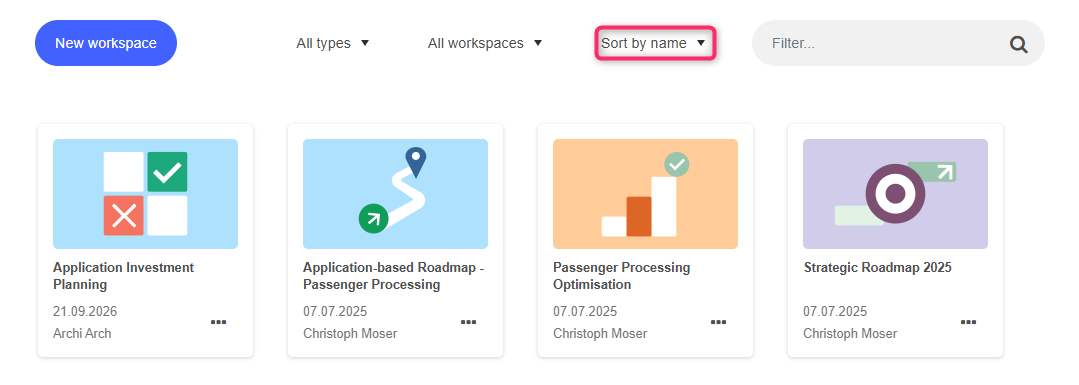
ADOIT 21.0 LTS adds sorting, optional setup steps, and warnings in the UI when contract or assessment data no longer matches your repository. Also, workspace cards now display additional information, making it easier to identify and manage workspaces.
Workspaces Page
The Workspaces page lists all workspaces that have been created. You can now sort workspaces by name, by author, by date of last change, or by template.
Create Workspace
When you create a workspace, additional optional steps help you adapt the worksapce to your needs:
Application Cost Management: Optionally enable Apply lifecycle dates to check contracts based on their validity period. If enabled, select the Valid year for which contract validity should be considered.
Application Investment Planning and Capability Investment Planning: Optionally define Workspace valid until (intended lifetime of the workspace) and Survey period (recommended window for collecting assessments).
Application Cost Management
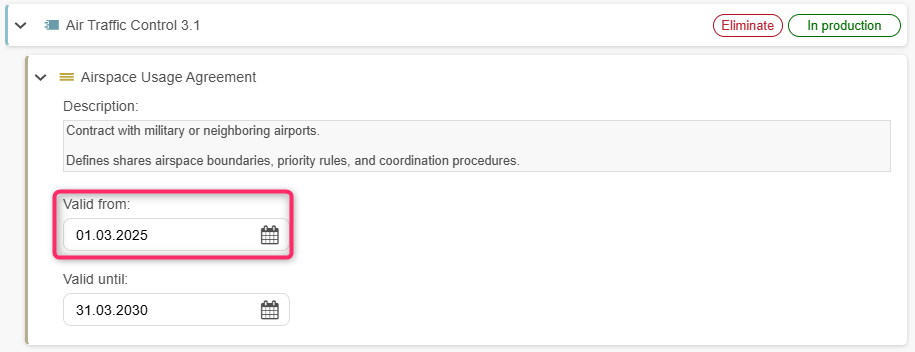
For contracts, you can now set an optional Valid from date in addition to Valid until. If you enabled Apply lifecycle dates when setting up the workspace, warnings appear when a contract does not match the configured valid year.
Application Investment Planning and Capability Investment Planning
Warnings appear when assessment results are outdated and differ from an element's current repository values. This can happen, for example, if the element was assessed in a different workspace or its properties were updated manually.

For details, please refer to the section "Workspaces" in the User Manual.
Methodical Improvements
ADOIT 21.0 LTS includes the following metamodel enhancement.
Application Services: Mark AI Systems
 Application Services can now be marked as AI Systems using a new Specialisation attribute in the "General" chapter. Select AI System or leave the attribute empty to classify services in your application landscape.
ADOIT Forms: Status and Submission Deadlines
ADOIT Forms now provide a clearer view of each form's current status and how much time remains to complete and submit it. Occasional contributors can track progress throughout the form lifecycle and meet deadlines with greater confidence.
ADOIT Forms is an add-on module. Head over to the ADOIT Forms What's New to learn more.
ArchiMate Pattern Library
The ADOIT documentation now includes a growing collection of ArchiMate Patterns based on proven modelling practices from the ADOIT user community, curated by BOC Customer Success Managers and Enterprise Architecture consultants. Aligned with the Lean Architecture Profile, each pattern documents recommended elements, relationships, modelling conventions, and typical use cases.
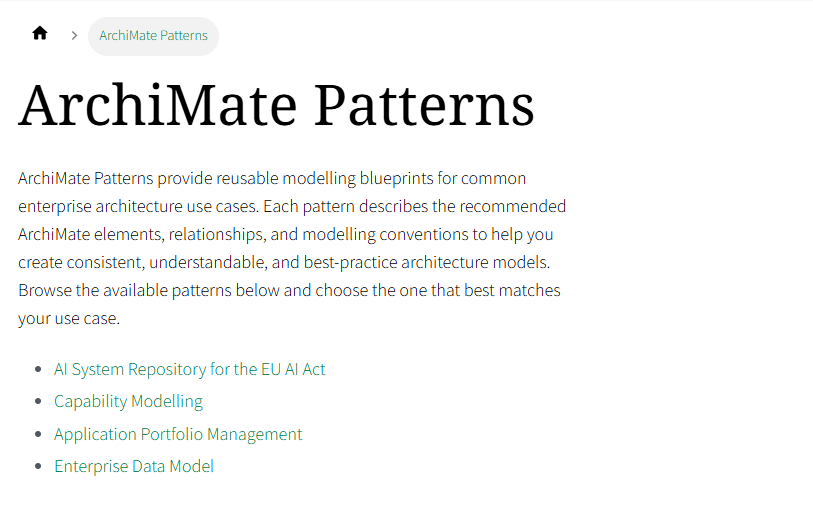
Find all patterns in ArchiMate Patterns.
New Features for ADOIT Administrators
Enable the AI Assistant Chat
You can enable the AI Assistant chat in the ADOIT Administration so users can interact with the repository in natural language. Configuration includes selecting an AI provider, activating MCP services, and enabling an OIDC client as described in the Administration Help.
For information on how to enable and configure the AI Assistant (Chat), please refer to the section "Enable the AI Assistant (Chat)" in the Administration Help.
AI Assistant: Anthropic Support
The AI Assistant now supports an additional AI provider type: Anthropic. When you select this provider, enter the specific model identifier and provide a valid API key to enable communication with the service.
For details, please refer to the section "AI Assistant" in the Administration Help.
Operations Tool
The Operations Tool is a web application that provides access to important operations for administering ADOIT without direct access to the application server or database server. You can either launch it directly from the ADOIT Administration in maintenance mode, or it starts automatically ifthe database is not initialised or via an environment variable in the deployment configuration.
Maintenance mode includes operations for encrypting credentials, resetting or re-enabling the Admin super user, importing or exporting large migration packages or repositories, script execution, exporting the active application library, and upgrading the product. A separate mode supports initialising an empty database.
For details, please refer to the section "Operations Tool" in the Administration Help.
ADONIS Connect: Upgrade of Data Synchronisation
To use enhanced ADONIS Connect synchronisation (including support for process hierarchies when linking applications to processes), ADOIT needs an updated configuration. A prerequisite is that the connected remote system is ADONIS 19.1 or higher or ADOGRC 15.1 or higher.
Open the data connector ADONIS and proceed to step 2 (Configure). When an upgrade is available, select the check box Upgrade of Data Synchronisation to opt in for the upgrade. ADOIT then updates the configuration.
Custom adaptations to the synchronisation configuration are overwritten when you confirm the upgrade.
For details, please refer to the section "Integration - Data Connectors: ADONIS" in the Administration Help.
Read & Explore: Dashboard as Default Start Content
The start content configuration for the Read & Explore scenario has been extended. In addition to a model, you can configure a configurable dashboard as the start content for each repository.
For details, please refer to the section "Read & Explore Scenario" in the Administration Help.
Data Actuality: Enable or Disable Email Notifications
In the data actuality configuration, a new Enable mailing option lets you turn email notifications on or off. Choose whether responsible users should receive email notifications when objects are marked as yellow or red.
For details, please refer to the section "Data Actuality" in the Administration Help.
Object Ownership: Read-Only Responsibility Fields
Optionally, you can make ownership relation fields read-only across components such as object properties and the tabular editor. Users add or remove object responsibles in a dedicated dialog instead. This helps prevent situations where a user removes themself as responsible and can no longer edit an object to assign a new responsible.
For details, please refer to the section "Object Owners" in the Administration Help.
Removed Features
EA Workflow
The EA Workflow is no longer available to new customers. Existing customers with licences that include the EA Workflow may continue to use it.
Predefined Dashboards
The following predefined dashboards have been removed from ADOIT 21.0 LTS:
Design & Document: My Objects, Strategy, Business, Application and Technology.
Read & Explore: Architecture Diagrams, Capabilities, Business Processes, Business Objects, Application Components and System Software.
You can recreate most of these views using configurable dashboards.
Migration from an Earlier Version of ADOIT to ADOIT 21.0 LTS
For customers who prefer on-premise deployment over the BOC Group SaaS offering, ADOIT 21.0 LTS supports a modern, Linux-based deployment using OCI-compliant containers on Kubernetes or Docker Compose. The container-based architecture improves scalability, portability, and operational flexibility while integrating into modern enterprise IT environments. You remain in full control of your deployment and update cycles.
Changed Requirements: Database User Credentials
ADOIT communicates with the database using a dedicated database user. This can be the default user ADOxx or an individual database user.
In earlier ADOIT versions, ADOxx could use a predefined default password. ADOIT 21.0 LTS no longer permits this default password for security reasons. If your existing database still uses the default ADOxx password, you must change it in the database before you upgrade.
You must also provide the database user credentials to ADOIT as an encrypted string. The upgrade guide below covers these requirements. General instructions for preparing database user credentials are available in the Installation Manual.
Upgrade ADOIT
The Installation Manual contains a migration guide that will help you upgrade ADOIT from an older version to version 21.0 LTS. The guide contains all the steps that need to be taken, with everything explained in detail:
Migration from All Other Versions to ADOIT 21.0
ADOIT 20.0 is available only for SaaS customers hosted on AWS. As all upgrades from 20.0 to 21.0 are performed by the BOC Cloud Operations team, no migration guide is provided for this version. If you are using ADOIT 16.0 or an earlier version, please contact your ADOIT consultant for assistance with the required upgrade steps.
Install Hotfix
You are already using ADOIT 21.0 LTS and want to install a hotfix? Step-by-step instructions are available here: