The "Read & Explore" Scenario
Via the "Read & Explore" scenario users can get a quick overview of architecture artefacts in ADOIT.
The "Read & Explore" scenario is read-only. Users have no write access to repository content (including all models and objects and their relations).
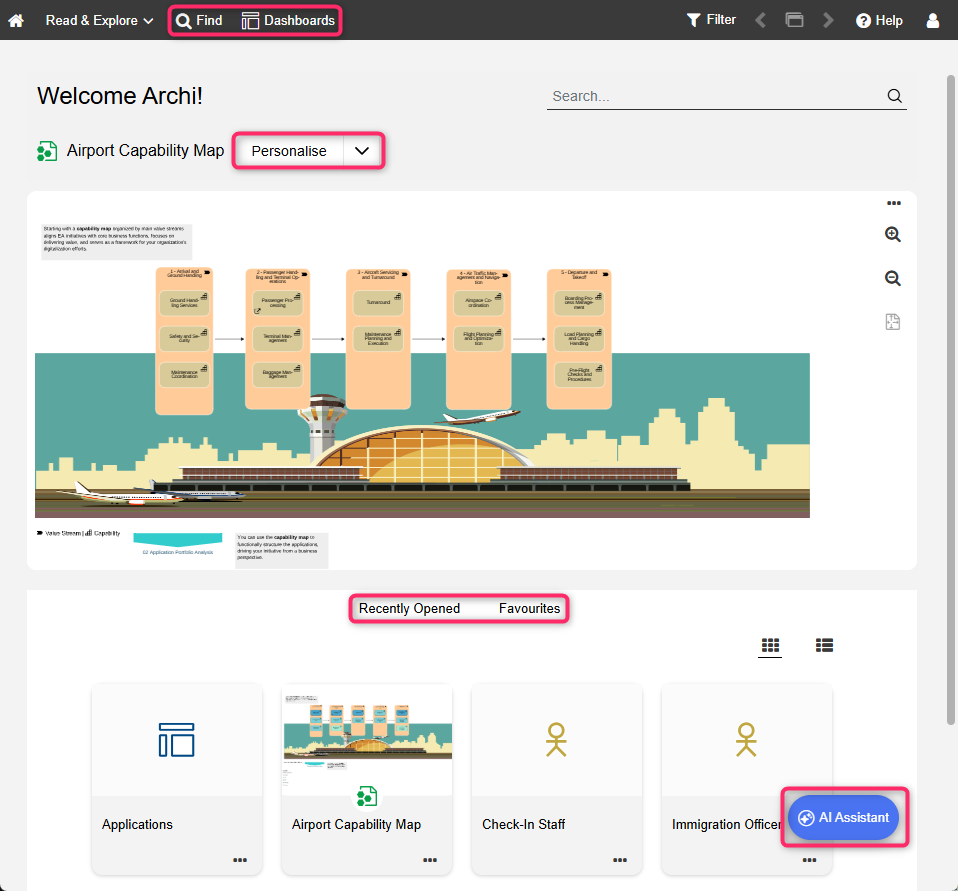
What you will see on the "Read & Explore" start page
The start page ("Home") has the following appearance:
Personal model or dashboard: A model or configurable dashboard that you can personalise according to your needs. You can use the suggested content or select your own.
Recently opened: Your most recently opened models and objects. Sorted by date, with the most recent artefact placed at the top. To see additional artefacts, click Show more....
Favourites: Your favourite models and objects. Sorted alphabetically. To see additional artefacts, click Show more....
View your most recently opened models and objects as well as your favourites as thumbnails or a
list. You can easily switch between the two layouts using the
 Show list and
 Show tiles icons.
If custom images have been uploaded for specific ArchiMate elements, they will appear as thumbnails, replacing the standard icons for those elements.
Additional Options
The toolbar at the top of the screen provides access to some of the most used features in ADOIT:
Find
 : Open the Explorer and the search function in ADOIT. Multiple
search and filtering options help you quickly find the artefact you are looking for.
: Open the Explorer and the search function in ADOIT. Multiple
search and filtering options help you quickly find the artefact you are looking for.Dashboards
 : Open and configure configurable dashboards.
The built-in legacy dashboards Architecture Diagrams, Capabilities, Business Processes, Business Objects, Application Components and System Software have been removed in ADOIT 21.0. You can recreate most of these views using configurable dashboards.
If your licence allows it, you can access additional features in the bottom right corner:
- AI Assistant: Use the AI Assistant to interact with ADOIT. You can ask questions in natural language, search and retrieve repository information, and discuss enterprise architecture and ArchiMate concepts.
Personalise the Start Page
The ADOIT administrator can set default content that all users see when they open the "Read & Explore" start page. Users can personalise this content by selecting a model or configurable dashboard, and restore the default settings at any time.
Select a Model or Dashboard
To personalise the start page:
On the "Read & Explore" start page, click the Personalise button.
Select a model from the Model Catalogue or a configurable dashboard from the Object Catalogue, and then click OK.
Restore Default Settings
To restore the default settings, as defined by your ADOIT administrator:
- Click the down arrow symbol
 in
the Personalise button, and then click Restore default settings.
in
the Personalise button, and then click Restore default settings.
The default settings will be restored. If your ADOIT administrator has defined default content for all users, it will be shown now. Otherwise, an empty widget will be shown.
If you are not able to personalise the start page, please ask your ADOIT administrator to enable the functionality in the ADOIT Administration.