Work with the AI Assistant
The AI Assistant provides a chat for interacting with ADOIT. You can ask questions in natural language, search and retrieve repository information, and discuss enterprise architecture and ArchiMate concepts.
The AI Assistant can find and analyse existing repository data. It can also create objects with a name and description and create relations between objects. Other changes to repository data must be made using the corresponding ADOIT components.
To use the AI Assistant, you must have access to the ADOIT Enterprise Edition and your ADOIT administrator must enable it and configure an AI provider.
The AI Assistant is limited to actions provided by your configured MCP tools. It cannot perform operations that are not defined there. See Preconfigured Tools for the current set of supported tools.
Open the AI Assistant
You can open the AI Assistant from the Design & Document and Read & Explore scenario start pages, or from within a model.
Open the global chat
To open the AI Assistant independently of a specific model:
- On the Design & Document or Read & Explore scenario start page, click AI Assistant in the bottom right corner.
The AI Assistant opens in a chat dialog. The chat history is available in the left-side panel, while the current conversation is displayed on the right.
Open the model-context chat
To open the AI Assistant in the context of a specific model:
Open the model in the graphical editor or the tabular editor.
Click the AI Assistant button
 .
.
The AI Assistant opens on the right side of the program window, in the context of the current model.
Use the AI Assistant
You can interact with the AI conversationally.
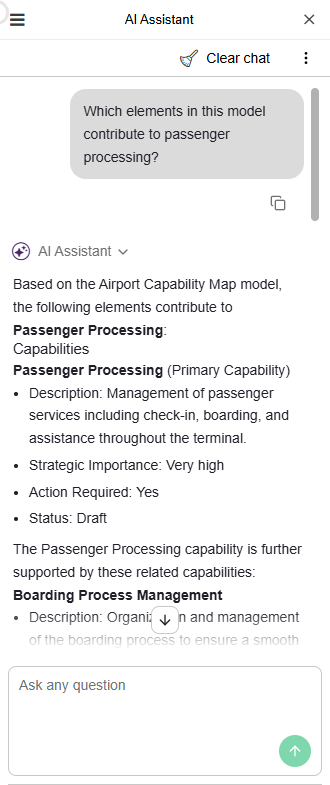
Type your own questions freely:
Use the free text field at the bottom (Ask any question).
Ask in natural language, just like you would speak to a colleague.
Let the AI Assistant help you, for example in the following areas:
Repository Data & Search: Search the repository for models and objects, browse saved searches, retrieve model and object details, and create objects and relations between objects.
Enterprise Architecture Knowledge: Explain ArchiMate concepts, modelling approaches, architecture principles, governance, and best practices.
Repository Metadata: List available object types, model types, and repository languages.
Practical Support: Help interpret models, answer questions about your architecture landscape, and provide links to open the properties of models and objects.
Make use of what the AI tells you:
Execute found saved searches and view the results directly in the chat.
Open the properties of found models and objects using the provided links and edit their attributes.
If the AI suggests improvements, you can apply them if you have write access, or leave a comment for the responsible colleagues.
Additional Options
The following additional options are available when using the AI Assistant:
New chat: Start a new discussion in the global chat.
Remove chat: Hover over a chat and select
 Delete chat in the global
chat.
Delete chat in the global
chat.Clear Chat: Deletes all messages in the model-context chat.
Copy content: Copies text to your clipboard. Use Copy response at the end of an AI message, or hover over your own message and select Copy prompt.
Show MCP usage: Shows or hides information about the MCP tools used to generate each AI response. The displayed information includes the number and names of the tools used. For an overview of the MCP tools available in ADOIT, see Preconfigured Tools in the Administration Help.
Chat History
The global chat keeps a history of your conversations. You can access previous chats from the chat history in the left-side panel.
You can have up to 10 chats in the global chat history. When this limit is reached and a new chat is created, the chat that has not been used for the longest time is removed.
The model-context chat provides one chat for the current model, but does not maintain a chat history.
Chat history and conversation context are subject to different limits. Within a chat, a maximum of 25 requests is retained as conversation context. When you send the 26th request, the oldest request is removed from the context.