The "Design & Document" Scenario
The purpose of the "Design & Document" scenario is to let you design your services and architectures and to plan your initiatives.
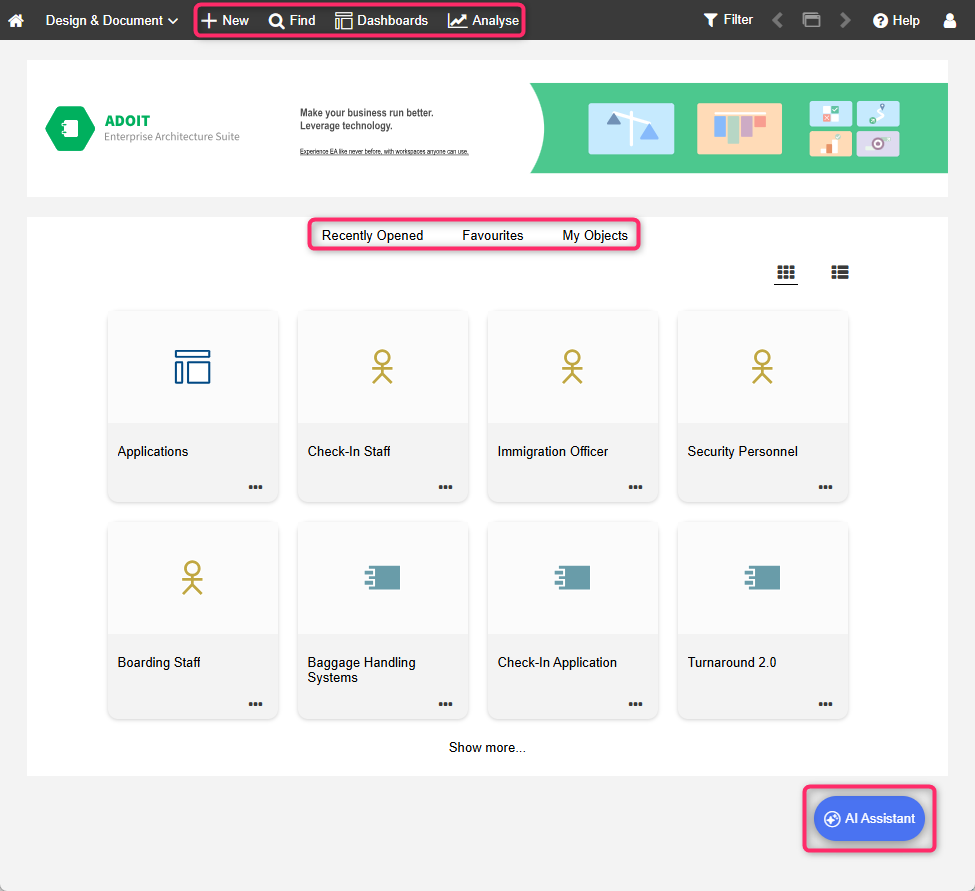
What you will see on the "Design & Document" start page
The start page has the following appearance:
Banner: The perfect place for an image that represents your organisation. Can be configured in the ADOIT Administration.
Recently opened: Your most recently opened models and objects. Sorted by date. To see additional artefacts, click Show more....
Favourites: Your favourite models and objects. Sorted alphabetically. To see additional artefacts, click Show more....
My Objects: A compact list of all repository objects for which you are responsible. Grouped by type and sorted alphabetically. To see additional objects, click Show more.... For a more detailed dashboard of your objects, go to Analyse
 > Dashboards > My
Objects.
> Dashboards > My
Objects.
View your most recently opened models and objects as well as your favourites as thumbnails or a
list. You can easily switch between the two layouts using the
 Show list and
 Show tiles icons.
If custom images have been uploaded for specific ArchiMate elements, they will appear as thumbnails, replacing the standard icons for those elements.
Additional Options
The toolbar at the top of the screen provides access to some of the most used features in ADOIT:
Find
 : Open the Explorer and the search function in ADOIT. Multiple
search and filtering options help you quickly find the artefact you are looking for.
: Open the Explorer and the search function in ADOIT. Multiple
search and filtering options help you quickly find the artefact you are looking for.Dashboards
 : Open and configure configurable dashboards.
Analyse
: This page has two sections: Analyses and Reports. Use the quick links at the top of the page
to access these sections. The Analyses section serves as a starting point to
run analyses on a data set of your choice. The Reports section shows the Reporting
Board, where PDF and RTF reports can be created.
 : Create new
 The built-in legacy dashboards My Objects, Strategy, Business, Application and Technology have been removed in ADOIT 21.0. You can recreate most of these views using configurable dashboards.
If your licence allows it, you can access additional features in the bottom right corner:
AI Assistant: Use the AI Assistant to interact with ADOIT. You can ask questions in natural language, search and retrieve repository information, and discuss enterprise architecture and ArchiMate concepts.
Forms: ADOIT Forms enables you to design, manage and complete forms for ADOIT with an easy to use graphical user interface. For details, please refer to the ADOIT Forms user manual.