The "Design & Document" Scenario
The purpose of the "Design & Document" scenario is to let you model and create transparency in a structured way.
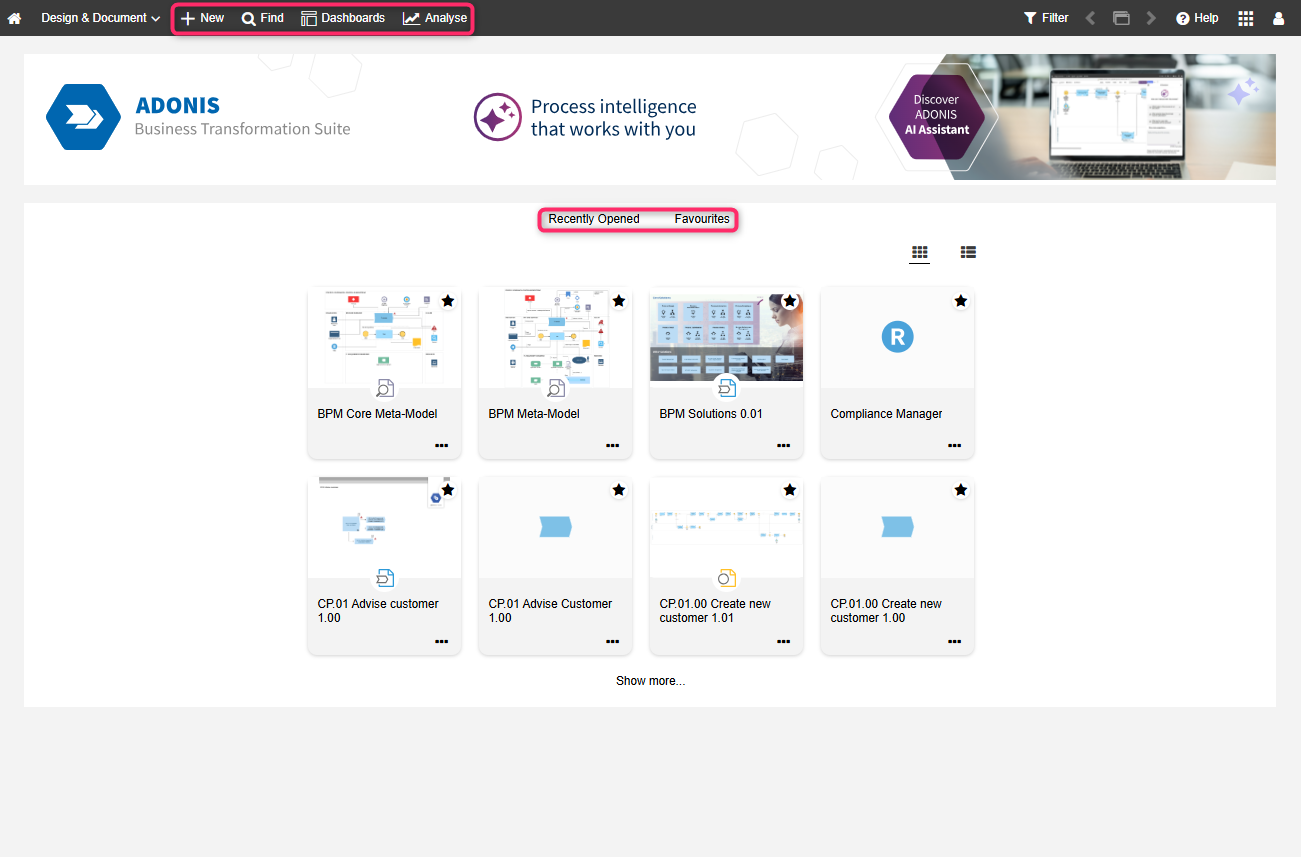
What you will see on the "Design & Document" start page
The start page has the following appearance:
Banner: The perfect place for an image that represents your organisation. Can be configured in the ADONIS Administration.
Recently opened: Your most recently opened models. Sorted by date. To see additional models, click Show more....
Favourites: Your favourite models and objects. Sorted alphabetically. To see additional artefacts, click Show more....
View your most recently opened models and favourites as thumbnails or a list. You can easily switch
between the two layouts using the  Show list and
  Show tiles
icons.
Show tiles
icons.
Additional Options
The toolbar at the top of the screen provides access to some of the most used features in ADONIS:
Find
 : Open the Explorer and the search function in ADONIS. Multiple
search and filtering options help you quickly find the artefact you are looking for.
: Open the Explorer and the search function in ADONIS. Multiple
search and filtering options help you quickly find the artefact you are looking for.Dashboards
 : Open and configure configurable dashboards.
Analyse
 : This page has two sections by default: Analyses and Reports. Use the quick links at the top
of the page to access these sections. The Analyses section serves as a
starting point to run analyses on a data set of your choice. The Reports section shows the
Reporting Board, where PDF and RTF reports can be created.Information for upgrading users
: This page has two sections by default: Analyses and Reports. Use the quick links at the top
of the page to access these sections. The Analyses section serves as a
starting point to run analyses on a data set of your choice. The Reports section shows the
Reporting Board, where PDF and RTF reports can be created.Information for upgrading usersThe built-in legacy dashboards My Processes & Assets, Initiatives, Risks, Compliance and News and Tasks have been removed in ADONIS 19.0. You can recreate most of these views using configurable dashboards. For a detailed mapping and instructions on how to set these up, please refer to the section Recreate Legacy Dashboards.
 : Create new
 ADONIS Apps
You can access add-ons and extensions for ADONIS via the ADONIS apps button
 in the top right corner of the
screen. The following ADONIS apps are available in the "Design & Document" scenario in ADONIS 19.1:
in the top right corner of the
screen. The following ADONIS apps are available in the "Design & Document" scenario in ADONIS 19.1:
Process Drafter: Create process models step by step in a tabular view. The Process Drafter is included for all ADONIS Enterprise Edition customers at no extra cost.
ADONIS Process Mining Essentials (PME): Use powerful process mining capabilities to uncover how your processes actually run. PME is a licensable add-on for the ADONIS Enterprise Edition.