Welcome to ADONIS!
Thank you for your interest in ADONIS. This Quick Start Guide helps you explore the key features in a Standard Test Account from a Master User perspective and take the first relevant setup checks in a structured way.
The goal is not to explain every administrative function at once. The goal is to help you understand the areas that matter first in a Standard Test Account: login, account administration, user data, and access readiness for your colleagues.
You don’t need to follow the steps in the exact order. Skim once, then focus on the parts you need most.
Before You Start
- You received a Master User email containing your username, one-time password, and the web client URL.
- You also received a credentials sheet listing the prepared logins for your colleagues and the test account link.
- The test account already includes the ADOmoney Bank sample content by default.
- In a Standard Test Account, some productive-environment administration features are intentionally restricted. Your main administration area is Account Administration.
Login
You received two emails from your BOC contact:
- A Master User sheet with your username, a one-time password, and the web client URL
- A credentials sheet listing your colleagues and the link to the test account
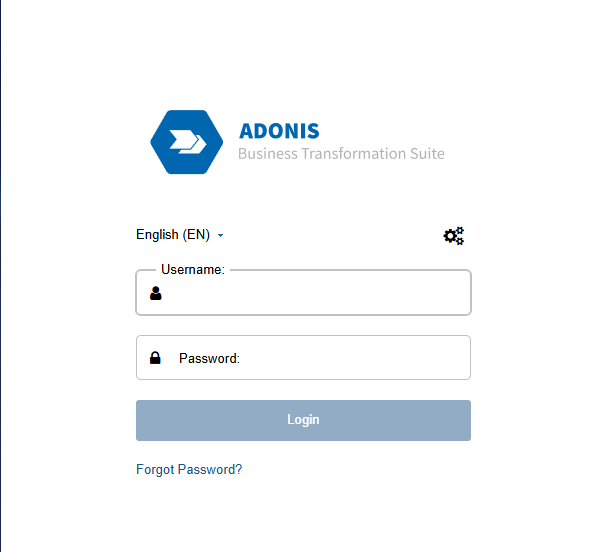
Click the URL in the Master User sheet, sign in with the Master User credentials, and change your password on first login.
You are now ready to prepare the account for your colleagues.
Standard Test Accounts are limited. Some settings are available only in Account Administration and broader administration capabilities from productive systems are not part of this setup.
Switch to the Account Administration
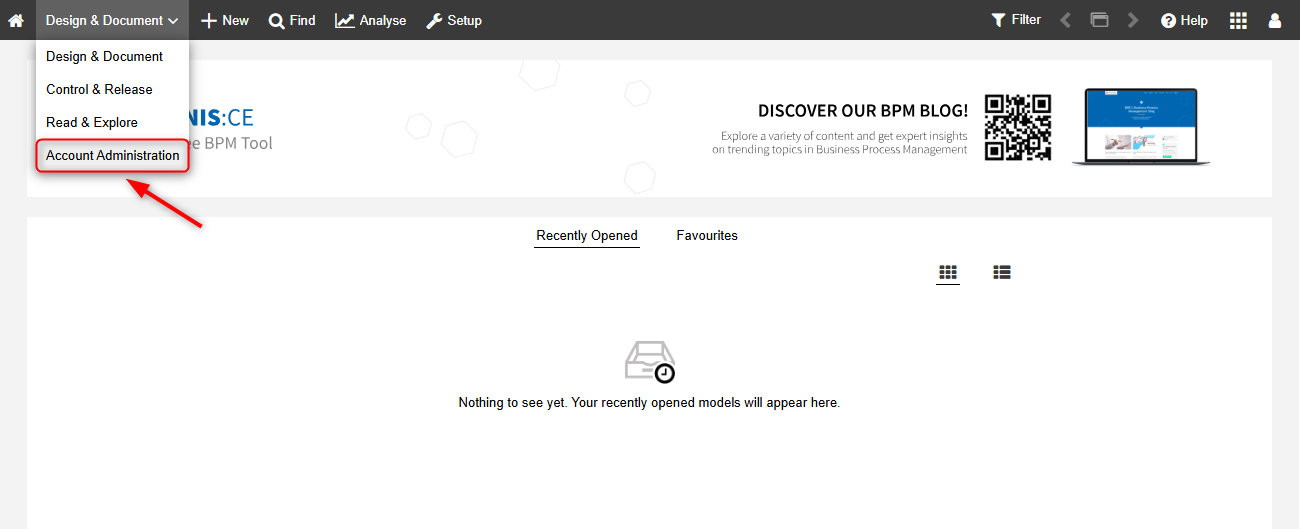
Your first task as Master User is to switch from Design & Document to Account Administration.
This is the area where you can review the prepared local users and make the small but important adjustments that help your colleagues start smoothly.
Get Oriented in Account Administration
Once you enter Account Administration, focus first on the user list rather than trying to look for broader administrator functions.
This area is designed to help you validate the prepared test users and make sure they are ready to log in and work with the account.
What You See in the User List
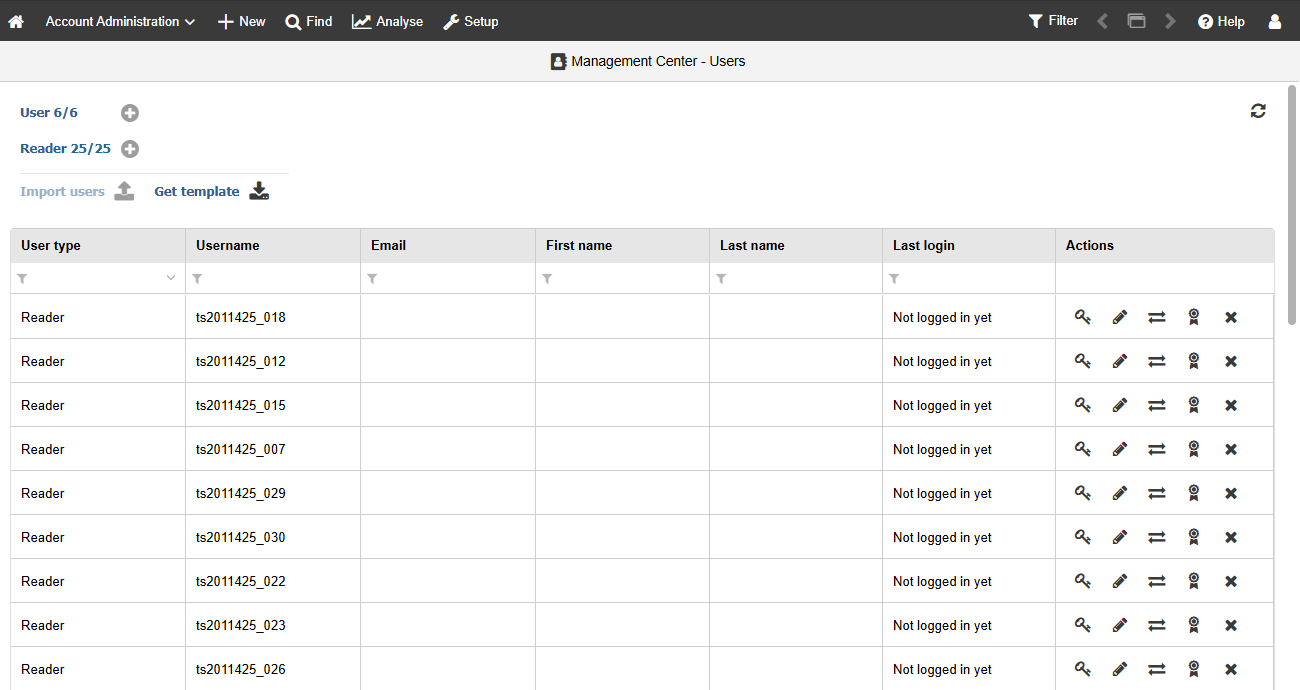
The list shows key information for each prepared test user:
- User type: User/Modeller or Reader
- Username
- First name / Last name
- Last login
- Actions
A practical first check is simply to compare this list with the credentials sheet you received from BOC.
Add Information to the Users
In Standard Test Accounts, the users are already prepared for you. Your job is usually not to rebuild the setup, but to complete the information that helps colleagues work with the system more easily.
The most useful first adjustments are:
- Open the prepared user entries in Account Administration.
- Enter or complete the first name and last name where needed.
- Make sure an email address is stored for each user.
- Share the correct login details from the credentials sheet together with the ADONIS URL.
Why This Step is so Important
In productive environments, usernames often match company email addresses and identity management is handled centrally. In a Standard Test Account, however, the prepared usernames are not always self-explanatory.
That is why maintaining the user details is important:
- Colleagues can identify which account belongs to whom
- Password reset works only if an email address is stored correctly
- The handover from Master User to the rest of the testing group becomes much smoother
What the Master User Should Validate
Before your colleagues start testing, check the essentials that are actually in your area of responsibility:
- The Master User login works
- The prepared user accounts match the credentials sheet
- User details such as names and emails are filled in where needed
- Your colleagues know which login belongs to them
- The account is ready for them to start working in their assigned role
You do not need to reproduce productive-environment administration in this setup. The focus is to make the prepared Standard Test Account usable and easy to hand over.
Essentials Accomplished
At this point, you have completed the most important first steps for a Standard Test Account from the Master User perspective:
- Your own login works
- You can access Account Administration
- The prepared user list has been reviewed
- Important user details have been added where needed
- The account is ready for your colleagues to start testing
Great job. You have successfully completed the first relevant Master User steps in ADONIS and can now let your colleagues start testing in a more structured way.
Continue Learning With Self-Service Resources
To keep building confidence and solve questions independently, use the following self-service resources:
When you Need Practical Product Help
Use the BOC Support Center and the ADONIS Online Help when you need step-by-step guidance for concrete tasks or want to understand more about the product environment.
When you Want to Learn Visually
Use the ADONIS tutorial videos if you prefer to see workflows in action rather than read through longer documentation.
When you Want Broader BPM know-how
Use the BPM Blog for practical BPM topics and expert insights, and the BPM Resource Library for webinars, posters, whitepapers, and other learning materials.
When you Want Guided Hands-on Training
Use our free ADONIS e-Learnings. They serve as a hands-on introduction to ADONIS and BPM for modellers, readers, analysts, process owners, and other stakeholders.
When you Want to Understand the Master User Area Better
Use the Master User documentation as your main reference for the capabilities available in Account Administration.
Suggested Self-Service Learning Path
A practical next-step sequence is:
- Use this Quick Start Guide for the first Master User tasks.
- Use the Master User documentation whenever you want to understand what can be maintained in Account Administration.
- Use the ADONIS e-Learnings to support your colleagues in their first practical steps.
- Use the BOC Support Center when you need additional help or FAQs.
- Use the tutorial videos when you want to see workflows visually.
- Use the BPM Blog and BPM Resource Library to deepen BPM know-how over time.
For any further questions or concerns, reach out to your BOC contact person.