Features in ADOGRC 15.0 LTS
Introducing ADOGRC 15.0 LTS, the latest Long-Term Support release of our Governance, Risk & Compliance (GRC) suite.
Building on its strong foundation in Internal Control (ICS), Risk Management (RM), and Compliance Management, ADOGRC continues to evolve as an integrated platform for managing all aspects of governance, risk, and compliance in one place.
This release introduces one new scenario – Audit Management – and extends both Internal Control as well as Operational Risk with Loss Collection capabilities.
Audit Management is introduced as a fully integrated scenario. By connecting audits with risks, controls, compliance requirements, and remediation activities, organizations can reduce audit effort, improve efficiency, and gain real-time visibility into their audit activities. This enables a proactive audit approach that validates control effectiveness, detects compliance gaps early, and tracks remediation through to completion.
In addition, ADOGRC extends its Internal Control and Operational Risk scenarios with comprehensive Loss Collection capabilities. Organizations can now capture loss events, assess their impact, and link them directly to the affected and business processes – providing greater transparency and valuable insights for continuous improvement.
Let's explore the new scenarios of ADOGRC 15.0 LTS in detail.
New Scenario: Audit Management
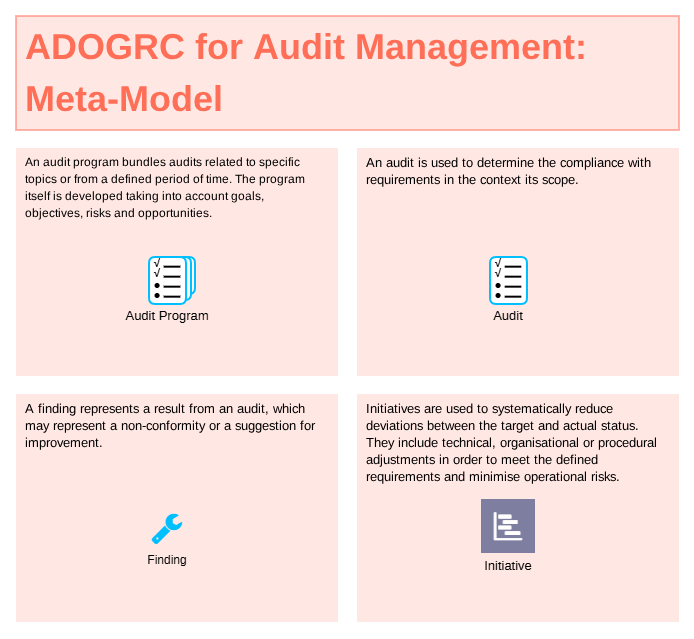
To plan, execute, and follow up on audits with, ADOGRC 15.0 LTS introduces Audit Management as a fully integrated scenario. It provides dedicated object types to cover the full audit lifecycle – including Audit Programs, Audits, Findings, and Initiatives – that are tightly linked to existing GRC artifacts already managed within the platform.
All audit objects can be operationalized with workflows that include scheduling, notifications, and reminders. Furthermore, My Dashboards are tailored towards contributors, Inventory Dashboards provide structured oversight, and Insight Dashboards offer real-time visibility into audit status, finding resolution, and remediation progress.
Find out more on Audit Management in our ADOGRC blog: What is Audit Management? and our Audit Management Solution Page.
All new object types are available for all users of the ADOGRC Standard Application Library, the new release workflows and dashboards depend on the license.
Audit Management is included in ADOGRC Extended and also as a dedicated Audit Management Focus Edition. Existing ADOGRC Extended customers can enable the new functionality by requesting an updated license.
Scenario Extension: Loss Collection for Internal Control & Operational Risk
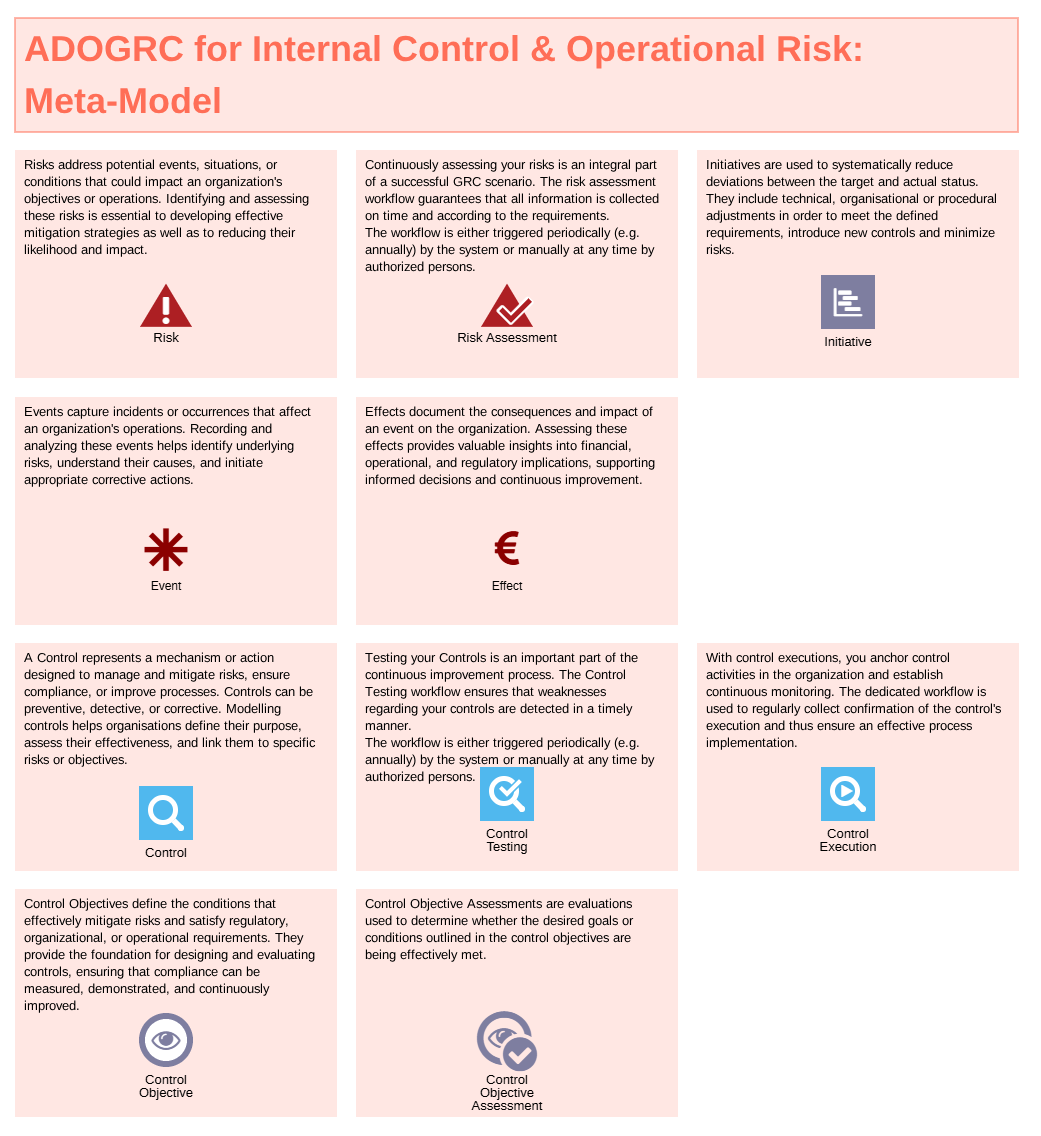
To strengthen Internal Control and Operational Risk, ADOGRC 15.0 LTS introduces Loss Collection capabilities through the new object types Event and Effect. Together, they enable organizations to capture operational incidents, document their consequences, and embed them directly within their GRC repository.
Both object types can be operationalized with workflows that include scheduling, notifications, and reminders. Furthermore, My Dashboards support handling incidents, Inventory Dashboards provide structured oversight, and Insight Dashboards deliver real-time visibility into events, their impacts, and remediation progress.
Find out more on our Internal Control Solution Page and Operational Risk Solution Page.
All new object types are available for all users of the ADOGRC Standard Application Library, the new release workflows and dashboards depend on the license.
Loss Collection is included in both ADOGRC Core and ADOGRC Extended. Existing ADOGRC Extended customers can enable the new functionality by requesting an updated license.
New Features for Users of the ADOGRC Standard Application Library
New Object Types for Audit Management & Loss Collection
To support the new Audit Management scenario and Loss Collection capabilities, the ADOGRC Standard Application Library has been extended with several new object types, including Audit Program, Audit, Finding, Event, and Effect. These additions provide the structured foundation needed to manage the full audit lifecycle and embed events as well as their effect into Internal Control and Operational Risk.
Full list of new object types:
| Audit Program | An *Audit Program* bundles audits related to specific focus topics or timeframes, developed in alignment with organizational goals, objectives, and risk evaluations. |
| Audit | An *Audit* evaluates compliance with regulatory, operational, or internal requirements within a defined scope. |
| Finding | A *Finding* documents an audit result, representing a non-conformity, operational deficiency, or recommendation for improvement. |
| Event | An *Event* captures an operational incident or occurrence that affects organizational activities, helping to identify root causes and link real-world incidents back to risks and controls. |
| Effect | An *Effect* quantifies the consequences of an event, providing visibility into financial losses, operational impacts, and regulatory implications. |
The new object types enable you to manage audits, capture operational events, and assess their impact within a single GRC platform – helping you strengthen governance, improve transparency, and drive continuous improvement.
Changes to Existing Object Types
We extended a few object types to cover upcoming regulatory changes and increased need for specific documentation regarding these objects.
- Processes can now directly reference Third Party Providers which are involved in the process.
- New chapter Processes in Third Party Providers to show if and in what way processes are related to this provider.
- Processes can now directly reference Contracts which are relevant in the course of this process.
- Processing Activities can now directly reference Third Party Providers in several places relevant for the GDPR.
- Contracts between intra-group providers can now be mapped to Contracts with external Third Party Providers.
Quality of Life Improvements
- Relations in assessment dialogs can now be clicked to open the referenced object for quickly checking info without leaving the dialog.
- Pre-defined search queries for objects you are involved in. These are the same queries as in the existing dashboards but now available to use in the new Configurable Dashboards (see below) to display them, e.g. as charts among other options you have in the new dashboards.
New Features for All Users
As ADOGRC 15.0 is built upon ADONIS 19.0, users automatically benefit from the following improvement.
- Configurabel Dashboards: A major new feature which allows you to create your own dashboards tailored to your specific needs. This is a powerful way to deliver all information in a graphical way with interactable lists, diagrams and a host of other customizable widgets. For details, also check out the documentation in the ADONIS User Manual.
- AI Assistant: Let your personal assistant help you with writing new descriptions and proof-reading and adapting existing content. Change tone and style, improve readability and translate to other languages without ever leaving the editor.
There are many more improvements than can be listed here, please see the New Features in ADONIS 19.0 and New Features in ADONIS 18.0
New Features for Administrators
As ADOGRC 15.0 is built upon ADONIS 19.0, administrators automatically benefit from a range of additional improvements.
- Installation Manual für ADOGRC: Now that the installation process of ADONIS and ADOGRC has been unified with deployment of container images, the installation manuals of both products have also been aligned. You will now find a fully featured installation manual describing all activities from creating a new database to starting your new deployment.
- New Providers and Models: More Providers and Models are now available for the AI Assistent and we included a handy connection test to get you up and running.
- MCP Services: Enhanced Authentication and Security: MCP Services are now decoupled from the REST API which allows for clearer separation of access restrictions. There are also several new security settings available, like IP restrictions.
- Dynamic Client Registration for MCP: When using ADONIS Model Context Protocol (MCP), agents can now query a specific URL to determine how to authenticate.
- Revoke Global Admin Rights: This allows you adapt to organizational changes by restricting an existing administrator without locking them out of the ADOGRC Administration completely.
- Generate OIDC Tokens: This option allows administrators to quickly generate an OIDC token with definable validity time for testing without going through the whole authentication flow.
- Extended CORS Security Settings: Administrators have now more fine-grained control over CORS security settings.
- Edit Info Text of Attributes: Administrators can now edit Info Texts for attributes in the Properties Management to provide users with a description specific to your organisation.
- Clone User with Random Password: Cloning a user will now set a random password and activate the checkbox that the user must change the password on next login.
- Export Named Users to Excel: It is now possible to export the list of named users to an Excel spreadsheet.
There are many more improvements than can be listed here, please see the New Features in ADONIS 19.0 and New Features in ADONIS 18.0.
You can find Release Information for previous ADOGRC versions in the section What's new.