Installation
This section describes how to
prepare your ADOIT instance to be used with ADOIT Forms.
grant ADOIT user access to ADOIT Forms.
1. Activate ADOIT Forms
In your ADOIT Administration open Settings, go to ADOIT Forms and General.
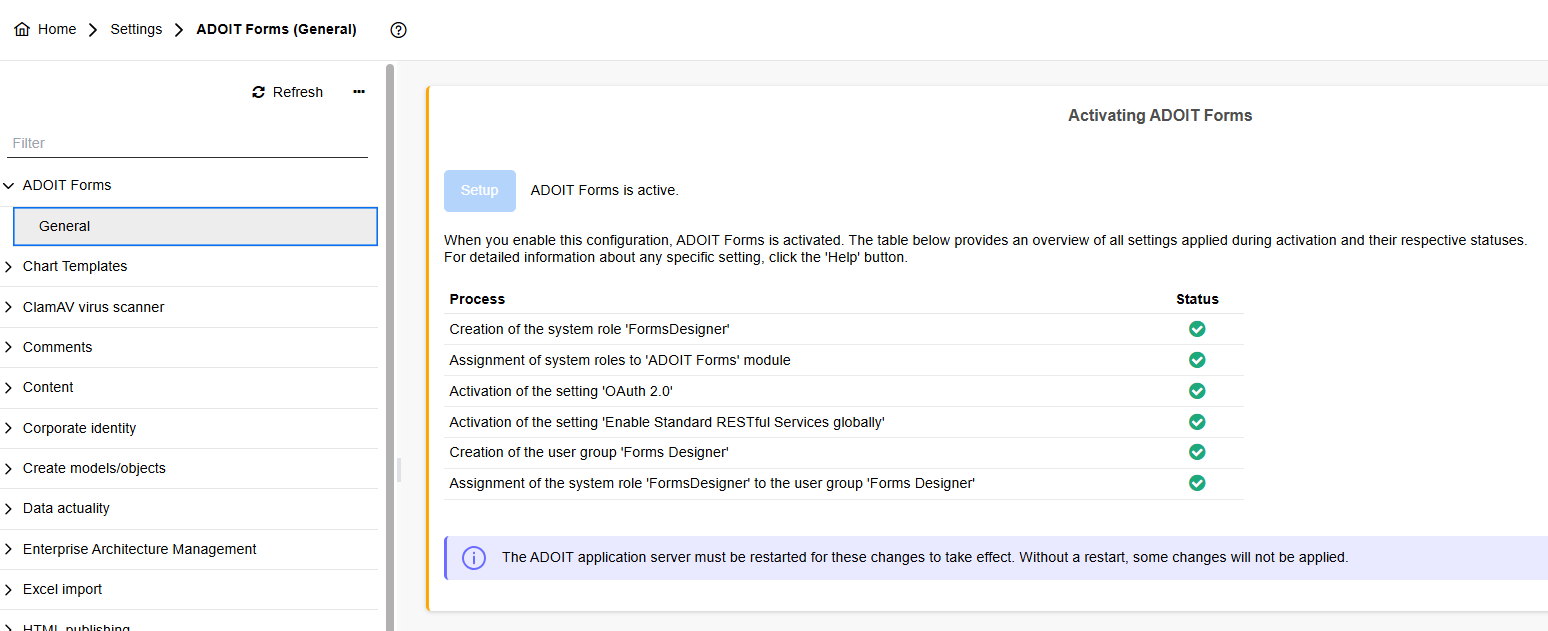
Setup enables ADOIT Forms and leads to the following changes in the ADOIT settings:
Activation of the setting Activate standard RESTful Services globally
Activation of the setting Activate OAuth 2.0 with the
Repository scenarios: Repository read APIs, Repository write APIs, Repository search APIs
User scenarios: User read APIs
Metamodel scenarios: Metamodel read APIs
Activation of Allow CORS
Activation of OAuth 2.0 and creation of an client
Creation of the system role FormsDesigner
Creation of the user group Forms Designer
The Base URL set for the ADOIT (see related instruction) must be compliant with the URL provided in the connection setup. A common source of issues is that it is different (for example a test URL provided in a production environment) or additional endings like /auth.view, /main.view, etc. are added.
Changing this setting requires a restart of the ADOIT environment.
2. Configure users for ADOIT Forms
In your ADOIT Administration you can enable your ADOIT users to use ADOIT Forms as
| ADOIT Forms user type | Needed configuration |
|---|---|
| Template Designer / Forms Reviewer | 1. Assign user group Forms Designer. 2. Ensure that system role FormsDesigner is assigned. 3. Only for named use license scenarios: Assign ADOIT Forms scenario under Named user. |
| Forms Submitter (update) | 1. Ensure write access to relevant Objects. 2. Only for named use license scenarios: Assign ADOIT Forms scenario under Named user. 3. Ensure that in Settings > System settings (Modules) the module ADOIT Forms is assigned to the used custom system role. |
| Forms Submitter (proposal) | 1. Ensure write access to relevant target folder. 2. Only for named use license scenarios: Assign ADOIT Forms scenario under Named user. 3. Ensure that in Settings > System settings (Modules) the module ADOIT Forms is assigned to the used custom system. |
| Forms Submitter (proposal with approval required) | 1. Assign arbitrary system role selected in Settings > ADOIT Forms > Settings for approvals. 2. Only for named use license scenarios: Assign ADOIT Forms scenario under Named user. 3. Ensure that in Settings > System settings (Modules) the module ADOIT Forms is assigned to the used custom system role. |