Create Configuration
An XML configuration file contains the mapping of objects from the Excel file to the ADONIS metamodel.
<config>
The XML file starts and ends with a <config> tag:
XML Example
<config>
...
</config>
<sheet>
In the XML file, each sheet to be imported from the Excel file is described in a separate <sheet>
tag. The following attributes must be defined for each <sheet>:
| Attribute name | Description | Sample values |
|---|---|---|
name | Name of the sheet in Excel | Applications |
class_name | Language independent name of the object type | [C_APPLICATION] |
id | Specifies the number of the column which uniquely identifies an object. [Optional] A comma separated list of column numbers which will be used to identify the object. | 1 |
data_row | Specifies the first row containing an object | 1 |
unique_name [Optional] | Set to true to prevent the creation of objects of the same type with the same name in the same language context | `[true |
Unique Object Identification by ID
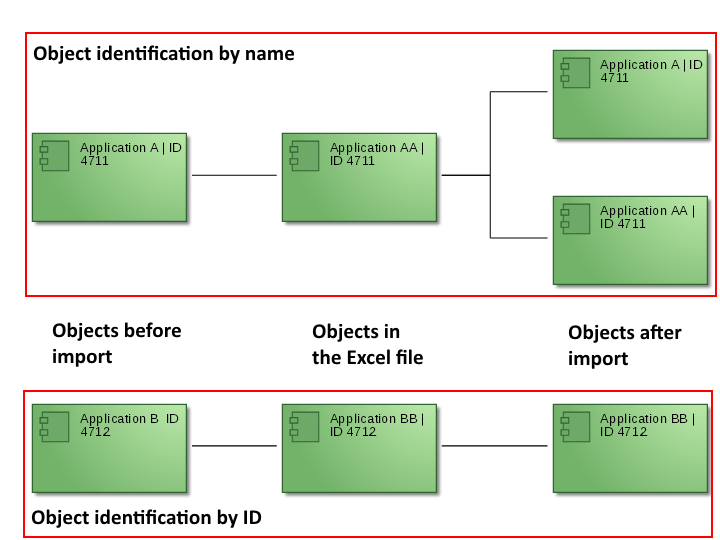
The field id defines which object attribute in the Excel file uniquely identifies an object.
Typical attributes for unique object identification are the attribute 'Name' or dedicated 'ID' attributes. The use of a dedicated 'ID' attribute offers the advantage that objects can be renamed in third-party systems over the course of time, but will still be identified as identical objects during import.
Example
You want to import three sheets containing objects of the type Application, Interface and Document:
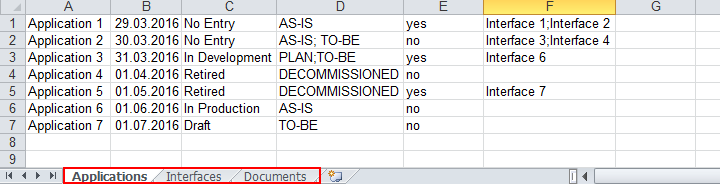
Below is an excerpt from the XML file with the sections for importing the sheets:
XML Example
<config>
<sheet name="Applications" class_name="C_APPLICATION" id="1" data_row="1">
...
</sheet>
<sheet name="Interfaces" class_name="C_INTERFACE" id="1" data_row="1">
...
</sheet>
<sheet name="Documents" class_name="C_DOCUMENT" id="1" data_row="1">
...
</sheet>
</config>
<attribute>
In the XML file, each object attribute to be imported from the Excel file is described in a separate
<attribute> tag. The following attribute types can be imported:
| Attribute type | Description |
|---|---|
simple | Stores textual values or numerical values |
date | Stores dates |
enum | Assignment of a value to an element of a list |
enum_list | Assignment of values to the elements of a list |
treeenumlist | Assignment of values to the nodes of a tree |
bool | Stores Boolean values |
relation | Stores relationships with other objects |
file_pointer | Stores links to external files |
<attribute type="simple">
Textual values and numeric values can be imported using the simple attribute type. The imported
values can be assigned to the following attribute types in the ADONIS metamodel:
ADONIS String (ADOSTRING)
Integer (INTEGER)
Double (DOUBLE)
Short String (SHORTSTRING)
Long String (LONGSTRING)
Unsigned Integer (UNSIGNED INTEGER)
String (STRING)
To do this, the following attributes must be defined for the tag <attribute>:
| Attribute type | Description |
|---|---|
name | Language independent name of the object attribute to which the imported value will be assigned |
type | Specification of the attribute type - here: simple |
context | Specification of the language of the attribute value, e.g. "de" for German and "en" for English. Possible values depend on the available content languages. |
column | Specification of the column number of the object attribute in the Excel file |
Example
You want to import the attribute Name, which is contained in the Notebook of the object type Application.
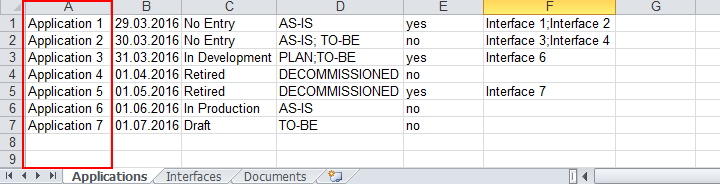
Below is an excerpt from the XML file with the relevant section
XML Example
<config>
<sheet name="Applications" class_name="C_APPLICATION" id="1" data_row="1">
<attribute name="NAME" type="simple" context="en" column="1"/>
...
</sheet>
...
</config>
<attribute type="date">
Date values can be imported using the date attribute type. The imported values can be assigned to
the following attribute types in the ADONIS metamodel:
Date (DATE)
Coordinated Universal Time (UTC)
Date values are all imported as 00:00 UTC. To ensure any customised scheduled jobs run based on local time, you can configure an offset to UTC.
The following attributes must be defined for the tag <attribute>:
| Attribute type | Description |
|---|---|
name | Language independent name of the object attribute to which the imported value will be assigned |
type | Specification of the attribute type - here: date |
context | Specification of the language of the attribute value, e.g. "de" for German and "en" for English. Available languages depend on the Application Library and licence. |
column | Specification of the column number of the object attribute in the Excel file. This column should be formatted as a date in the Excel file. |
utc_offset_hours [Optional] | Specification of the offset in hours from Coordinated Universal Time (UTC) to local time, e.g. "1" for Central European Time (CET) or "-5" for Eastern Standard Time (EST). |
utc_offset_minutes [Optional] | Specification of the offset in minutes from Coordinated Universal Time (UTC) to local time, e.g. "30" for Indian Standard Time (IST) for a total time offset of +05:30 (if utc_offset_hours is set to "5"). |
Example
You want to import the attribute Production Date, which is contained in the Notebook of the object type Application.
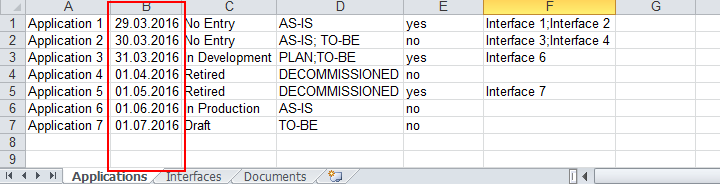
Below is an excerpt from the XML file with the relevant section
XML Example
<config>
<sheet name="Applications" class_name="C_APPLICATION" id="1" data_row="1">
...
<attribute name="A_VALID_FROM" type="date" context="en" column="2"/>
...
</sheet>
...
</config>
<attribute type="enum">
Attribute values can be imported and assigned to the elements of a list using the enum attribute
type. The imported values can be assigned to the following attribute type in the ADONIS metamodel:
- Enumeration (ENUM)
An ENUM attribute is a list of predefined values (e.g 'Low', 'Medium' and 'High'). Only one value can be selected from the list.
Via the Excel interface, you can assign values from an Excel file to the values in the list. You can
freely define which value from the Excel file is transferred to which value in the list. To do this,
the following attributes must be defined for the tag <attribute>:
| Attribute type | Description |
|---|---|
name | Language independent name of the object attribute to which the imported value will be assigned |
type | Specification of the attribute type - here: enum |
context | Specification of the language of the attribute value, e.g. "de" for German and "en" for English. Available languages depend on the Application Library and licence. |
column | Specification of the column number of the object attribute in the Excel file |
domain_mapping | Definition of the mapping between the values of the Excel file and the elements of the list (see below the table for details). |
separator_domain_mapping [Optional] | Define the separator between multiple values within the domain_mapping attribute. For example, if the values are listed as "No Entry\@v0,..." in the Excel file, the value of the separator is "@". |
domain_mapping
Each element in a list in ADONIS has a language independent name - e.g. v0, v1, v2, etc. The values
in the Excel file must be mapped to the language independent names of the elements of the list. This
is done using the domain_mapping attribute. A corresponding value from the list is assigned to
each value from the Excel file: This attribute has to contain a comma-separated list of value pairs:
Domain_mapping="<Excel Value 0>,v0,<Excel Value 1>,v1,<Excel Value 2>,v2,…"
The values from the Excel file and the language dependent values of the ENUM attribute do not have to be the same. For example, you can assign the Excel value 'Pink' to the predefined value 'Red' in the list.
Example
You want to import the attribute Lifecycle State, which is contained in the Notebook of the object type Application.
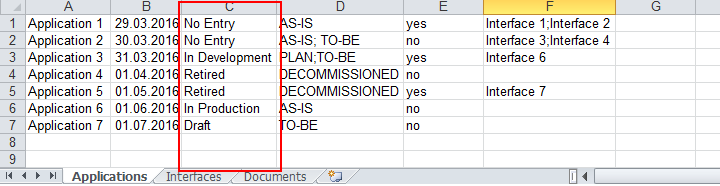
Below is an excerpt from the XML file with the relevant section
XML Example
<config>
<sheet name="Applications" class_name="C_APPLICATION" id="1" data_row="1">
...
<attribute name="A_LIFECYCLE_STATE" type="enum" context="en" column="3" domain_mapping="Kein Eintrag,v0,Entwurf,v1,In Entwicklung,v2,In Produktion,v3,Stillgelegt,v4"/>
...
</sheet>
...
</config>
<attribute type="enum_list">
Attribute values can be imported and assigned to the elements of a list using the enum_list
attribute type. The imported values can be assigned to the following attribute type in the ADONIS
metamodel:
- Enumeration List (ENUMLIST)
An attribute of the type enum_list is a list of predefined values (e.g 'Low', 'Medium' and
'High'). In contrast to attributes of the type ENUM, multiple values from the list can be selected
at the same time.
You can define freely which value from the Excel file is transferred to which value in the list. To
do this, the following attributes must be defined for the tag <attribute>:
| Attribute type | Description |
|---|---|
name | Language independent name of the object attribute to which the imported value will be assigned |
type | Specification of the attribute type - here: enum_list |
context | Specification of the language of the attribute value, e.g. "de" for German and "en" for English. Available languages depend on the Application Library and licence. |
column | Specification of the column number of the object attribute in the Excel file |
separator | Define the separator between multiple values in the Excel file which should be assigned to the list. In this way, you can assign multiple values to the ENUMLIST attribute at the same time. For example, if the values are listed as "Variant 1;Variant 2" in the Excel file, the value of the separator is ";". |
domain_mapping | Definition of the mapping between the values of the Excel file and the elements of the list (see <attribute type='enum'> for details). |
separator_domain_mapping [Optional] | Define the separator between multiple values within the domain_mapping attribute. For example, if the values are listed as "No Entry\@v0,..." in the Excel file, the value of the separator is "@". |
<attribute type="treeenumlist">
Attribute values can be imported and assigned to the nodes of a tree using the treeenumlist
attribute type. The imported values can be assigned to the following attribute type in the ADONIS
metamodel:
- ENUMLIST_TREE
Attributes of the type ENUMLIST_TREE are trees with predefined values (e.g. "Variant 1", "Variant 2" and "Variant 3"). Multiple values from the tree can be selected at the same time.
You can define freely which value from the Excel file is transferred to which node. To do this, the
following attributes must be defined for the tag <attribute>:
| Attribute type | Description |
|---|---|
name | Language independent name of the object attribute to which the imported value will be assigned |
type | Specification of the attribute type - here: treeenumlist |
context | Specification of the language of the attribute value, e.g. "de" for German and "en" for English. Available languages depend on the Application Library and licence. |
column | Specification of the column number of the object attribute in the Excel file |
separator | Define the separator between multiple language independent names of tree nodes in the Excel file. In this way, you can assign multiple values to the 'ENUMLIST_TREE' attribute at the same time. For example, if the values are listed as "PLAN;TO-BE" in the Excel file, the value of the separator is ";". |
Example
You want to import the attribute Variants, which is contained in the Notebook of the object type Application.
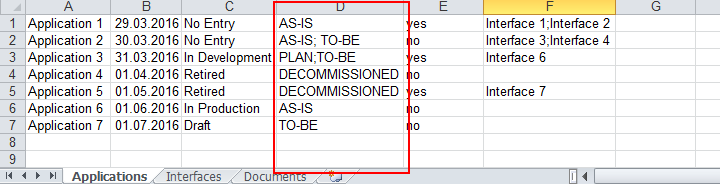
Below is an excerpt from the XML file with the relevant section
XML Example
<config>
<sheet name="Applications" class_name="C_APPLICATION" id="1" data_row="1">
...
<attribute name="A_ARCHITECTURE_TREE" type="treeenumlist" context="en" column="4" separator=";"/>
...
</sheet>
...
</config>
<attribute type="bool">
Boolean values ('TRUE' and 'FALSE') can be imported using the bool attribute type. The imported
values can be assigned to the following attribute type in the ADONIS metamodel:
- Bool (BOOL)
To do this, the following attributes must be defined for the tag <attribute>:
| Attribute type | Description |
|---|---|
name | Language independent name of the object attribute to which the imported value will be assigned |
type | Specification of the attribute type - here: bool |
context | Specification of the language of the attribute value, e.g. "de" for German and "en" for English. Available languages depend on the Application Library and licence. |
column | Specification of the column number of the object attribute in the Excel file |
bool_mapping | Definition of the mapping between the values of the Excel file and the values of the object attribute 'TRUE' and 'FALSE'. This attribute contains two values, separated by a comma. The first value is mapped to the boolean value 'TRUE', the second to 'FALSE'. |
Example
You want to import the attribute Action Required, which is contained in the Notebook of the object type Application.
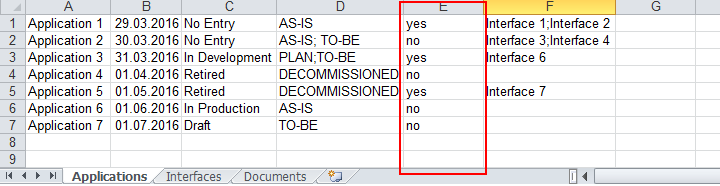
Below is an excerpt from the XML file with the relevant section
XML Example
<config>
<sheet name="Applications" class_name="C_APPLICATION" id="1" data_row="1">
...
<attribute name="A_NEED_FOR_ACTION" type="bool" context="en" column="5" bool_mapping="ja,nein"/>
...
</sheet>
...
</config>
<attribute type="relation">
Relations between objects can be established via the attribute type relation. In the ADONIS
metamodel, these relations are represented by relation classes.
The following attributes must be defined for the tag <attribute>:
| Attribute type | Description |
|---|---|
name | Language independent name of the relation class to which the referenced objects will be assigned |
type | Specification of the attribute type - here: relation |
context | Specification of the language of the attribute which uniquely identifies the referenced object, e.g. "de" for German and "en" for English. Available languages depend on the Application Library and licence. |
column | Specification of the column number of the relation in the Excel file |
separator | Define the separator between multiple referenced objects in the Excel file. If the referenced objects are listed as "interface1;interface2;interface3", the value of the attribute is ";". |
attr_separator [Optional] | Define the separator between multiple attributes values used to identify the referenced objects. If the referenced objects are listed as "interface1\@description1;interface2\@description2", the value of the attribute is "@". |
lookup_attr_name | Language independent name of the attribute which uniquely identifies the referenced object. This does not have to be set to the "NAME" attribute. [Optional] A list of language independent attribute names which will be used to identify the referenced object. |
direction | Determine whether the relation should be interpreted as an incoming reference or outgoing reference. Possible values are "from" (incoming reference) and "to" (outgoing reference). |
target_class | Language independent name of the referenced object type |
strategy | The attribute value determines how to handle the conflicts regarding the relations during the Excel import. See section Import Conflict Management for more information. Set to overwrite by default. |
Incoming References vs. Outgoing References
For each reference a decision on the source and the target object has to be made. Taking the
perspective of the source object, the relation can be classified as an outgoing reference (symbol
 ). Taking the perspective of the
target object, the relation can be classified as an incoming reference (symbol
). Taking the perspective of the
target object, the relation can be classified as an incoming reference (symbol
 ).
).
Example 1
You want to create relations in the attribute Provided Interfaces, which is contained in the Notebook of the object type Application.
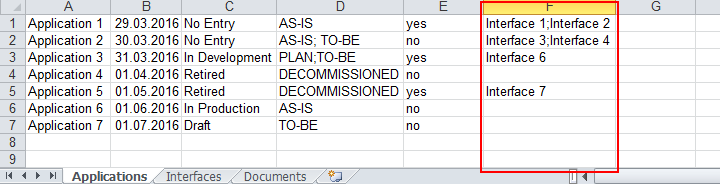
Below is an excerpt from the XML file with the relevant section
XML Example
<config>
<sheet name="Applications" class_name="C_APPLICATION" id="1" data_row="1">
...
<attribute name="RC_PROVIDED_INTERFACES" type="relation" context="en" column="6" separator=";" lookup_attr_name="NAME" direction="TO" target_class="C_INTERFACE"/>
...
</sheet>
...
</config>
Example 2
As in Example 1 above, however the content of the cell in the Excel file in column F looks like this:

That is, the referenced objects are uniquely identified by two attributes.
Below is an excerpt from the XML file with the relevant section
XML Example
<config>
<sheet name="Applications" class_name="C_APPLICATION" id="1" data_row="1">
...
<attribute name="RC_PROVIDED_INTERFACES" type="relation" context="en" column="6" separator=";" attr_separator="@"; lookup_attr_name="NAME,DESCRIPTION" direction="TO" target_class="C_INTERFACE"/>
...
</sheet>
...
</config>
<attribute type="file_pointer">
Relations to external objects or programs can be established via the attribute type file_pointer.
The imported values can be assigned to the following attribute type in the ADONIS metamodel:
- File Pointer (FILE_POINTER)
To do this, the following attributes must be defined for the tag <attribute>:
| Attribute type | Description |
|---|---|
name | Language independent name of the object attribute to which the imported value will be assigned |
type | Specification of the attribute type - here: file_pointer |
context | Specification of the language of the attribute value, e.g. "de" for German and "en" for English. Available languages depend on the Application Library and licence. |
column | Specification of the column number of the object attribute in the Excel file |
separator | Defines a separator between program name and file reference in the Excel file. If the separator is empty, then the cell content will be imported as a file reference and program name will be kept empty. |
Accessibility of Links to Files
In modern browsers, links to files on a local hard drive, UNC links to files on a server and also links to network drives are not accessible for security reasons. Links to files on other websites are accessible normally.
Example
You want to create relations to external documents in the attribute Referenced Document, which is contained in the Notebook of the object type Document:

Below is an excerpt from the XML file with the relevant section
XML Example
<config>
<sheet name="Documents" class_name="C_DOCUMENT" id="1" data_row="1">
...
<attribute name="A_REFERENCED_DOCUMENT" type="file_pointer" context="en" column="2"/>
...
</sheet>
...
</config>