Solution Guide - End-User Application Governance
Vielen Dank für Ihr Interesse an unseren ADOIT-Lösungen! Wir freuen uns darauf, Sie dabei zu unterstützen, Ihre EA-Initiativen in greifbare Ergebnisse zu verwandeln.
Bevor Sie beginnen
Dieser Leitfaden setzt voraus, dass Sie bereits den ADOIT Quick Start Guide abgeschlossen haben. Wenn Ihre ADOIT-Umgebung bereits eingerichtet ist, können Sie direkt mit dem Solution Guide für End-User Application Governance beginnen.
Innovationen durch sicheres End-User Computing fördern
In vielen Unternehmen entwickeln Mitarbeiter ihre eigenen End User Computing (EUC)-Applikationen (wie Excel-Tabellen, Access-Datenbanken oder Makros), um alltägliche operative Aufgaben zu lösen. Diese Basis-Innovation ist äußerst vorteilhaft, da sie Teams stärkt, die Flexibilität erhöht und die Produktivität durch eine geringere Abhängigkeit von der IT-Abteilung erheblich steigert. Tatsächlich erkennt eine Mehrheit der Unternehmen an, dass EUC-Applikationen die Gesamtproduktivität verbessern.
Da diese von Benutzern erstellten Tools jedoch oft außerhalb der direkten Kontrolle der IT betrieben werden, bringen sie naturgemäß gewisse Risiken mit sich. Ohne angemessenes Bewusstsein können Unternehmen mit Problemen bei der Datenintegrität, fehlender Dokumentation und Compliance-Herausforderungen konfrontiert werden. Beispielsweise zielt etwa ein Drittel der erfolgreichen Cyberangriffe auf Daten ab, die in unüberwachter Infrastruktur gespeichert sind.

Um widerstandsfähig zu bleiben und Innovationen sicher zu skalieren, müssen Unternehmen diese Lösungen sichtbar machen. End-User Application Governance hilft Ihnen, diese Applikationen durch fundierte, transparente und richtlinienkonforme Entscheidungen im gesamten Unternehmen zu steuern. Dieser Ansatz ermöglicht es Ihnen, die Vorteile von EUC voll auszuschöpfen, während Sie gleichzeitig Risiken aktiv reduzieren, die Geschäftskontinuität sichern und die Einhaltung von Vorschriften wie DORA und NIS2 gewährleisten.
Warum End-User Application Governance in ADOIT
Eine effektive Verwaltung von EUC erfordert einen proaktiven Ansatz, der die Durchsetzung von Richtlinien, Technologie und Transparenz kombiniert, ohne die Innovation zu bremsen.
ADOIT bietet eine einheitliche Sicht auf alle Applikationen und Prozesse, einschließlich derer, die von Endbenutzern erstellt und gepflegt werden. Mit ADOIT erhalten Sie die nötige Transparenz und Governance, um verborgene Risiken in gut verwaltete Assets zu verwandeln. Es ermöglicht Ihnen, Governance-Richtlinien zu etablieren, Änderungen zu verfolgen, Audit-Trails zu überwachen und sicherzustellen, dass alle Applikationen die erforderlichen regulatorischen Standards erfüllen – und gibt so sowohl dem Fachbereich als auch der IT das Vertrauen, sicher Innovationen durchzuführen.
Wie es in ADOIT funktioniert
Wählen Sie das Lean-Metamodell-Profil als Ausgangspunkt
Wie bereits im ADOIT Quick Start Guide empfohlen, wählen Sie das Metamodell-Profil ‚ADOIT for Lean Architecture Fans‘. Es ist ein bewährter und pragmatischer Ausgangspunkt, der die Dinge einfach hält und gleichzeitig aussagekräftige Analysen ermöglicht.
Es vereinfacht die Komplexität von ArchiMate und stellt gleichzeitig sicher, dass Sie über alle Objekte und Beziehungen verfügen, die für die vollständige Nutzung unserer angebotenen Solutions und Beispielmodelle erforderlich sind.

Von hier aus können Sie Schritt für Schritt erweitern, sobald Sie wissen, welche Elemente und Beziehungen für Ihre Praxis der End-User Application Governance tatsächlich benötigt werden.
Machen Sie es Teams leicht, ihre Tools zu registrieren
Der erste Schritt zur Erlangung der Kontrolle besteht darin, Ihre Teams zu bitten, ihre End User Applications zu registrieren. Schaffen Sie unternehmensweite Transparenz und etablieren Sie eine verlässliche Grundlage für eine sichere Governance.
Schritte:
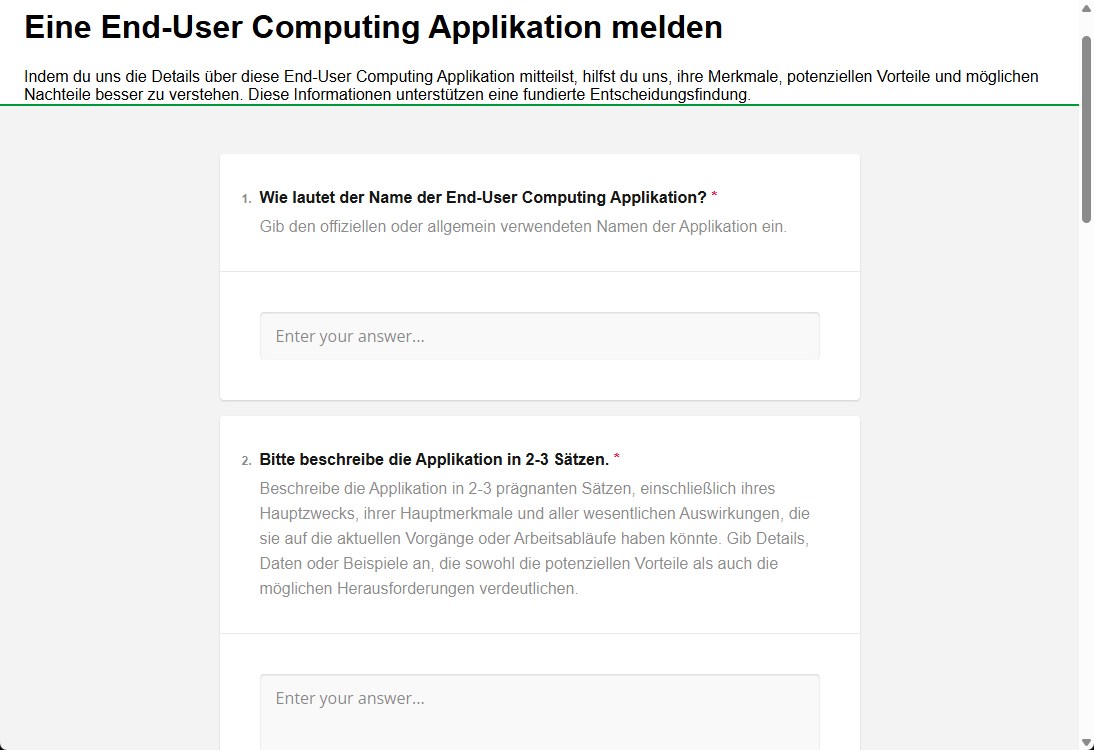
- Nutzen Sie ADOIT Forms, um allen eine einfache, geführte Möglichkeit zu geben, ihre Endnutzer-Applikationen zu registrieren, ohne tiefgehende Repository-Kenntnisse zu benötigen.
- Stellen Sie Ihren Benutzern den Link zum dedizierten Formular „Eine End-User Computing Applikation melden“ zur Verfügung.
- Benutzer vergeben einen Namen für die EUC-Applikation, beschreiben kurz deren Zweck und fügen die Geschäftseinheiten hinzu, die die Applikation nutzen.
- Anschließend geben die Benutzer an, welche Art von Technologie verwendet wird und ob die in der Applikation verarbeiteten Daten beispielsweise personenbezogene oder Kundendaten sind. Dies ist aufgrund möglicher Sicherheits- oder Compliance-Probleme wichtig.
- Optional können sie ein Tag auswählen, um die Applikation zu klassifizieren. Zum Beispiel „EUC“.
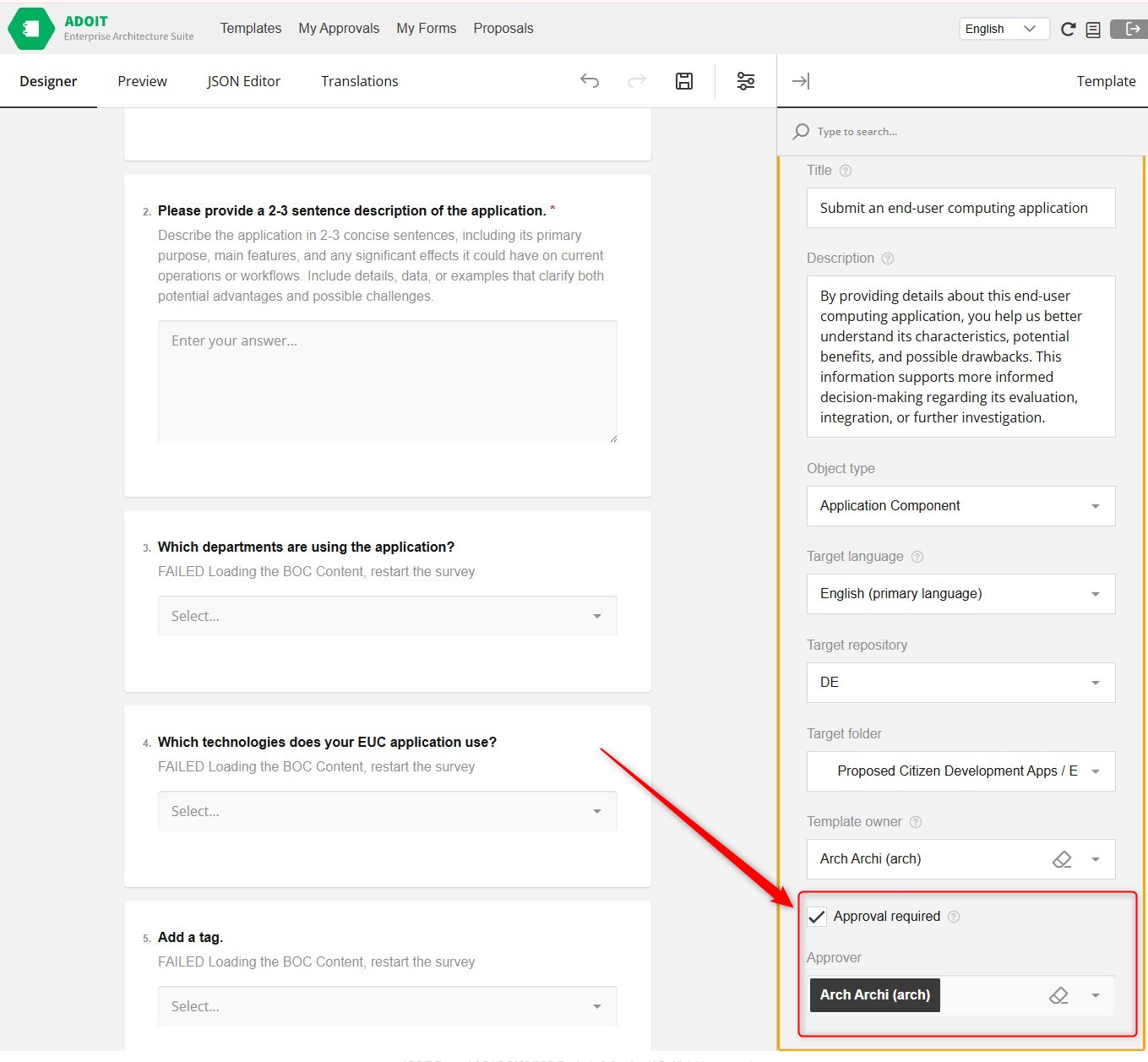
- Sobald das Formular eingereicht wurde, hängen die nächsten Schritte von Ihren Formulareinstellungen ab:
- „Approval required“ (Freigabe erforderlich) ist NICHT aktiviert: Die neuen Objekte werden automatisch im vordefinierten Repository-Ordner gespeichert.
- „Approval required“ IST aktiviert: Die Informationen werden direkt an die definierten Genehmiger zur Überprüfung gesendet.
Überprüfungsprozess, wenn „Approval required“ aktiviert ist:
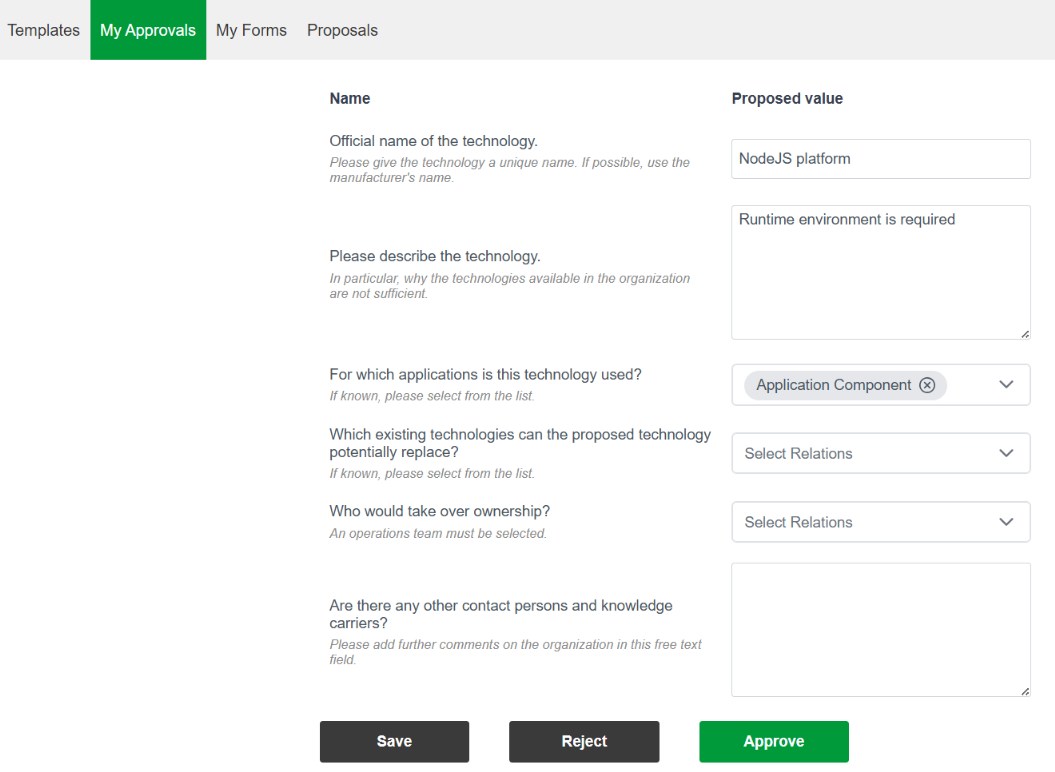
- Wenn „Approval required“ aktiviert ist, werden die Informationen direkt an die ausgewählten Enterprise-Architekten zur Überprüfung gesendet. Diese werden per E-Mail benachrichtigt.
- Auf der Forms-Seite unter "Meine Freigaben“ können die Enterprise-Architekten die vorgeschlagenen Applikationen überprüfen und genehmigen oder ablehnen. In diesem Schritt ist es auch möglich, Änderungen an den vorgeschlagenen Applikationen vorzunehmen.
- Nach dem Klicken auf „Approve“ werden die neuen Objekte automatisch im vordefinierten Repository-Ordner gespeichert.
Erkennen Sie Risiken, bevor sie sich auf das Geschäft auswirken
Sobald der EUC-Katalog aufgebaut ist, müssen Sie beurteilen, ob diese Applikationen vertrauliche Daten enthalten und wie ihre Sicherheit verbessert werden kann. Sehen Sie auf einen Blick, welche Capabilities, Technologien und Prozesse jedes der benutzerdefinierten Tools berührt, um Risiken frühzeitig zu erkennen.
Schritte:
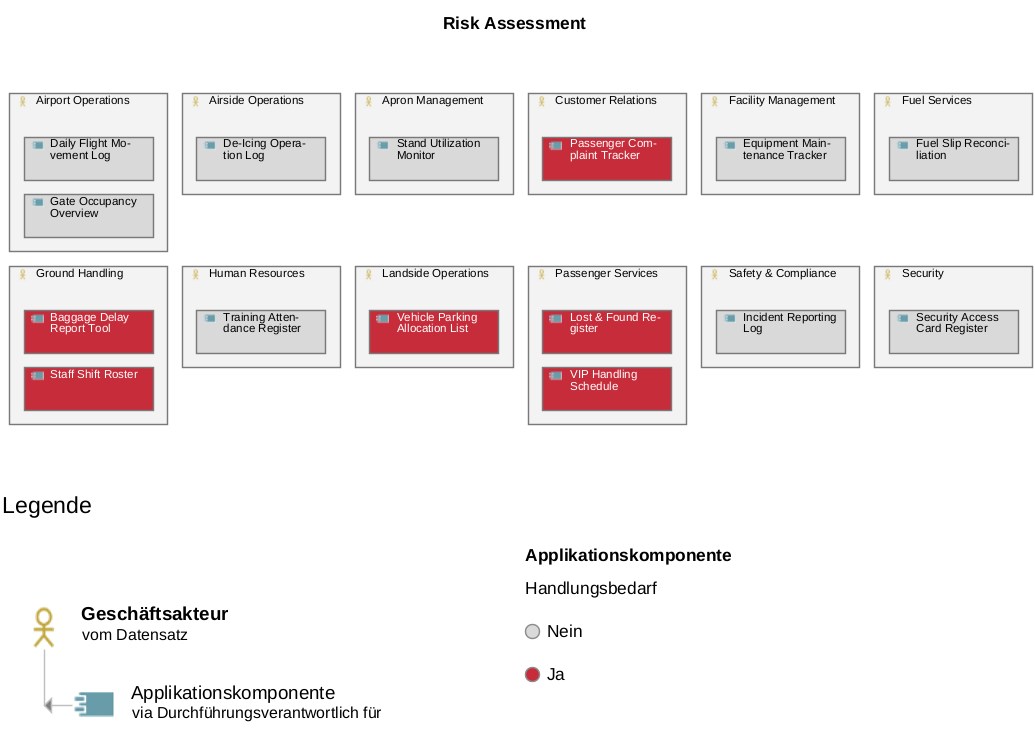
- Öffnen Sie eine Sicht, die zeigt, wie die EUC-Applikationen ihren jeweiligen Organisationseinheiten zugeordnet sind. Sie können unser Beispiel verwenden: Geschäftakteur -> durchführungsverantwortlich für -> Applikationskomponente.
- In unserem Beispielformular haben wir das Attribut „Handlungsbedarf" als JA/NEIN-Frage verwendet, um zu erfassen, ob es sich bei den verarbeiteten Daten um personenbezogene oder Kundendaten handelt. Nun können wir die Farbcodierung von ADOIT verwenden, um Applikationen, die diese sensiblen Daten verarbeiten, visuell hervorzuheben (z. B. indem wir sie rot markieren). Diese Applikationen stellen ein höheres Risiko dar und erfordern sofortiges Handeln.
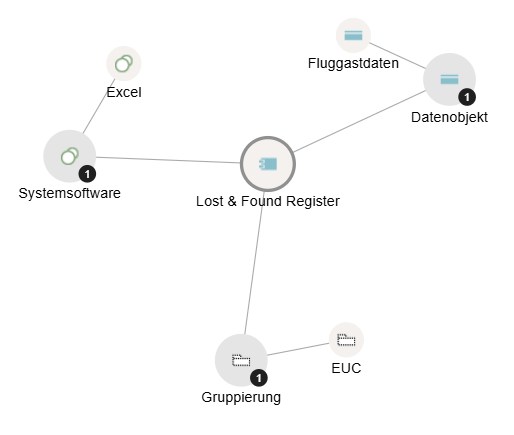
- Sehen Sie sich eine risikoreiche EUC-Applikation genauer an, indem Sie das Insights Dashboard öffnen.
- Im Beziehungsnetzwerk sehen Sie sofort, welche Datenobjekte (z. B. Fluggastdaten) mit dieser Applikation verknüpft sind und welche zugrunde liegende Technologie (z. B. Excel) verwendet wird:
Steuern Sie die strategische Weiterentwicklung jedes Tools
Erstellen Sie klare Verbesserungspläne für jedes Tool. Entscheiden Sie, ob Sie die Applikation absichern, verbessern oder modernisieren wollen, und weisen Sie Verantwortlichkeiten zu, um dies umzusetzen.
Schritte:
- Entwickeln Sie eine Roadmap oder Strategie zur Absicherung von EUC-Applikationen, die sensible Daten enthalten.
- Entscheiden Sie über die geeignete Maßnahme: „Absichern“ kann bedeuten, die Lösung auf eine robustere technologische Plattform zu migrieren, Zugriffsbeschränkungen zu implementieren oder besser geschützte Speicherorte zu wählen.
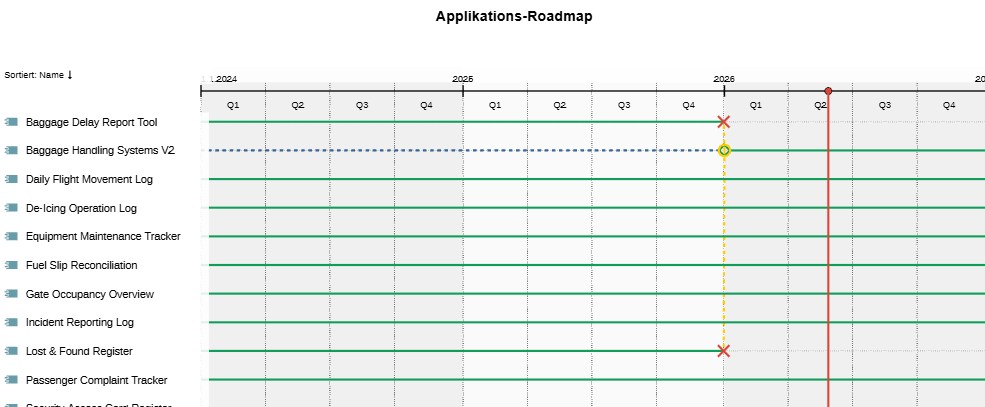
- Erstellen Sie einen Workspace, um die Ausmusterung der risikoreichen EUC-Applikationen zu planen.
- Erstellen Sie eine Gantt-Diagramm-Sicht, die den Lebenszyklus jeder EUC-Applikation und den Zeitplan für ihren Ersatz visualisiert:
Passen Sie die Governance kontinuierlich an Veränderungen an
Halten Sie die Governance als lebendigen Prozess aufrecht. Wenn sich Tools weiterentwickeln oder neue entstehen, stellen Sie sicher, dass die Entscheidungen korrekt, abgestimmt und richtlinienkonform bleiben. Nutzen Sie stets aktuelle Übersichten, die den Governance-Status, Maßnahmen und den Fortschritt im Laufe der Zeit verfolgen, um sicherzustellen, dass alle Applikationen kontinuierlich die erforderlichen Standards erfüllen.