Le scénario « Cartographier & Documenter »
L’objectif du scénario « Cartographier & Documenter » est de vous permettre de modéliser et de créer du contenu de manière structurée.
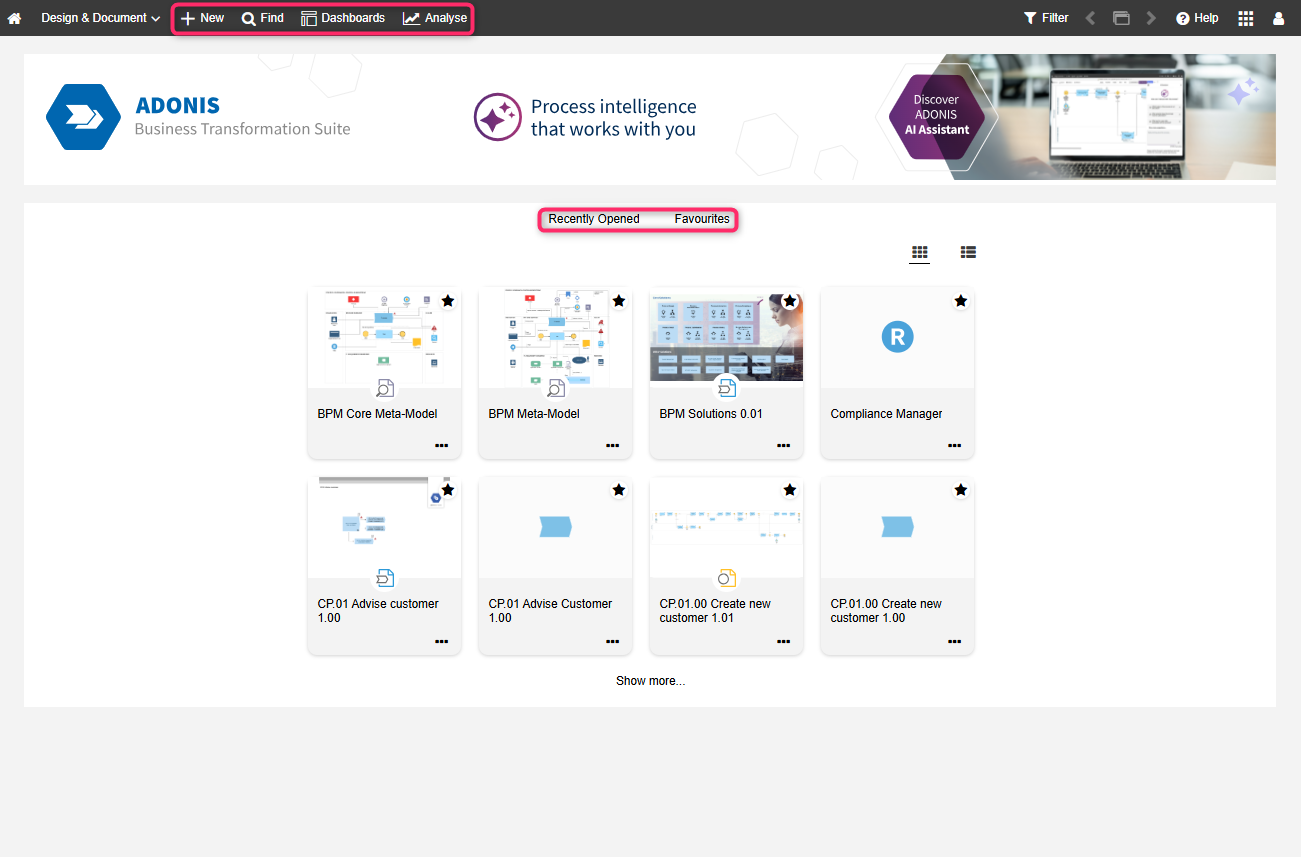
Le contenu de la page d'accueil « Cartographier & Documenter »
La page d’accueil est organisée comme suit :
Bannière: vous pouvez y insérer une image représentant votre organisation. Cela peut être configuré dans l'Administration ADONIS.
Récemment ouvert: Les modèles que vous avez ouverts le plus récemment. Triés par date. Pour afficher d’autres modèles, cliquez sur Afficher plus....
Favoris: Vos modèles et objets favoris. Trié par ordre alphabétique. Pour consulter d’autres artefacts, cliquez sur Afficher plus....
Affichez vos modèles les plus récemment ouverts et vos favoris sous forme de vignettes ou de liste.
Vous pouvez basculer facilement entre les deux affichages à l’aide des icônes
 Afficher la liste et
 Afficher les vignettes.
Options supplémentaires
La barre de menu située en haut de l'écran permet d'accéder à certaines des fonctionnalités les plus utilisées dans ADONIS :
Rechercher
 : Ouvrez l’Explorateur et utilisez la fonction de recherche
d'ADONIS. Les différentes options de recherche et de filtrage permettent de retrouver rapidement
l’artefact recherché.
: Ouvrez l’Explorateur et utilisez la fonction de recherche
d'ADONIS. Les différentes options de recherche et de filtrage permettent de retrouver rapidement
l’artefact recherché.Tableaux de bord
 : Ouvrir et configurer des tableaux de bord configurables.
Analyser
 : Cette page comporte par défaut deux sections : Analyses et Restitutions. Utilisez les liens
rapides en haut de la page pour accéder directement à ces sections. La section Analyses sert de point de départ pour effectuer des analyses sur un jeu de données de
votre choix. La section Restitutions affiche le tableau de bord des rapports,
où il est possible de créer des rapports au format PDF et RTF.
: Cette page comporte par défaut deux sections : Analyses et Restitutions. Utilisez les liens
rapides en haut de la page pour accéder directement à ces sections. La section Analyses sert de point de départ pour effectuer des analyses sur un jeu de données de
votre choix. La section Restitutions affiche le tableau de bord des rapports,
où il est possible de créer des rapports au format PDF et RTF.
 : Créer de nouveaux
 Les tableaux de bord hérités intégrés Mes processus & Actifs, Initiatives, Risques, Conformité ainsi que Notifications ont été supprimés dans ADONIS 19.0. Vous pouvez recréer la plupart de ces vues à l’aide de tableaux de bord configurables. Pour obtenir un mapping détaillé et des instructions sur la manière de configurer cela, veuillez consulter la section Recréer des tableaux de bord hérités.
Applications ADONIS
Vous pouvez accéder aux modules complémentaires et aux extensions d'ADONIS via le bouton
 Applications ADONIS situé en
haut à droite de l’écran. Les applications ADONIS suivantes sont disponibles dans le scénario «
Cartographier & Documenter » dans ADONIS 19.0 :
Applications ADONIS situé en
haut à droite de l’écran. Les applications ADONIS suivantes sont disponibles dans le scénario «
Cartographier & Documenter » dans ADONIS 19.0 :
Dessinateur de processus: Créez des modèles de processus étape par étape dans une vue tabulaire. Le Concepteur de processus est inclus sans coût supplémentaire pour tous les clients qui utilisent ADONIS Enterprise Edition.
ADONIS Process Mining Essentials (PME): Exploitez de puissantes fonctionnalités de Process Mining pour découvrir comment vos processus fonctionnent réellement. PME est un module additionnel sous licence destiné aux utilisateurs d'ADONIS Enterprise Edition.