New Features in ADONIS 19.1
ADONIS 19.1 is a minor update that builds on the 19.0 LTS foundation and introduces targeted improvements for administrators. The update adds the Operations Tool for selected maintenance tasks, extends AI Assistant configuration with Anthropic support, advanced authentication options, and new GPT-5.6 models, lets you disable the welcome screen for all users, and refines object ownership settings in the ADONIS Administration.
The release also includes fixes for issues identified since ADONIS 19.0.
Read on to learn more about the updates delivered with ADONIS 19.1.
New Features for ADONIS Administrators
Operations Tool
The Operations Tool is a web application that provides access to important operations for administering ADONIS without direct access to the application server or database server. You can either launch it directly from the ADONIS Administration in maintenance mode, or it starts automatically if the database is not initialised or via an environment variable in the deployment configuration.
Maintenance mode includes operations for encrypting credentials, resetting or re-enabling the Admin super user, importing or exporting large migration packages or repositories, script execution, exporting the active application library, and upgrading the product. A separate mode supports initialising an empty database.
For details, please refer to the section "Operations Tool" in the Administration Help.
AI Assistant: Anthropic Support, Advanced Authentication, and GPT-5.6 Models
ADONIS 19.1 extends the AI Assistant configuration with Anthropic as an additional AI provider, advanced authentication capabilities for OpenAI-compliant endpoints, and new GPT-5.6 models when you use OpenAI.
Anthropic Support
The AI Assistant now supports an additional AI provider type: Anthropic. When you select this provider, enter the specific model identifier and provide a valid API key to enable communication with the service.
Advanced Authentication for OpenAI-Compliant Providers
When using the OpenAI-compliant provider type, advanced authentication mechanisms beyond a standard API key can now be implemented, including OAuth 2.0 and certificate-based authentication. These enterprise-grade security options are available as a custom-tailored package; please contact your ADONIS consultant if you are interested in enabling them for your organisation.
Expanded OpenAI Model Support: GPT-5.6 Models
When using OpenAI as your AI provider, you can now additionally select GPT-5.6 Sol, GPT-5.6 Terra, and GPT-5.6 Luna as the AI model.
For details, please refer to the section "AI Assistant" in the Administration Help.
Welcome Screen: Disable for All Users
ADONIS 19.0 introduced a new welcome screen to help users discover quick-start guides and online trainings. In ADONIS 19.1, administrators can turn the welcome screen off for all users when it is not needed in your organisation.
Under Settings > System settings > Modules > Getting started, the default is Available for all users. You can limit availability to specific system roles or set the module to none so that no users see the welcome screen.
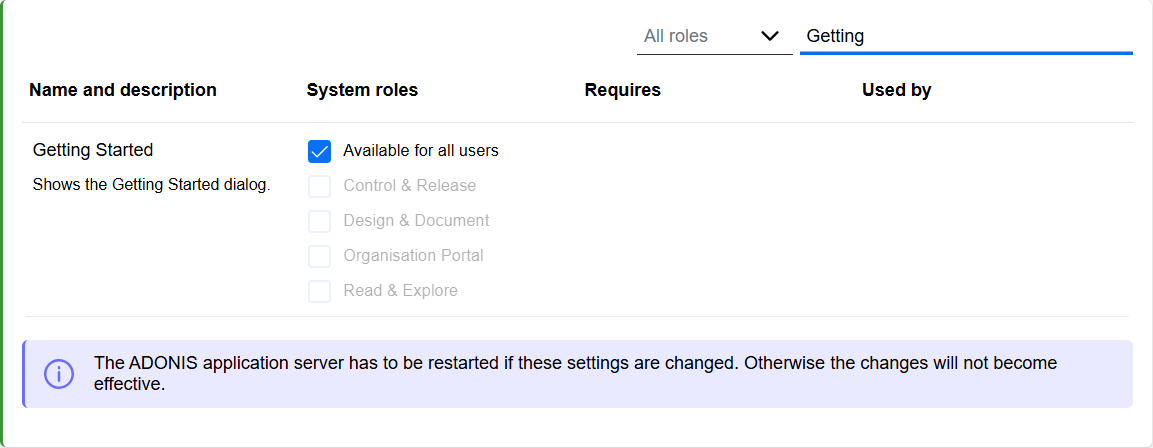
For details, please refer to the section "Modules" in the Administration Help.
Object Ownership: Read-Only Responsibility Fields
Optionally, you can make ownership relation fields read-only across components such as object properties and the tabular editor. Users add or remove object responsibles in a dedicated dialog instead. This helps prevent situations where a user removes themself as responsible and can no longer edit an object to assign a new responsible.
For details, please refer to the section "Object Owners" in the Administration Help.
Migration from an Earlier Version of ADONIS to ADONIS 19.1
Changed Requirements: Database User Credentials
ADONIS communicates with the database using a dedicated database user. This can be the default user ADOxx or an individual database user.
In earlier ADONIS versions, the default database user could use a predefined default password. ADONIS 19.1 no longer permits this default password for security reasons. If your existing database still uses the default password, you must change it in the database before you upgrade.
You must also provide the database user credentials to ADONIS as an encrypted string. The upgrade guides below cover these requirements. General instructions for preparing database user credentials are available in the Installation Manual.
Upgrade ADONIS
The Installation Manual contains migration guides that will help you upgrade ADONIS from an older version to version 19.1. Each guide contains all the steps that need to be taken, with everything explained in detail:
Migration from All Other Versions to ADONIS 19.1
ADONIS 18.0 is available only for SaaS customers hosted on AWS. As all upgrades from 18.0 to 19.1 are performed by the BOC Cloud Operations team, no migration guide is provided for this version. If you are using ADONIS 15.0 or an earlier version, please contact your ADONIS consultant for assistance with the required upgrade steps.
Install Hotfix
You are already using ADONIS 19.1 and want to install a hotfix? Here are step-by-step instructions: