New Features in ADONIS 19.0 LTS
Welcome to ADONIS 19.0, our latest Long Term Support (LTS) release! This release focuses on expanding insight, usability, and control across process management, analysis, and administration.
For users, ADONIS 19.0 introduces:
Significant enhancements to the AI Assistant, including text creation and refinement, improved process generation with lanes, and greater control during AI execution
Extended configurable dashboards with new widgets, built-in queries, richer chart capabilities, and more
New Variant Analysis capabilities in the add-on module ADONIS Process Mining Essentials, supporting deeper insight into real execution behaviour
Methodical improvements such as richer document hierarchies and extended hierarchy modelling for additional object types
For administrators, ADONIS 19.0 adds:
Extended AI Assistant configuration, including support for Google Gemini, OpenAI-compliant services and Anthropic as well as built-in connection testing
Improved administration capabilities, such as the ability to revoke global administrator rights from users
Read on to learn more about the new features and enhancements in ADONIS 19.0.
ADONIS 19.0 is available for all SaaS and on-premise customers.
ADONIS 18.0 was released as a SaaS-only version for customers hosted on AWS. On‑premise customers upgrading from ADONIS 17.x or earlier should follow the migration guidance at the end of this page.
New Features for All Users
AI Assistant: Text Creation, Lanes, and More
ADONIS 19.0 introduces text generation and editing to the AI Assistant, along with several refinements to existing features, further improving usability and control.
Create and Refine Text in Properties
ADONIS 19.0 extends the AI Assistant with powerful text generation and editing capabilities directly embedded in model and object properties.
Long-text attributes, such as descriptions, documentation fields, or notes, can now be edited and improved with AI support exactly where the content is maintained, without switching context. The AI Assistant is seamlessly integrated into this environment, helping you refine existing texts or generate entirely new content.
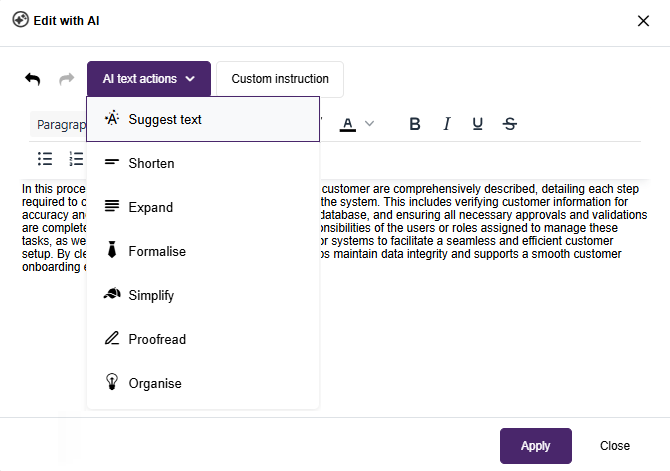
You can:
- adapt tone and style (for example, make text more concise or more academic),
- improve grammar, spelling, and readability,
- restructure or expand existing content,
- translate attribute texts into other languages, and
- apply custom instructions using natural language.
Once you are satisfied with the result, the refined text can be applied directly to the attribute with a single click. This enhancement supports process authors, analysts, and documentation teams in keeping descriptive content clear, consistent, and high quality without leaving ADONIS.
The AI Assistant is available only in the ADONIS Enterprise Edition.
For details, please refer to the section "Edit With AI" in the User Manual.
Process Generation with Lanes
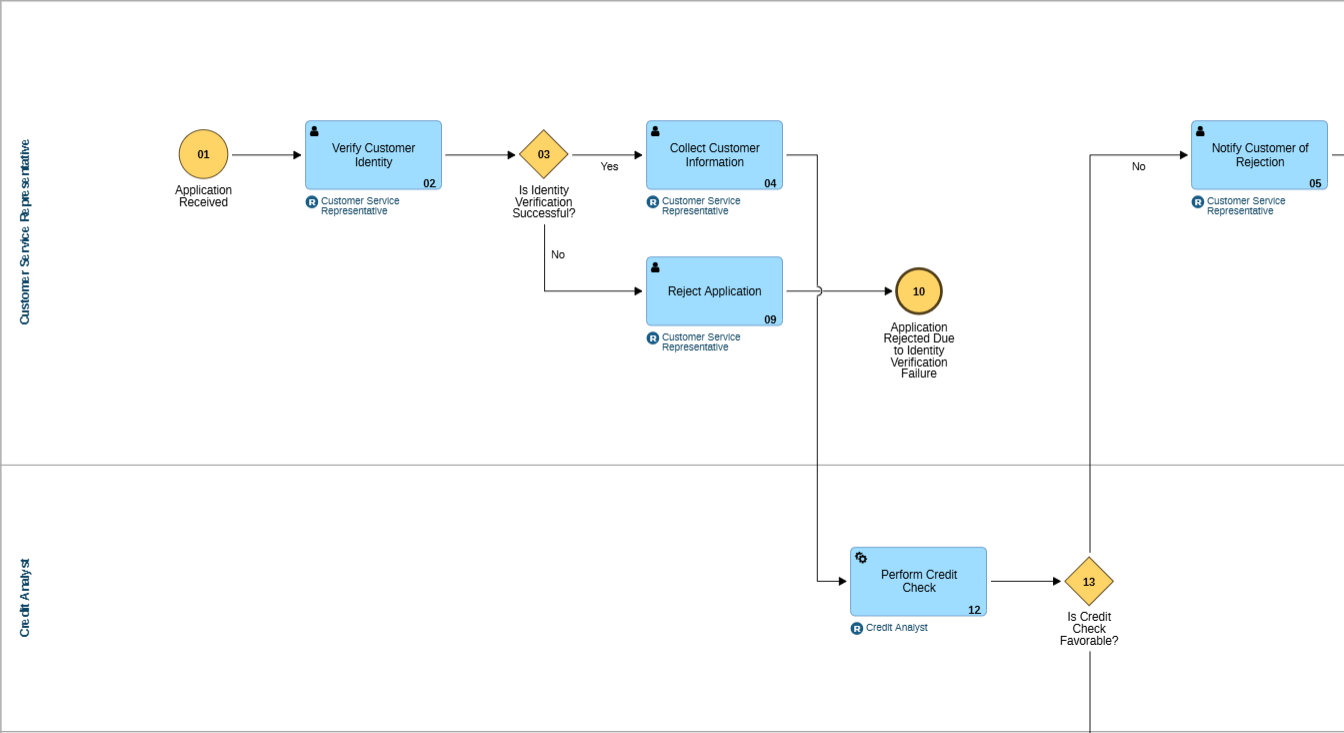
AI-assisted process generation has been enhanced. When generating process proposals, the AI Assistant can now include  Lanes.
This makes generated process models more expressive from the beginning. Lanes help represent responsibilities, participating roles, organisational boundaries, or external participants more clearly, reducing the effort required to restructure a generated process after creation.
AI Assistant: Copy Responses and Prompts
When working with the AI Assistant, whether extracting processes from SOPs, or understanding and analysing processes, you can now easily copy AI responses and your own prompts to the clipboard.
AI Assistant: Automatic Numbering of Generated Processes
When using the AI Assistant to design processes, either from a textual process description or directly from SOPs, newly generated objects are now automatically numbered.
AI Assistant: Cancel AI Actions
When using the AI Assistant (design or analysis), a Stop button is now available while the AI operation is running. You can interrupt long-running AI actions at any time and continue working without waiting for the operation to complete.
Configurable Dashboards: New and Enhanced Widgets
ADONIS 19.0 further evolves configurable dashboards with new widgets, extended visualisation options, and several usability improvements.
News Widget
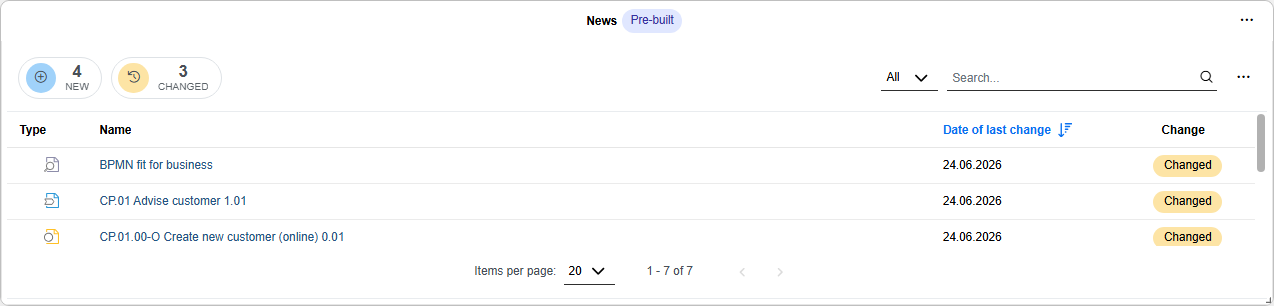
The new News widget provides a configurable way to display recent changes to models and objects in a clear, tabular format. It helps you and your colleagues stay informed about newly created, updated, or released content.
Dashboard creators can tailor the widget to suit different audiences or use cases. For example, they can focus on specific model or object types or show only changes since the user’s last login. This makes the News widget a flexible tool for communicating relevant updates and supporting transparency across teams.
New Personal Overview Widgets
ADONIS 19.0 introduces several new widgets that replace the predefined, personal overview dashboards from the Design & Document scenario in earlier ADONIS versions. These widgets integrate seamlessly into configurable dashboards and provide focused, role-based insights.
My Processes
The My Processes widget provides a detailed overview of the processes that are relevant to the current user. It lists  Business Process Diagrams,
  Process Landscapes, and
  Process objects for which the user is assigned a role, such as Process owner, Process manager, Methodical reviewer, or Process analyst/designer, with the option to sort the list by these responsibilities.
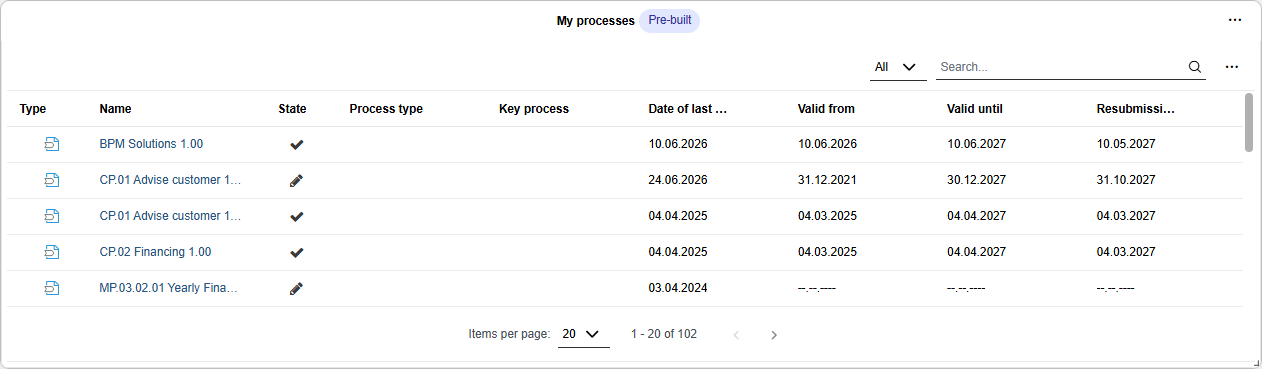
This widget helps you quickly access the process content you are responsible for, supporting faster orientation, follow-up, and collaboration.
My Objects
The My Objects widget gives users a focused overview of repository objects for which they are assigned as Responsible person.
By clearly showing ownership and responsibility, the widget supports better transparency and helps users keep track of the objects they are expected to maintain.
My KPIs
The My KPIs widget provides a detailed overview of  Performance Indicators that are relevant to you. It lists KPIs from Business Process Diagrams and Process Landscapes where you are assigned a role, such as Process owner, Process manager, Methodical reviewer, or Process analyst/designer, as well as KPIS for which you are directly assigned as Responsible person. The widget can be filtered to focus on specific areas of responsibility.
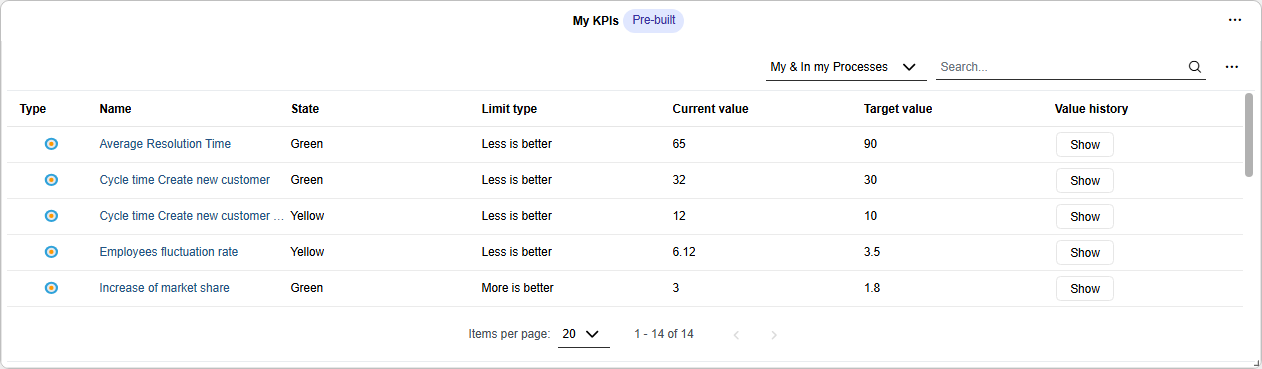
This brings KPI information closer to daily work and supports continuous monitoring of process performance and target achievement.
Built-In Queries
Built-in queries are predefined data sets that provide commonly used views on models and objects. The following built-in queries are available for configurable dashboards in ADONIS 19.0:
- My Controls
- My Initiatives
- My KPIs
- My Processes
- My Risks
These queries can be used to configure any widget type based on a search query, such as Bar Chart, Pie Chart, Table, or Number widgets.
By using built-in queries together with the various new widget types, it is possible to replicate the personal overview dashboards from the Design & Document scenario in earlier ADONIS versions.
Gauge Charts: Aggregated Values
Gauge charts now support aggregation across multiple elements. Instead of visualising values for a single artefact only, gauge charts can display aggregated values derived from a broader set of elements. These elements are determined via a saved or built-in search query.
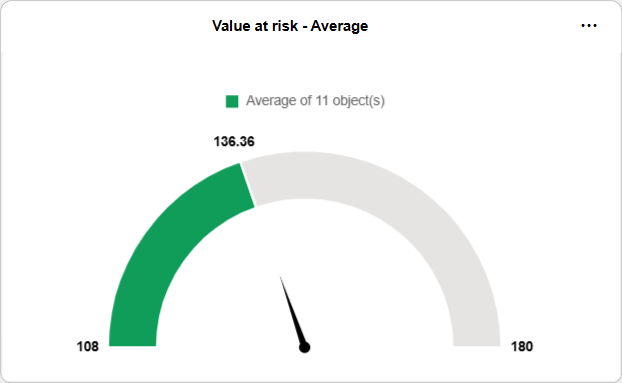
This is especially useful for monitoring indicators, such as average assessment values or overall status indicators calculated across several objects.
Pie Charts: Categories from Numerical Ranges
Pie charts have been extended so that categories can now be derived from numerical attribute ranges.
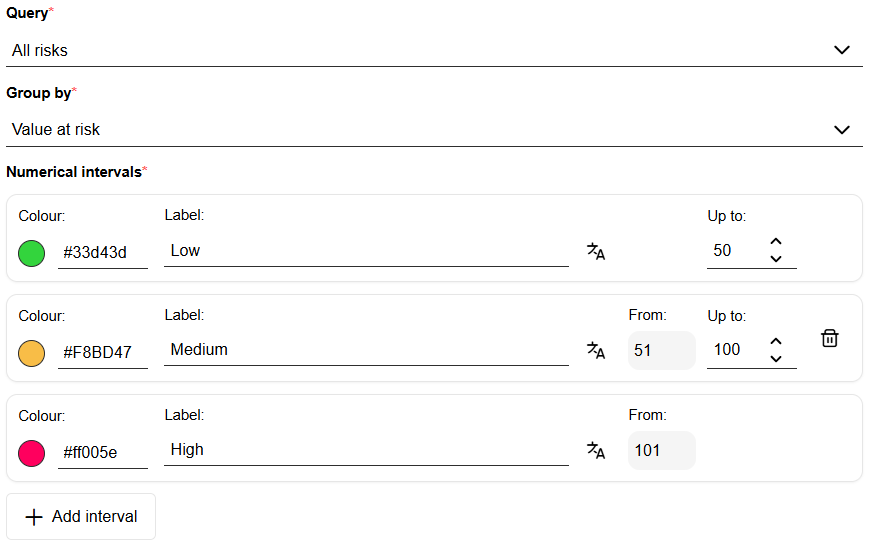
This allows dashboard creators to group numerical values into meaningful categories, such as low, medium, and high, and visualise their distribution at a glance. As a result, numerical data becomes easier to interpret and compare within dashboards.
Additional Usability Improvements
Configurable dashboards in ADONIS 19.0 include several further usability enhancements:
- Clone dashboard: Create a copy of an existing dashboard and use it as a starting point for a new one.
- Table widget improvements (Table and News):
- Search within tables.
- Select which columns are displayed.
- Start page enhancements:
- New Favourites tab, in addition to the existing All and Created by me tabs.
For details, please refer to the section "Configurable Dashboards" in the User Manual.
Please note that the predefined, personal overview dashboards ("My Processes & Assets", "Initiatives", "Risks", "Compliance", and "News & Tasks") have been removed from the product in ADONIS 19.0. With the new configurable dashboards, you can now design your dashboards much more freely and purposefully for yourself as well as for other users.
ADONIS PME: Variant Analysis
ADONIS Process Mining Essentials (PME) now supports Variant Analysis.
Variants represent the different paths or sequences of activities that cases take within a process. With Variant Analysis, you can better understand how work is actually performed, identify common execution paths, and detect exceptional behaviour that may indicate inefficiencies, deviations, or opportunities for improvement.
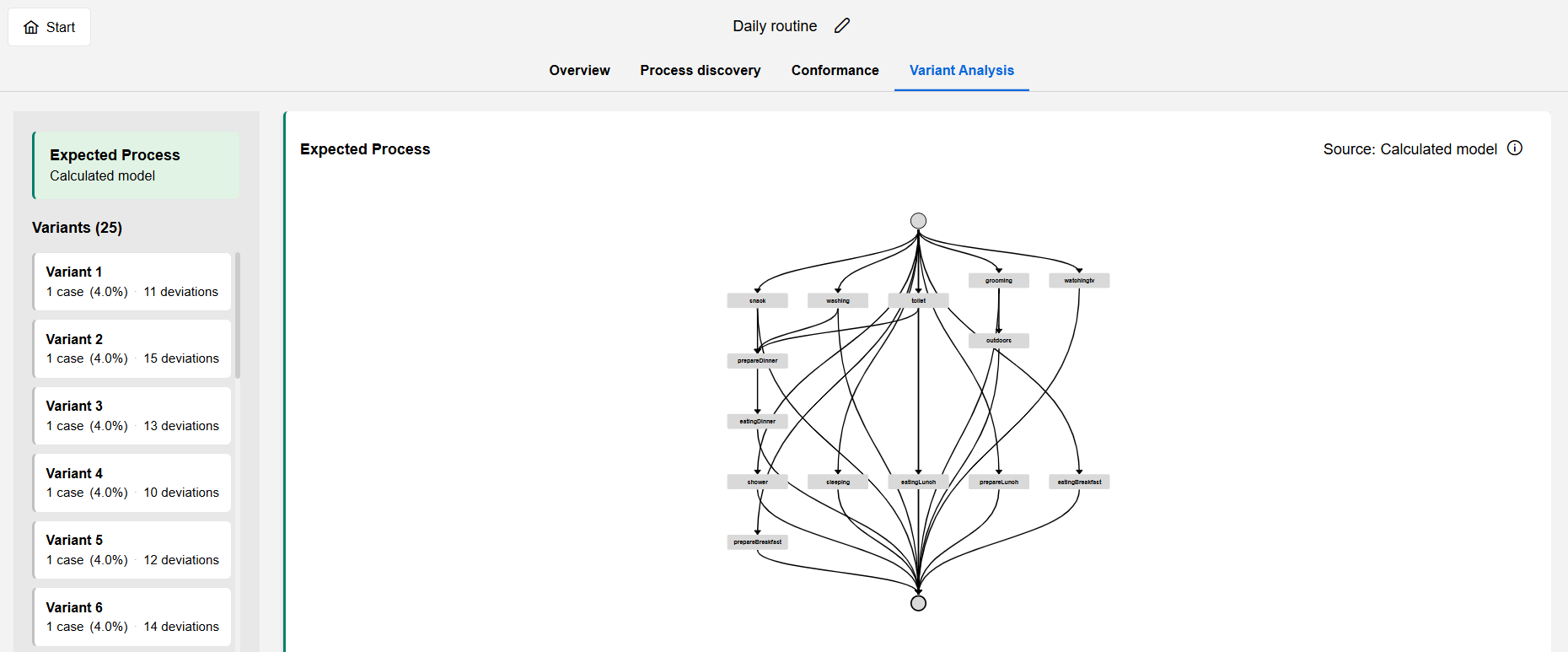
Variant Analysis supports process analysts and process owners in answering questions such as:
- Which process path is followed most often?
- Which variants lead to longer case durations?
- Where do cases deviate from the expected process?
- Which variants should be standardised, improved or investigated further?
PME is an optional, licensable add-on module available on the ADONIS Marketplace. It is only available in the ADONIS Enterprise Edition.
For information on how to use PME, please refer to the "ADONIS Process Mining Essentials (PME) Guide".
Welcome Screen
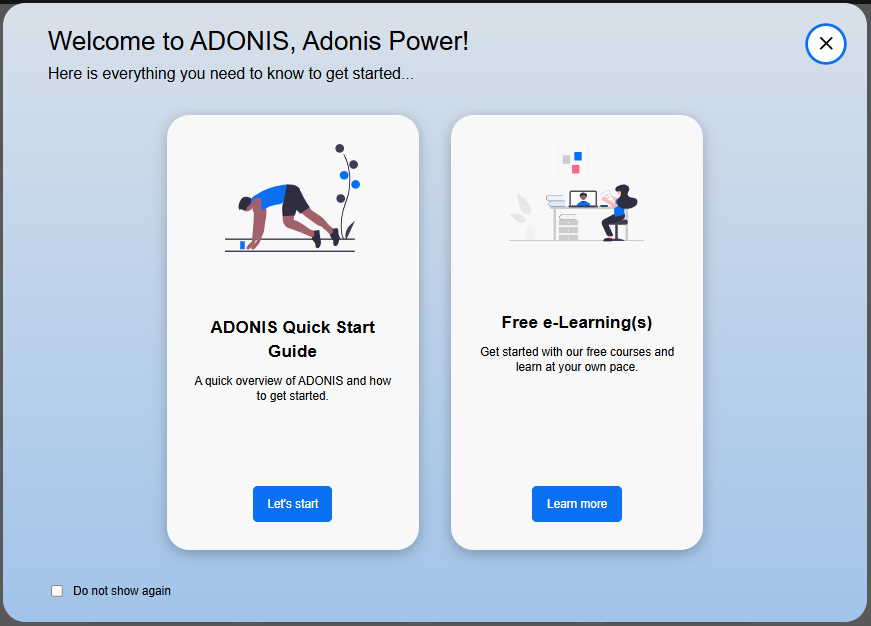
ADONIS 19.0 introduces a new welcome screen designed to help you discover quick-start guides and online trainings more easily. It appears automatically when you start ADONIS and helps new users find guidance faster and start working productively in ADONIS. If you prefer a more direct start, you can easily disable it (and access it again at any time via the help menu).
Process Insights: Applications Across the Process Hierarchy
The Insights dashboard for Process objects has been extended with the new IT Systems and Resources widget. This widget is available for customers who are integrating ADONIS with its sister product ADOIT.
IT Systems and Resources displays  Applications imported from ADOIT which are connected directly or indirectly, through referenced Business Process Diagrams, to the selected process.
This helps you understand which applications support not only a single process but also subordinated processes across the process hierarchy. As a result, you gain a clearer view of application usage, dependencies, and potential impact areas within your process architecture.

This widget only exists if synchronisation of objects between ADONIS and ADOIT is enabled in your licence.
For details, please refer to the section "IT Systems" in the User Manual.
New Features for Users of the ADONIS BPMS Application Library
Document: More Information on Hierarchy
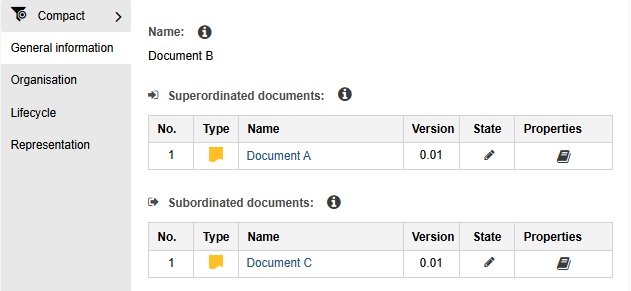
 Document objects now show the complete hierarchy of subordinated and superordinated documents in their properties.
Previously, subordinated documents were displayed via the outgoing relation Has subdocument in the "General information" chapter of the document properties.
With ADONIS 19.0:
- The relation has been renamed to Subordinated documents.
- The same relation is now also displayed from the opposite perspective as the incoming relation Superordinated documents.
As a result, users can see both parent and child documents directly in the properties of a document. This makes document hierarchies easier to understand and maintain, and helps users recognise how a document is positioned within a broader document structure.
Hierarchy Modelling for Cost Centers, Initiatives, Resources and Topics
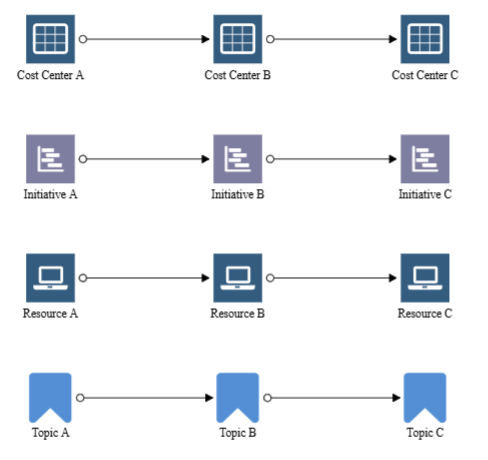
Hierarchy modelling is now supported for additional object types:
 Cost Center
 Initiative
 Resource
 Topic
Topic
For these object types, organisations can now model structured hierarchical relationships directly in the graphical editor or define them via the object properties.
The corresponding hierarchy relations are displayed in the object properties from both perspectives. Users can view incoming and outgoing relations, such as Superordinated cost centers and Subordinated cost centers, in the General information chapter.
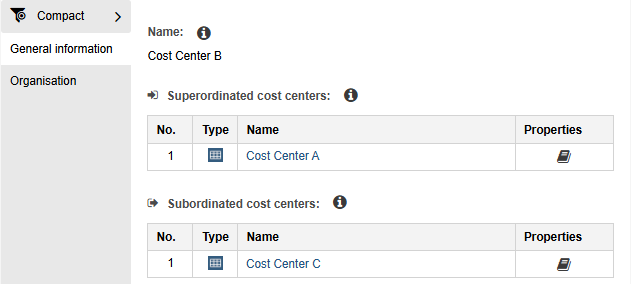
This enables a more consistent representation of hierarchical structures across the repository and simplifies the analysis and maintenance of organisational relationships.
New Attribute: Escalation Code
The new attribute Escalation code has been added for the following object types:
 End Event
 Intermediate Event (sequence flow)
 Intermediate Event (boundary)
You can find this attribute in the "Details" chapter, within the "Escalation (details)" group. It allows you to precisely define which escalation is sent or received when an escalation event occurs.
Cross-Reference: Property "Click on the Image/Object Opens" Moved
In the properties of  Cross-reference objects, the attribute Click on the Image/Object Opens has been moved to improve accessibility.
The attribute is now located directly in the "Representation" chapter, outside of the "Visualisation (Standard)" group. Additionally, it can now be edited regardless of which Graphical representation is selected for the cross-reference. Previously, this setting could only be changed when the Standard representation was active.
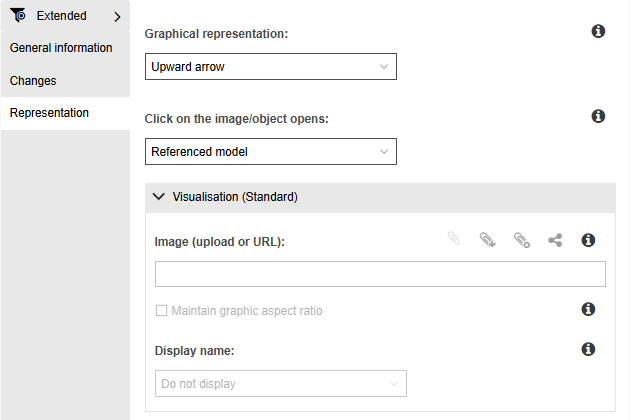
This change makes the configuration easier to understand and maintain when defining what should happen when users click a cross-reference in a model.
New Features for ADONIS Administrators
AI Assistant: New AI Providers, New Models, and Connection Test
The AI Assistant now supports additional AI provider types: Google Gemini, OpenAI-compliant services, and, starting with ADONIS 19.0.1, Anthropic. In addition, the lineup of available GPT-5 models has been expanded, and a new connection test feature has been introduced.
Google Gemini
You can now select Google Gemini as an AI provider. When choosing this provider, you must specify the relevant Model name and provide a valid API key to enable communication with the service.
OpenAI-compliant Services
Support for OpenAI-compliant services in ADONIS 19.0 means you can integrate any provider that implements the OpenAI API specification, including self-hosted, third-party or open-source model deployments. You need to enter the Model name and Endpoint URL of the service, and optionally the API key (typically only required for secured or cloud-hosted instances).
Anthropic
Starting with ADONIS 19.0.1, you can select Anthropic as an AI provider. When choosing this provider, you must specify the relevant model identifier and provide a valid API key to enable communication with the service.
Expanded OpenAI Model Support: New GPT-5 Models
When using OpenAI as your AI provider, your options now include four new models from the GPT-5 family: GPT 5.1, GPT-5.4 mini, GPT-5.4, and GPT-5.4-nano. This expanded lineup allows you to tailor AI capabilities precisely to your business requirements.
Connection Test
A new Test connection function is available. It allows you to verify that the current configuration is valid and that a connection to the selected AI provider can be established.
When testing the connection, ADONIS uses the configured settings and API key to perform a test request. A message indicates whether the connection was successful. If the test fails, the message provides information about the cause of the error to support troubleshooting.
For information on how to enable and configure the AI Assistant, please refer to the section "AI Assistant" in the Administration Help.
SCIM: Target Object Group for Shared Users
The configuration of SCIM user defaults becomes more precise in ADONIS 19.0. When defining the repository and enabling the "Share with repository" option to make provisioned users available as objects in modelling in ADONIS, you can now select the exact object group where these shared user objects should be placed.
This gives you granular control over where your user objects are stored, ensuring an automated, clean and well-structured repository architecture from the very first login.
For details, please refer to the section "Configure General SCIM Settings" in the Administration Help.
OAuth 2.0 & OIDC: Dynamic Client Registration for MCP
ADONIS can act as an OAuth 2.0 Authorization Server and OpenID Provider (OP). In this role, it authenticates users for external applications (OAuth 2.0 or OpenID Connect clients), allowing them to sign in with their ADONIS credentials.
For both authentication mechanisms, you can now configure Dynamic Client Registration (DCR). This allows agents that access the ADONIS Model Context Protocol (MCP) server to automatically query a specific URL to determine how to authenticate themselves.
For details on how to configure DCR, please refer to the sections "Authentication > OAuth 2.0 > Enable Dynamic Client Registration" and "Authentication > OIDC > Enable Dynamic Client Registration" in the Administration Help.
Guidance on using the MCP services and a reference implementation in Python for creating an agent is available via the BOC Developer Portal.
Expanded Font Support
ADONIS provides font support for a wide range of languages without requiring any additional configuration. This includes languages that use the following alphabets:
- Latin (e.g., English, French, German, Spanish)
- Cyrillic (e.g., Bulgarian, Russian)
- Greek
- Hebrew
New in ADONIS 19.0: If you require characters for languages not covered by the default alphabets, you can now enable additional font packages directly in the system settings. The following language groups are already preconfigured and can be activated as needed:
- Chinese, Japanese, and Korean (CJK)
- Thai
For details, please refer to the section "Fonts" in the Administration Help.
Other custom languages currently require a prior evaluation and a dedicated customizing project by the BOC Group.
Global Administrators: Revoke Administration Rights
ADONIS 19.0 adds the ability to remove global administrator privileges from a user. With this change, global administrator permissions can be managed more flexibly throughout the user lifecycle. You can grant broad administrative access when needed and later revoke it again without deleting or recreating the user.
For details, please refer to the section "Configure Global Administrators" in the Administration Help.
Removed Features
This section list features that have been removed from ADONIS 19.0.
Predefined Dashboards
The predefined, personal overview dashboards ("My Processes & Assets", "Initiatives", "Risks", "Compliance", and "News & Tasks") have been removed from ADONIS 19.0. You can recreate most of these views using configurable dashboards. For a detailed mapping and instructions on how to set these up, please refer to the section Recreate Legacy Dashboards.
Additionally, the "Management Dashboard" has been removed.
Data Actuality
The functionality to confirm the data actuality of objects has been removed from ADONIS 19.0.
Task-Based Notifications
Task-based notifications are no longer supported in ADONIS 19.0. To configure release workflow notifications, use email notifications instead.
Microsoft SQL Server: Windows Authentication
ADONIS 19.0 no longer supports Windows Authentication for Microsoft SQL Server databases. Use SQL Server Authentication instead.
Migration from an Earlier Version of ADONIS to ADONIS 19.0
The Installation Manual contains a migration guide that will help you upgrade ADONIS from an older version to version 19.0. The guide contains all the steps that need to be taken, with everything explained in detail:
Migration from All Other Versions to ADONIS 19.0
ADONIS 18.0 is available only for SaaS customers hosted on AWS. As all upgrades from 18.0 to 19.0 are performed by the BOC Cloud Operations team, no migration guide is provided for this version. If you are using ADONIS 15.0 or an earlier version, please contact your ADONIS consultant for assistance with the required upgrade steps.
Install Hotfix
You are already using ADONIS 19.0 and want to install a hotfix? Here are step-by-step instructions: