New Features in ADOIT 18.2
ADOIT 18.2 builds on the foundation of 18.0 and delivers quality-of-life additions for administrators across core areas such as metamodel rights management, named user administration, corporate identity settings and the REST API. This release also expands the AI Assistant with support for Amazon Bedrock and OpenAI-compliant providers, giving organisations greater flexibility in choosing and integrating the AI models that best fit their infrastructure and security requirements.
Read on to learn more about the new features in ADOIT 18.2!
New Features for ADOIT Administrators
AI Assistant: Support for Amazon Bedrock and OpenAI-compliant Services
The AI Assistant (AI-powered end-of-life lookup and AI-generated requirement suggestions in roadmapping workspaces) now supports two additional AI provider types: Amazon Bedrock and OpenAI-compliant services. These new options expand your flexibility in choosing the AI infrastructure and model ecosystem that best fits your organisation’s needs.
Amazon Bedrock
You can now connect the AI Assistant to Amazon Bedrock, enabling you to leverage a broad selection of foundation models hosted securely on AWS. This integration offers increased scalability, security and choice for your AI workloads.
OpenAI-compliant Services
ADOIT 18.2 also introduces support for OpenAI-compliant services. This allows you to integrate any provider that implements the OpenAI API specification, including self-hosted, third-party or open-source model deployments. This gives you greater freedom to tailor the AI Assistant to your infrastructure, security requirements and preferred model landscape.
For information on how to enable and configure the AI Assistant, please refer to the section "AI Assistant" in the Administration Help.
Metamodel Rights: Show Restricted Targets
ADOIT 18.2 introduces a new option on the Rights page of the ADOIT Administration. When working on metamodel rights with Expert Mode enabled, you can now display target classes of relations that are normally hidden due to endpoint restrictions.
Endpoint restrictions define which object classes a relation class may connect to. These restrictions can only be configured by ADOIT product developers or customisers as part of the application library.
To show restricted targets, you can use the new Show restricted targets option. When enabled:
All target classes of a selected relation class are displayed, including those normally hidden due to endpoint restrictions.
Restricted target classes are clearly marked with the label (restricted).
This makes it easier for administrators to understand the full connection possibilities of a relation class, even if certain endpoints are intentionally limited in the application library.
For details, please refer to the section "Manage Metamodel Rights" in the Administration Help.
Remove All Named Users From Scenario
A new feature allows administrators to remove all named users from selected application scenarios (for example, Design & Document) at once. Simply select a scenario to highlight all included users and remove their assignments in a single bulk action.
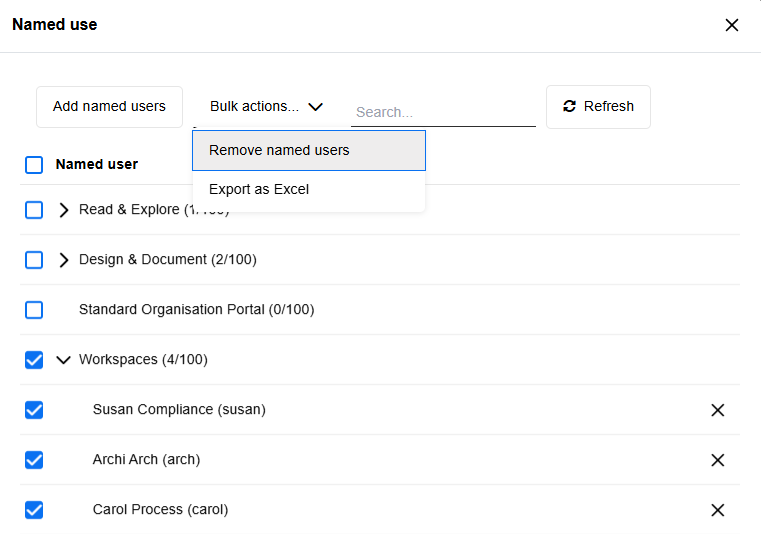
For details, please refer to the section "Manage Named Users" in the Administration Help.
Corporate Identity: SVG Logos
ADOIT now supports uploading corporate logos for your organisation's CI scheme in SVG format, ensuring they remain crisp at any resolution or screen size. Previously, only JPEG, PNG, BMP and GIF were allowed.
For details, please refer to the section "Corporate Identity" in the Administration Help.
REST API Improvements
The ADOIT REST API has been significantly expanded in version 18.2 to provide more flexibility for integrations and more granular access to metamodel and repository data. Key updates include:
Enriched User Data: The
/usersendpoint now supports the?include=groupInfoparameter, allowing you to retrieve group IDs and names directly with the user profile.Unified Object Operations: Endpoints for creating and updating objects now support the full range of parameters available for object retrieval (e.g.,
richText,showAll,includeGroupPath).New Metamodel Endpoints: Dedicated endpoints for global attributes (
/metamodel/attributes) have been added, including support for retrieving technical info texts.Enhanced Class Metadata: The
/metamodel/classesendpoints now offer a powerfulincludeparameter to fetch attributes, properties configurations, relations, and detailed info texts in a single request.Direct Repository References: When fetching models, a new
repositoryObjectIdproperty is included for modelling instances and modelling relations of repository objects, simplifying the link between the model view and the underlying repository data.Enum Language Independence: It is now possible to fetch language-independent values for ENUM attributes when retrieving relation details.
For detailed technical specifications and endpoint documentation, please refer to the Swagger API Reference on the BOC Developer Portal.
Migration from an Earlier Version of ADOIT to ADOIT 18.2
Changes to Software Requirements
Please note the following changes to the software requirements for running ADOIT when migrating from previous versions.
No longer supported
Tomcat 8 and Tomcat 9
Java 8 and Java 11
Oracle Database
Added support for
Tomcat 10.1 and Tomcat 11
Java 17, Java 21 and Java 25
SQL Server 2025
Compiler Runtime Update (Visual C++ Redistributable)
ADOIT 18.2 requires the Microsoft Visual C++ Redistributable for Visual Studio 2015–2022 (v14) to run the Application Server. If it is not already present on your system, the installer will prompt you to download and install it automatically during setup.
Upgrade ADOIT
The Installation Manual contains a number of migration guides that will help you upgrade ADOIT from an older version to version 18.2. Each guide contains all the steps that need to be taken, with everything explained in detail:
Upgrade from ADOIT 18.0 – 18.1 to ADOIT 18.2 (ArchiMate Library)
Upgrade from ADOIT 17.0 – 17.6 to ADOIT 18.2 (ArchiMate Library)
Upgrade from ADOIT 15.0/15.1 to ADOIT 18.2 (ArchiMate Library)
Migration from ADOIT 14.0 or Earlier to ADOIT 18.2 (ArchiMate Library)
If you are using ADOIT 14.0 or earlier with the ArchiMate Application Library, please contact your ADOIT consultant for assistance with the required steps.
Switch from Standard Library to ArchiMate Library
With ADOIT 16.0, the ADOIT Standard Application Library has been discontinued and is no longer supported. Are you using ADOIT 15.0/15.1 or earlier with the ADOIT Standard Application Library? To upgrade to ADOIT 18.2, you need to switch to the ArchiMate Application Library. Please contact your ADOIT consultant for assistance with the migration.
Install Hotfix
You are already using ADOIT 18.2 and want to install a hotfix? Here are step-by-step instructions: