New Features in ADONIS 17.1
ADONIS 17.1 is a minor update to ADONIS 17.0, bringing a range of improvements especially for administrators.
Key highlights include a simplified setup for the Process Drafter, support for SCIM, and the ability to configure ADONIS as an OpenID Provider (OP).
For Designers, it is now possible to apply colouring to multiple object types in charts and models, making visualisations more powerful and informative.
Additionally, this release includes fixes for issues discovered since the release of ADONIS 17.0.
New Features for All Users
Colour Multiple Object Types in Charts and Graphical Editor
In previous versions, you could already colour objects of one specific type based on the value of an attribute. With ADONIS 17.1, you can now define multiple colouring rules for different object types, using either a shared attribute or distinct attributes for each type.
Example: In a matrix chart that visualises initiatives for applications, both the  Applications in the rows and the
  Initiatives in the columns can now highlight whether action is required.

This new flexibility lets you highlight multiple types of objects in the same view, making your charts and graphical models even more informative and enabling an even deeper analysis.
For details, please refer to the sections "Make Objects Coloured and Create Heat Maps" and "Apply Colouring to Charts" in the User Manual.
New Features for ADONIS Administrators
Process Drafter: Simplified Setup
Setting up the Process Drafter just got easier.
When you open the Process Drafter settings within the ADONIS Administration, the current configuration is automatically validated. At the top of the page, ADONIS displays whether the required configuration for activating the Process Drafter is  valid or
  invalid.
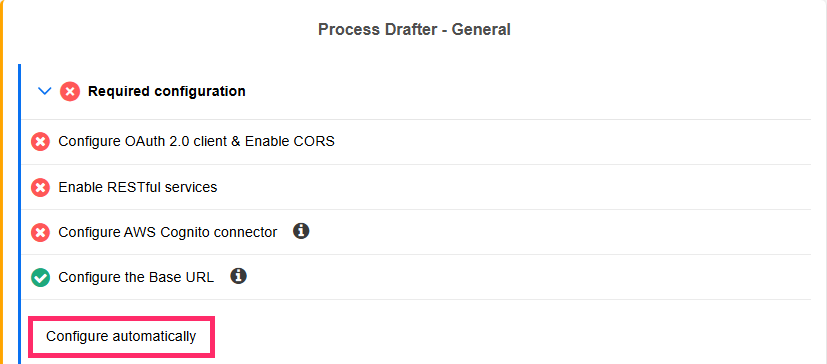
If any settings are missing, you can click Configure automatically. A background script will run and automatically apply the required configuration (except the Base URL, which must always be set manually).
This feature is especially helpful for customers migrating from earlier ADONIS versions. In fresh ADONIS 17.1 or higher installations, these settings (except the Base URL) are already preconfigured.
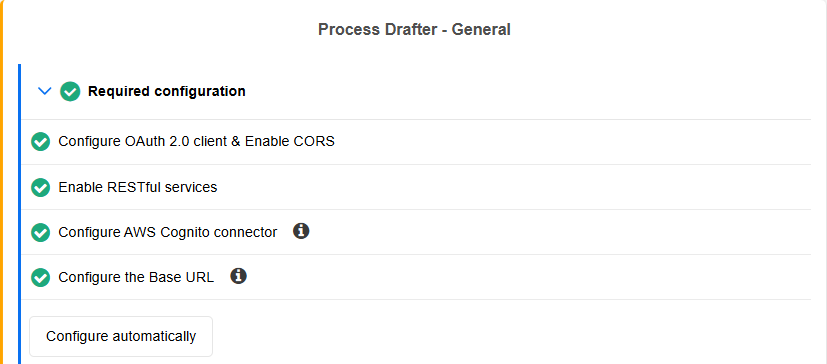
These improvements in validation and automatic configuration make the setup process faster, more reliable, and less prone to configuration errors.
For information on how to enable the Process Drafter, please refer to the section "Activation and setup" in the ADONIS Process Drafter Guide.
AI Assistant: Azure OpenAI Support
In ADONIS 17.1, the AI Assistant has been enhanced to support Azure OpenAI as an alternative to OpenAI. This gives you more flexibility in how you connect to AI services.
To configure the Azure OpenAI integration, simply provide:
- The endpoint URL of your Azure OpenAI resource
- Your API key
- The relevant deployment name
Once configured, you can immediately start using the AI Assistant powered by Azure OpenAI.
For details, please refer to the section "AI Assistant" in the Administration Help.
SCIM Support
ADONIS 17.1 introduces support for the System for Cross-domain Identity Management (SCIM) standard, enabling automated user and user group provisioning via a standardised REST protocol. SCIM allows external systems to manage ADONIS user accounts in compliance with the SCIM 2.0 specification.
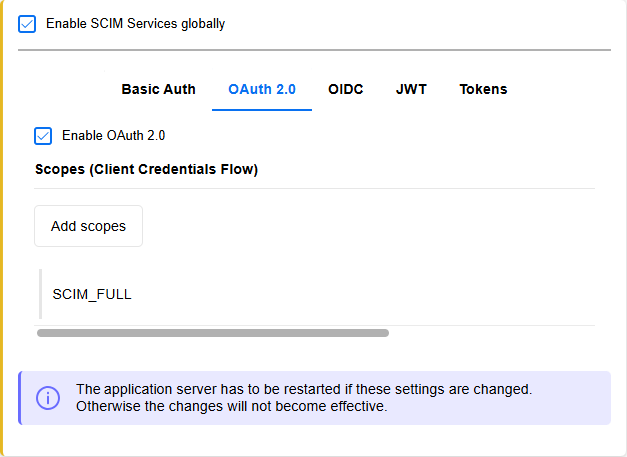
When used alongside, for example, SAML-based authentication with Microsoft Entra ID as the IdP for ADONIS, this opens up new use cases that were not supported before. These include automatically removing users from ADONIS when they are deleted in Microsoft Entra ID, or making users available in ADONIS before their first login so all stakeholders are available for assigning organisational responsibilities.
For details, please refer to the section "SCIM Services" in the Administration Help.
OIDC: Enable and Configure ADONIS as an OpenID Provider (OP)
The new OIDC page in the Authentication component lets you enable and configure ADONIS as an OpenID Provider (OP). In this role, ADONIS can authenticate users for external applications (OIDC clients), allowing users to sign in with their ADONIS credentials, similar to logging in with Google or GitHub on other websites.
This setup supports single sign-on (SSO) scenarios, making it possible for users to access third-party services with their existing ADONIS account. Administrators can configure trusted client applications to enable this functionality.

When used in this capacity to provide OIDC authentication for the REST API in ADONIS, client applications can not only authenticate users but also check their authorisation, for example, by verifying whether a user has a certain role or group assignment.
For details, please refer to the sections "Authentication > OIDC" and "Settings > REST API" in the Administration Help.
File Management Settings
In ADONIS 17.1, you no longer need to manually adjust configuration files to control which file types users and administrators are allowed to upload, as was required in previous ADONIS versions. Instead, you can now define these settings directly in the new File Management area in the ADONIS Administration. Here, you can also set file size limits for uploads and specify supported protocols for file pointer attributes.
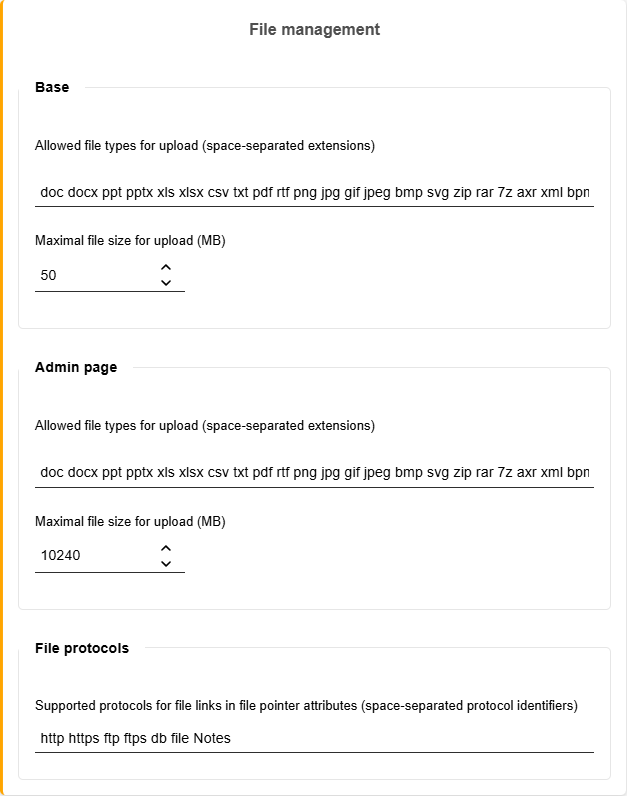
For details, please refer to the section "File Management" in the Administration Help.
Properties Module Extensions
The Properties component, available in the ADONIS Administration with the appropriate license, has been enhanced to offer even more flexibility when tailoring the properties of object and model types to your organisation’s needs.
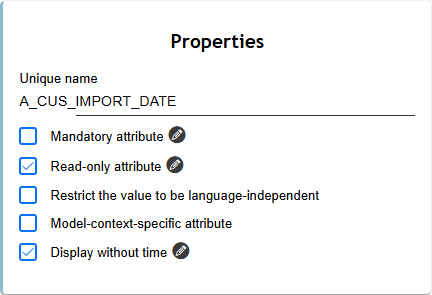
The following new features are now available:
Read-only: This option makes an attribute write-protected, so its value can't be changed in ADONIS. This is particularly helpful for attributes synced from other systems, where editing should only happen at the source.
Display without time: For attributes of the type Coordinated Universal Time, you can enable the new Display without time property to store only the date. Otherwise, the attribute will store both date and time.
Collapsed: The new Collapsed property gives more control over the layout of groups within chapters, allowing them to appear collapsed or expanded by default.
For details, please refer to the section "Properties" in the Administration Help.
The availability of the Properties component depends on the licence.
Unshare and Delete Users
The new Unshare from all repositories and delete option allows administrators to remove users from all repositories they are shared with and then permanently delete them in a single step. This streamlines user management, since administrators previously had to unshare users manually from each repository before deletion was possible.
For details, please refer to the section "Delete Users" in the Administration Help.
Support Access
SaaS customers can now temporarily grant BOC employees access for troubleshooting and support purposes. When Support Access is activated, a temporary support user account is created with full access to the ADONIS Administration and its components, and all repositories.
For details, please refer to the section "Support Access" in the Administration Help.
Authentication: Upload Multiple LDAP Certificates
When configuring LDAP domain settings with LDAPS, you can enable SSL and upload an SSL (X.509) certificate. New in ADONIS 17.1 is the ability to upload multiple certificates instead of just one. This is useful, for example, when LDAPS requires both a client authentication certificate and a server authentication certificate, or when preparing for a certificate rollover to avoid downtime.
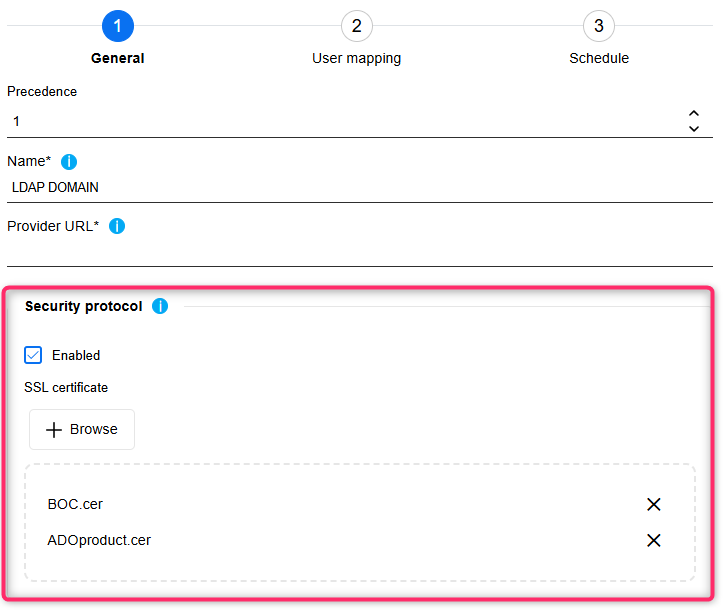
For details, please refer to the section "LDAP > General" in the Administration Help.
Migration from an Earlier Version of ADONIS to ADONIS 17.1
Changes to Software Requirements
Please note the following changes to the software requirements for running ADONIS when migrating from previous versions.
No longer supported
Tomcat 8 and Tomcat 9
Java 8 and Java 11
Oracle Database
Added support for
Tomcat 10.1 and Tomcat 11
Java 17 and Java 21
Upgrade ADONIS
The Installation Manual contains a number of migration guides that will help you upgrade ADONIS from an older version to version 17.1. Each guide contains all the steps that need to be taken, with everything explained in detail:
Migration from All Other Versions to ADONIS 17.1
If you are using ADONIS 13.0 or earlier, please contact your ADONIS consultant for assistance with the required steps.
Install Hotfix
You are already using ADONIS 17.1 and want to install a hotfix? Here are step-by-step instructions: