New Features in ADOIT 20.0
Welcome to ADOIT 20.0! This release introduces a new workspace, configurable dashboards and much more.
For users, highlights include:
Application Compliance Assessment Workspace: Assess and analyse your application landscape based on defined principles and constraints in a dedicated workspace.
Configurable Dashboards: Tailor ADOIT with drag-and-drop widgets, including charts, tables, text, and images, to monitor key metrics at a glance.
Improved Search Experience: Build smarter, reusable queries using dynamic placeholders like "Me" and relative date ranges.
For administrators, ADOIT 20.0 adds:
Expanded AI Provider Support: Connect the AI Assistant to Google Gemini or any OpenAI-compliant service, and instantly verify settings with the new connection test.
Granular SCIM Defaults: Control exactly which object group user objects are placed in.
Revocable Admin Rights: Dynamically manage the user lifecycle by revoking global administrator privileges without deleting accounts.
Read on to learn more about the new features in ADOIT 20.0!
ADOIT 20.0 is available only for SaaS customers hosted on AWS. All SaaS and on-premise customers will be able to upgrade to ADOIT 21.0 LTS, planned for release at the end of Q3 2026.
New Features for Users
New Workspace: Application Compliance Assessment
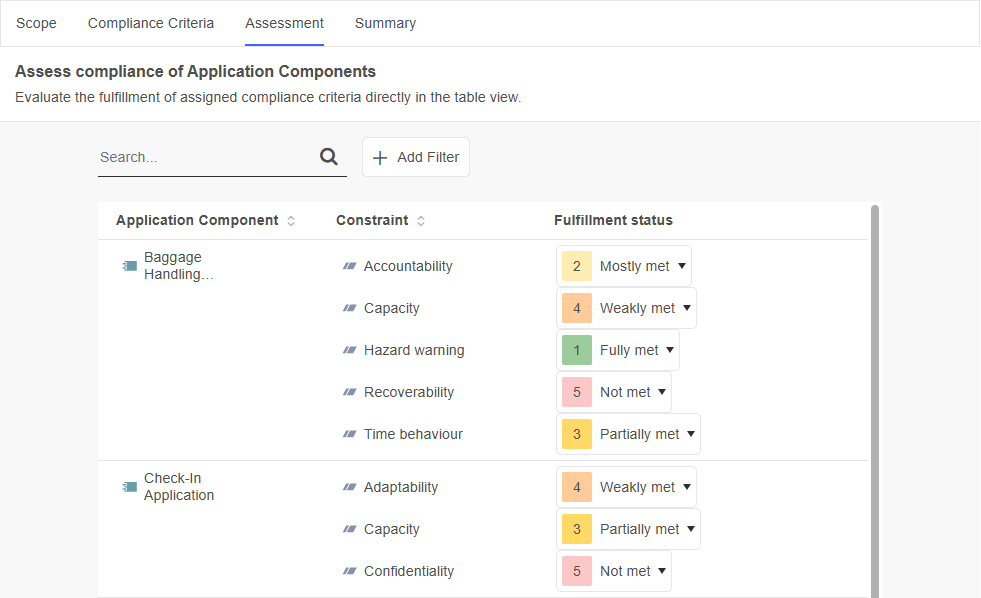
The Application Compliance Assessment template enables your team to assess and analyse the compliance of your application landscape based on defined principles and constraints.
Here's how it works:
First, select
 Application Components that define the scope of your compliance assessment.
Next, assign compliance criteria (
 Principles and
  constraints) to your application components.
Then, assess the fulfillment status of the assigned compliance criteria for each application component (from "Not met" to "Fully met").
Finally, use the summary to analyse the results. You can switch between different table views and a heatmap to compare compliance across application components and controls and identify areas that require attention.
For details, please refer to the section "Application Compliance Assessment" in the User Manual.
Configurable Dashboards
The new configurable dashboards offer extensive personalisation options. Build your own dashboards by combining widgets such as charts and tables to monitor important metrics and visualise relevant data at a glance.
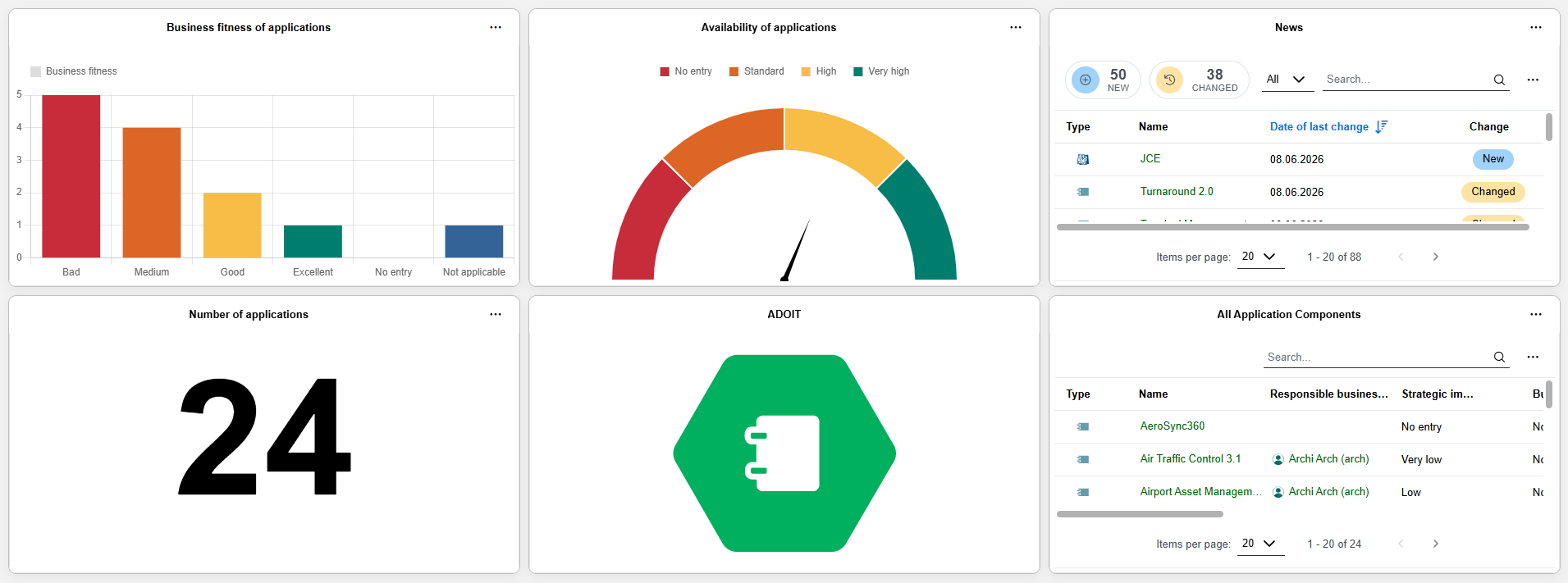
Drag and drop widgets: Arrange and resize widgets as needed to suit your workflow.
Data sources: Widgets can display information from different sources.
Bar charts, pie charts, table widgets, and number widgets visualise data from saved queries created via the ADOIT search function or predefined queries provided by ADOIT. For example, you can create a bar chart based on a saved search for
Application Components and display their Business fitness.
Gauge charts are based on a specific models or objects. For example, a gauge chart can visualise the Availability of
Application Components.
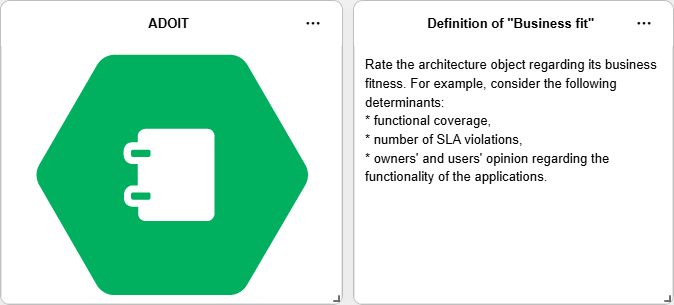
Text widgets allow you to add explanatory or contextual information directly to your dashboard, while image widgets are ideal for logos, illustrations, or other visual elements.
Role-based dashboards: Create dashboards tailored to your responsibilities or specific scenarios.
Information sharing: Dashboards can be shared with colleagues, helping teams maintain a common understanding and consistent visibility of key metrics.
With configurable dashboards, ADOIT 20.0 empowers you to turn data into actionable insights and bring the most relevant information exactly where it’s needed.
For details, please refer to the section "Configurable Dashboards" in the User Manual.
New Search Experience Improved
With ADOIT 20.0, we continue to fine-tune the search experience introduced in ADOIT 18.0 by adding highly requested quality-of-life features.
Dynamic Placeholders: "Me" and Date
You can now use dynamic placeholders when filtering your search, allowing for more sophisticated and reusable queries:
- Me: Available for relations that target
 User objects. Selecting Me automatically filters for elements where you are personally assigned or responsible.
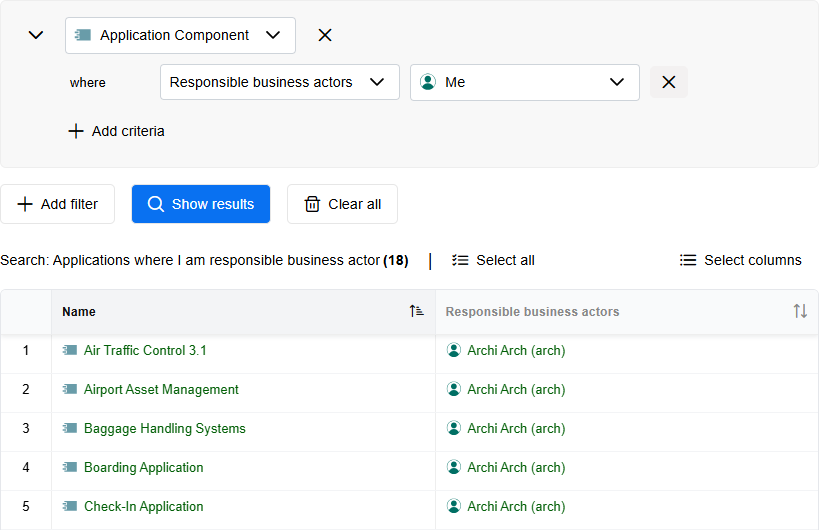
- Date: Instead of picking static dates, you can now filter using relative date ranges based on the current day (e.g., previous, current, or future day, week, month, or quarter).
These placeholders remain dynamic when you save your search. For example, a saved search for applications expiring "within the next year" will always calculate the timeline relative to the day you run it.
For details, please refer to the section "Use Filters" in the User Manual.
Saved Searches: Copy ID and REST URL to Clipboard
We’ve added two new options to streamline work for developers and data analysts when using saved searches:
Copy ID to clipboard: Quickly copy the unique identifier of a saved search to the clipboard, perfect for targeting specific searches via the ADOIT REST API.
Copy REST URL to clipboard: Generate a ready-to-use REST URL instantly for use in external applications like Microsoft Excel.
For details, please refer to the section "Recent & Saved Searches" in the User Manual.
New Features for ADOIT Administrators
AI Assistant: New AI Providers, New Models, and Connection Test
The AI Assistant (AI-powered end-of-life lookup and AI-generated requirement suggestions in roadmapping workspaces) now supports two additional AI provider types: Google Gemini and OpenAI-compliant services. In addition, the lineup of available GPT-5 models has been expanded, and a new connection test feature has been introduced.
Google Gemini
You can now select Google Gemini as an AI provider. When choosing this provider, you must specify the relevant Model name and provide a valid API key to enable communication with the service.
OpenAI-Compliant Services
Support for OpenAI-compliant services in ADOIT 20.0 means you can integrate any provider that implements the OpenAI API specification, including self-hosted, third-party or open-source model deployments. You need to enter the Model name and Endpoint URL of the service, and optionally the API key (typically only required for secured or cloud-hosted instances).
Expanded OpenAI Model Support: New GPT-5 Models
When using OpenAI as your AI provider, your options now include four new models from the GPT-5 family: GPT 5.1, GPT-5.4 mini, GPT-5.4, and GPT-5.4-nano. This expanded lineup allows you to tailor AI capabilities precisely to your business requirements.
Connection Test
A new Test connection function is available. It allows you to verify that the current configuration is valid and that a connection to the selected AI provider can be established.
When testing the connection, ADOIT uses the configured settings and API key to perform a test request. A message indicates whether the connection was successful. If the test fails, the message provides information about the cause of the error to support troubleshooting.
For information on how to enable and configure the AI Assistant, please refer to the section "AI Assistant" in the Administration Help.
SCIM: Target Object Group for Shared Users
The configuration of SCIM user defaults becomes more precise in ADOIT 20.0. When defining the repository and enabling the "Share with repository" option to make provisioned users available as objects in modelling in ADOIT, you can now select the exact object group where these shared user objects should be placed.
This gives you granular control over where your user objects are stored, ensuring an automated, clean and well-structured repository architecture from the very first login.
For details, please refer to the section "Configure General SCIM Settings" in the Administration Help.
OAuth 2.0 & OIDC: Dynamic Client Registration for MCP
ADOIT can act as an OAuth 2.0 Authorization Server and OpenID Provider (OP). In this role, it authenticates users for external applications (OAuth 2.0 or OpenID Connect clients), allowing them to sign in with their ADOIT credentials.
For both authentication mechanisms, you can now configure Dynamic Client Registration (DCR). This allows agents that access the ADOIT Model Context Protocol (MCP) server to automatically query a specific URL to determine how to authenticate themselves.
For details on how to configure DCR, please refer to the sections "Authentication > OAuth 2.0 > Enable Dynamic Client Registration" and "Authentication > OIDC > Enable Dynamic Client Registration" in the Administration Help.
Guidance on using the MCP services and a reference implementation in Python for creating an agent is available via the BOC Developer Portal.
Expanded Font Support
ADOIT provides font support for a wide range of languages without requiring any additional configuration. This includes languages that use the following alphabets:
- Latin (e.g., English, French, German, Spanish)
- Cyrillic (e.g., Bulgarian, Russian)
- Greek
- Hebrew
New in ADOIT 20.0: If you require characters for languages not covered by the default alphabets, you can now enable additional font packages directly in the system settings. The following language groups are already preconfigured and can be activated as needed:
- Chinese, Japanese, and Korean (CJK)
- Thai
For details, please refer to the section "Fonts" in the Administration Help.
Other custom languages currently require a prior evaluation and a dedicated customizing project by the BOC Group.
Global Administrators: Revoke Administration Rights
ADOIT 20.0 adds the ability to remove global administrator privileges from a user. With this change, global administrator permissions can be managed more flexibly throughout the user lifecycle. You can grant broad administrative access when needed and later revoke it again without deleting or recreating the user.
For details, please refer to the section "Configure Global Administrators" in the Administration Help.
Migration from an Earlier Version of ADOIT to ADOIT 20.0
ADOIT 20.0 introduces a new containerised deployment architecture for operating ADOIT server components. Both the ADOIT application server—previously a Windows-based service—and the web server now run exclusively as containers on Linux.
ADOIT 20.0 is available only for SaaS customers hosted on AWS. On-premise installations will not be supported for this version.
All SaaS and on-premise customers will be able to upgrade to ADOIT 21.0 LTS, the next long-term support release planned for the end of Q3 2026. This release will be the next official on-premise version and will provide full migration paths for all existing ADOIT environments.