New Features in ADOIT 19.0
Welcome to ADOIT 19.0! This release is all about accelerating your path to architectural insights.
For users, highlights include:
Two new workspace templates: Application Cost Management and Capability Investment Planning for better financial transparency and strategic alignment
A range of workspace improvements, including enhanced UI, better visualisation, and Excel exports from any page
Further enhancements to the new search experience, now supporting direct chart generation and additional attribute types
New Scenario Planning capabilities to design and compare future architectures without impacting your object repository
Improved onboarding with solution guides, an updated sample repository and an improved metamodel profile ADOIT for Fans of a Lean Architecture
For administrators, ADOIT 19.0 adds:
Amazon Bedrock support for the AI Assistant, alongside existing AI providers
Expanded REST API capabilities for more powerful integrations and data access
New administration features such as bulk removal of named users, enhanced metamodel rights visibility, and SVG support for corporate branding
Read on to learn more about the new features in ADOIT 19.0!
New Features for Users
New Workspace Templates
ADOIT 19.0 introduces two new workspace templates designed to support financial transparency and strategic capability development: Application Cost Management and Capability Investment Planning. These templates help your organisation drive more informed investment decisions.
Application Cost Management
The new Application Cost Management workspace enables you and your team to analyse the financial aspects of your application landscape based on the contracts that govern them.
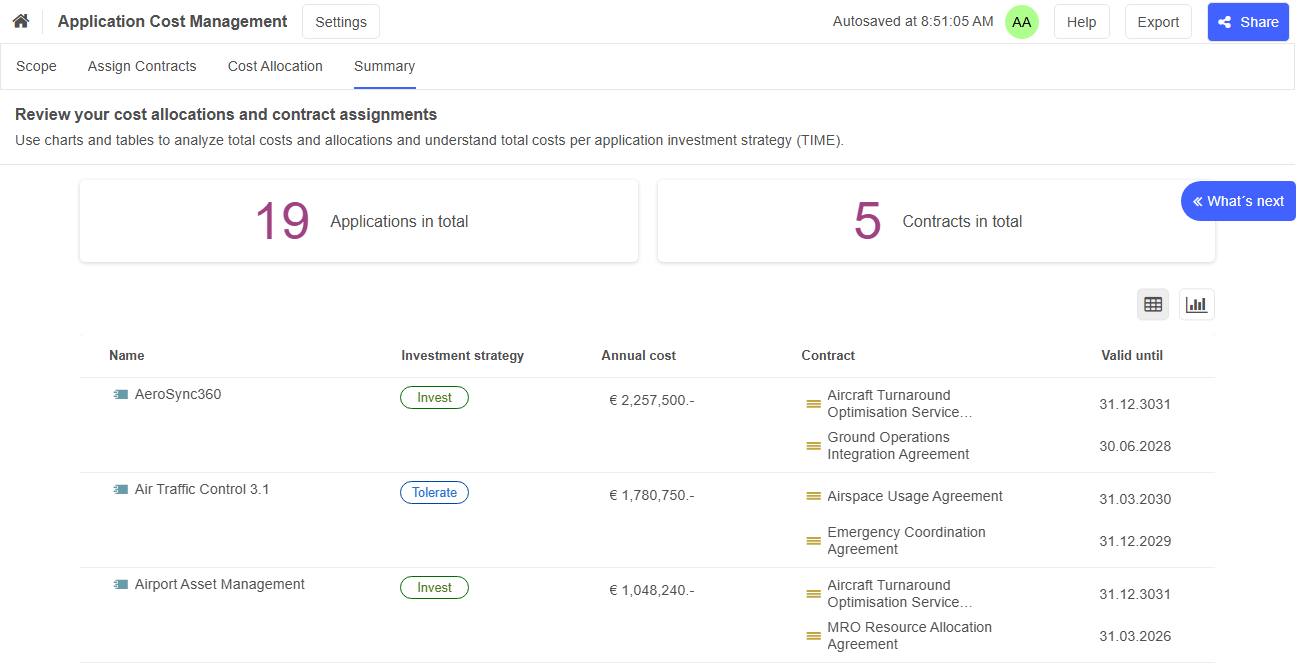
Here's how it works:
First, select
 Application Components and
  Application Services that define the scope of your cost review.
Next, associate contracts with your application elements, including relevant contract details such as expiry dates.
Then, allocate contract costs across one or more application elements by defining cost shares in percent — ideal for contracts covering several applications.
Finally, use the summary view, where you can switch between a table view and a bar chart, to evaluate total costs and understand how these costs align with the Gartner's TIME model (Tolerate, Invest, Migrate, and Eliminate).
Capability Investment Planning
The second new workspace in ADOIT 19.0, Capability Investment Planning, supports you in evaluating your capabilities and determining how best to invest in them.
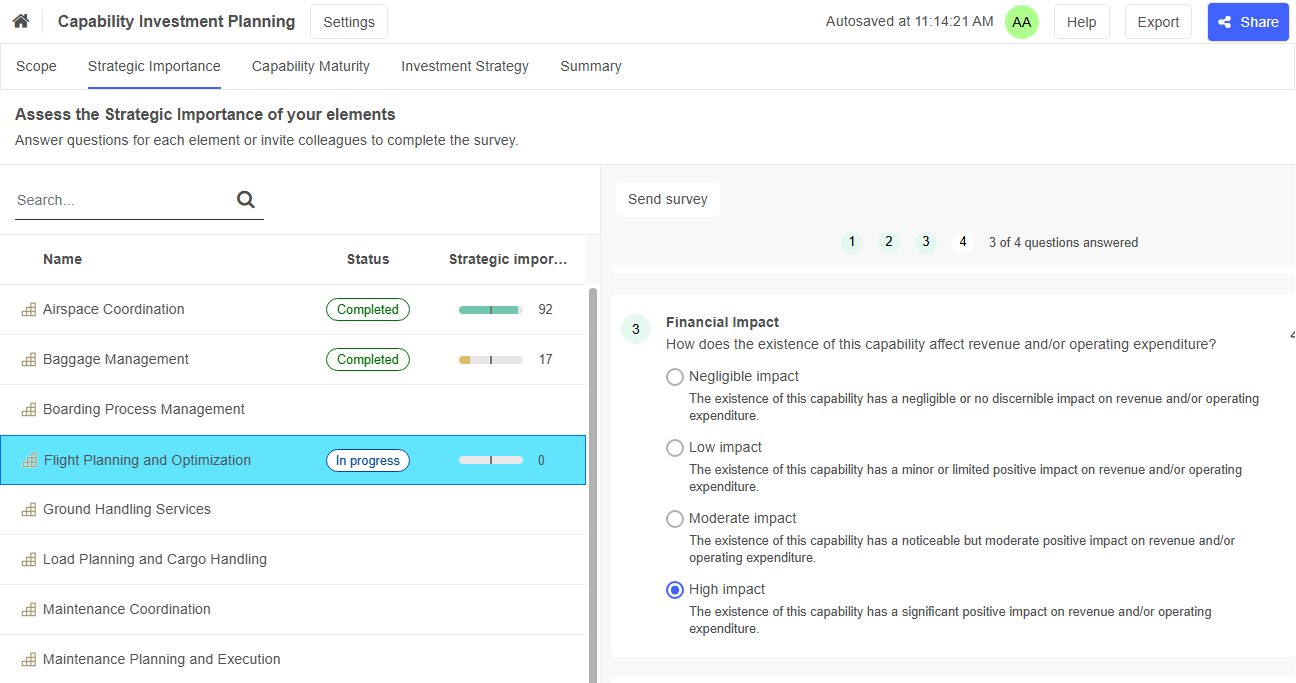
The steps follow the familiar workflow from Application Investment Planning workspaces:
Begin by adding
 Capabilities and
  Business Functions you want to assess to your workspace.
Next, you and your team fill out two compact surveys to assess the strategic importance and maturity level of your elements. These surveys can also be delegated to subject-matter experts.
Then, derive the recommended investment strategy for each element: Minimal Attention, Operational Stability, Strategic Priority, or Strategic Strength
When you are finished, you have access to a summary that provides a consolidated overview of the status of all elements in the workspace.
Updated Workspace Templates
ADOIT 19.0 not only brings new workspaces, but also several enhancements to existing workspaces, improving usability and visual clarity.
Application Investment Planning
Application Investment Planning workspaces have been updated:
In addition to
Application Services, you can now also assess the fitness of Application Components.A refined UI on all pages aligned with the look and feel of the roadmapping workspaces ensures better clarity and ease of use.
An improved Survey UI streamlines the assessment process.
Roadmapping Workspaces
The roadmapping workspaces have also been enhanced:
The Application-based, Capability-based, and Goal-based Roadmap workspaces have also been enhanced:
General UI improvements provide clearer navigation.
Extended settings allow configuration of years and months as planning periods, offering more precise planning options.
The updated Kanban Board displays cost-related information more prominently.
General Workspace Improvements
Additional general enhancements in ADOIT 19.0 include:
A more intuitive visualisation of steps through a new tab-based design.
More precise naming of steps to ensure maximum clarity throughout the workflow.
A new Excel export available from any page within a workspace, enabling flexible data extraction.
For details, please refer to the section "Workspaces" in the User Manual.
New Search Experience Improved
ADOIT 19.0 further enhances the new search experience introduced in ADOIT 18.0, making it easier to build charts.
Create Charts from Search Results
The new search experience is now fully integrated with analyses (which combine datasets and charts).
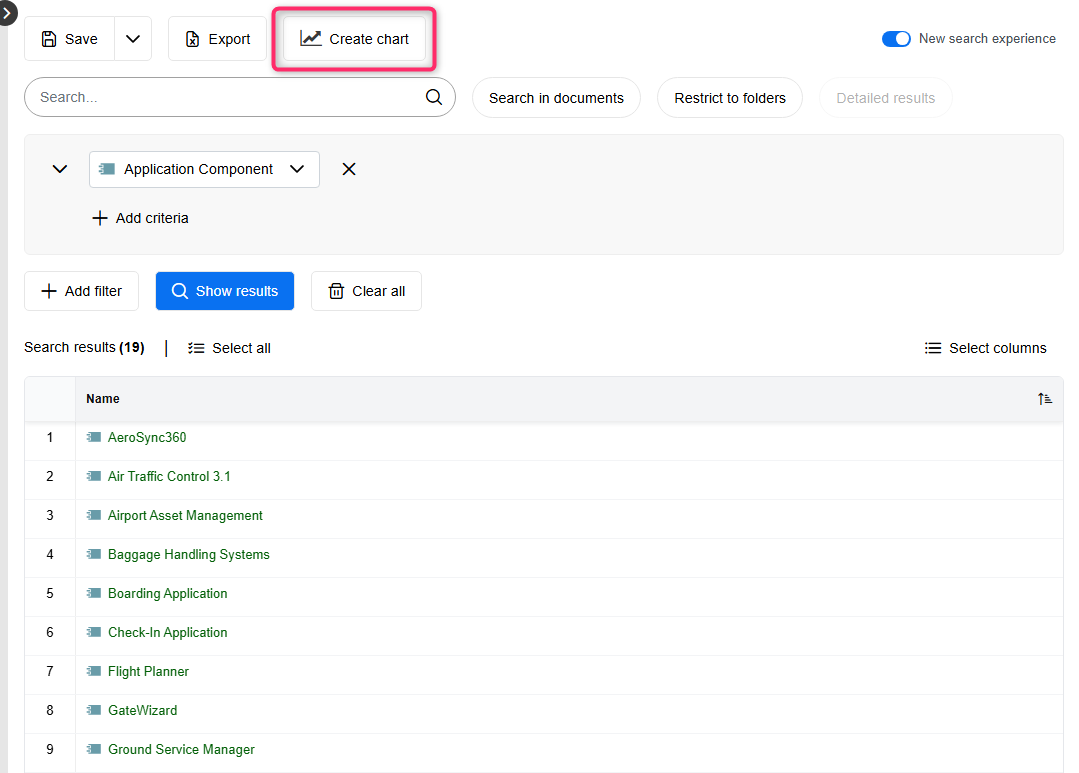
This provides the following benefits:
You can now create charts directly from a search result, just like with the classic search.
When viewing or modifying a dataset within an analysis, ADOIT automatically uses the new search experience. This ensures a consistent workflow for all search-driven analyses.
For details, please refer to the section "Directly Create Charts" in the User Manual.
Support for Additional Attribute Types
The new search experience now supports two additional attribute types:
Enumeration list
Unsigned integer
These attribute types were not previously supported, making this a small but valuable enhancement, especially for customised metamodels.
Easier Onboarding for New ADOIT Users
ADOIT 19.0 makes getting started in the world of Enterprise Architecture Management simpler than ever by providing a guided path from your first login to your first architectural insight. New users can navigate the tool more quickly, benefit from clear guidance, and gain immediate access to practical resources that make the first steps noticeably smoother. The following enhancements play a key role:
ADOIT Solution Guides: Master key EA initiatives with scenario-based, step-by-step instructions.
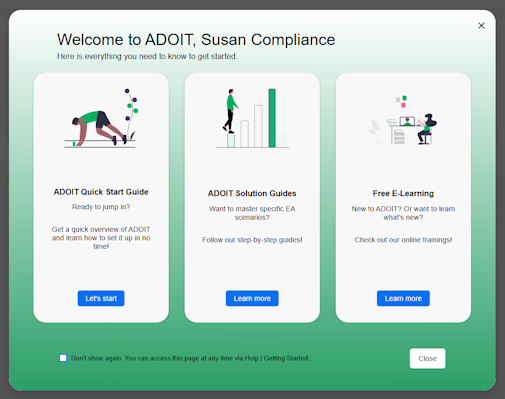
New Welcome Screen: Instantly access quick-start guides and training resources upon startup.
Airport Sample Repository: Explore a modern, realistic EA landscape featuring a comprehensive capability map.
Enhanced Lean Architecture Profile: Model across all layers with a curated, high-impact subset of the ArchiMate framework.
ADOIT Solution Guides
We’ve created dedicated solution guides drawing on our nearly 30 years of consulting experience and industry best practices. They offer clear, step-by-step instructions tailored to the following scenarios:
Application Portfolio Management
Capability-based Planning
Enterprise Architecture Design
Scenario Planning
Technology Lifecycle Management
These guides help you quickly master key EA initiatives in ADOIT.
Welcome Screen
ADOIT 19.0 introduces a new welcome screen designed to help you discover quick-start guides, solution guides, and online trainings more easily. It appears automatically when you start ADOIT and highlights useful resources that support both onboarding and day-to-day work. If you prefer a more direct start, you can easily disable it at any time.
New Sample Repository: Airport
The new Airport sample repository replaces the previous ADOMoney Bank repository.
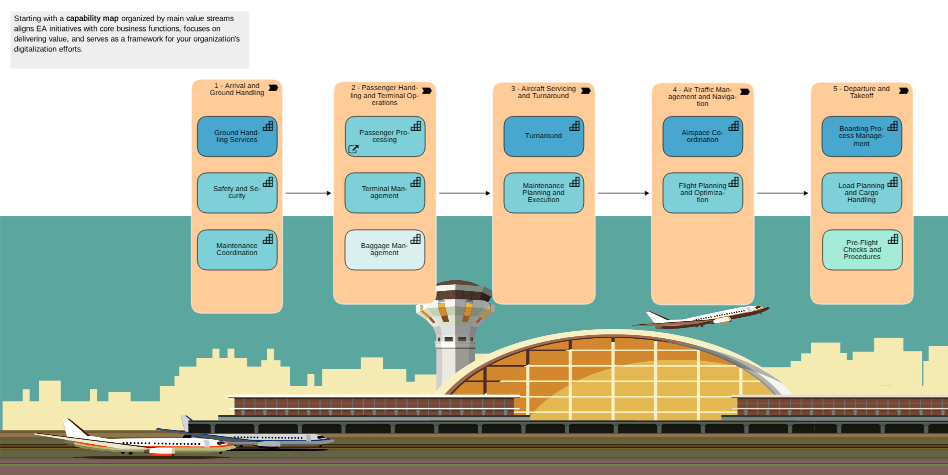
It provides a rich starting point for exploring typical enterprise architecture scenarios:
Big-Picture View: Starts with a high-level capability map of the airport organisation.
Versatile Scenarios: Covers application portfolio management, EA design, and many others.
Realistic Data: Includes a full set of models and objects, giving you realistic structures and viewpoints to explore, analyse, and adapt.
The Airport sample repository is automatically available in the ADOIT:Community Edition, the ADOIT Academy edition, and in standard test accounts. To import it into other deployments, please contact your ADOIT consultant.
Updated Metamodel Profile: ADOIT for Fans of a Lean Architecture
The metamodel profile ADOIT for Fans of a Lean Architecture, designed for fast and lightweight enterprise architecture modelling, has been significantly enhanced. It offers a curated subset of the ArchiMate framework featuring 25 object types and 10 relationships (previously 14 and 9).
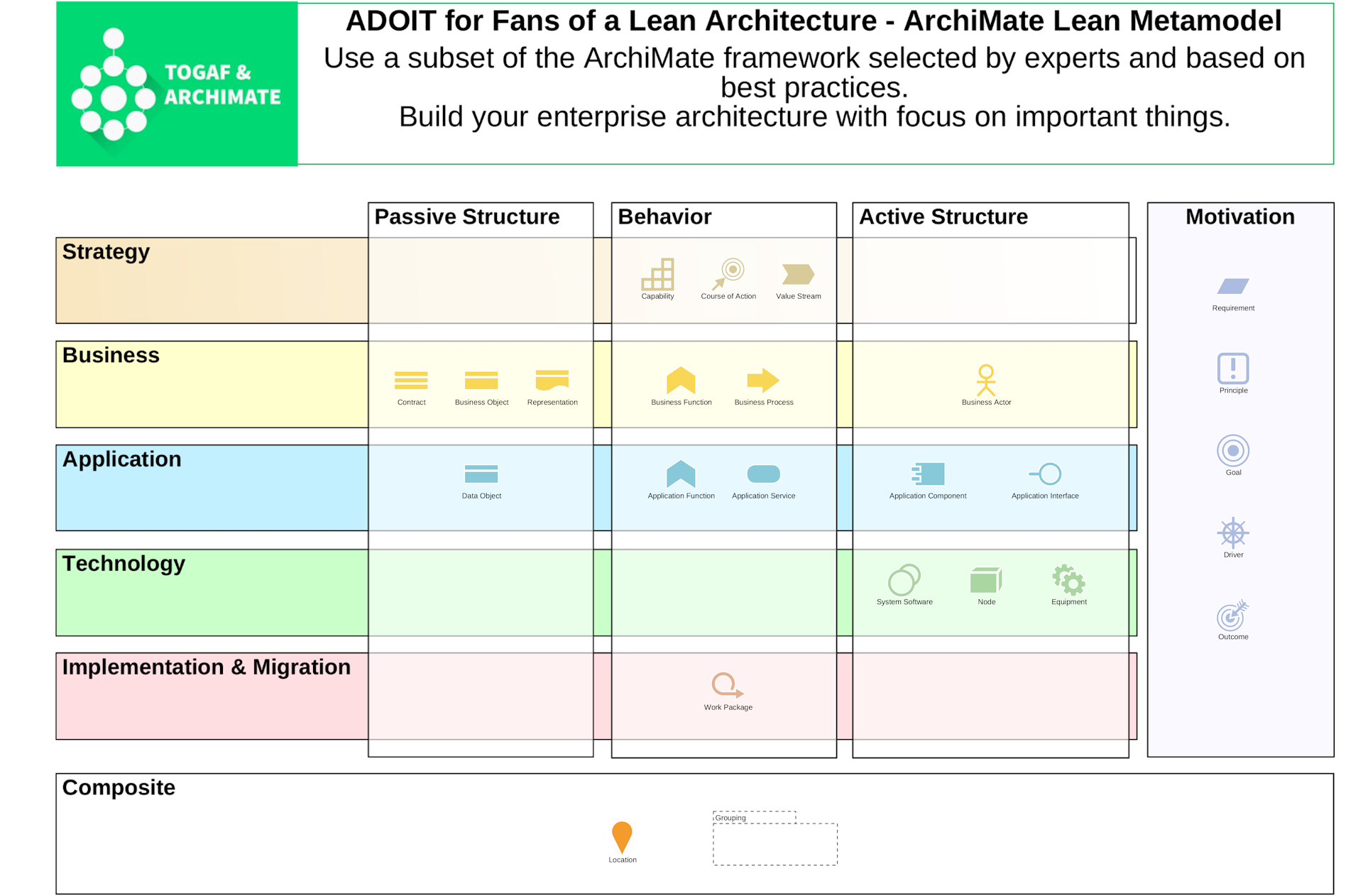
In ADOIT 19.0, the profile now:
Fully supports all default ADOIT features, including all workspaces.
Serves as the foundation for the new ADOIT Solution Guides.
Offers a more complete and versatile modelling scope while remaining easy to understand.
We recommend this profile if you are new to ArchiMate and want to model across all architecture layers with minimal complexity. If you prefer the full ArchiMate depth, use the profile ADOIT for ArchiMate Champions, or choose ADOIT for Portfolio Specialists if you want to focus on a specific architecture layer.
For details, please refer to the section "ADOIT for Fans of a Lean Architecture" in the User Manual.
Scenario Planning
With Scenario Planning in ADOIT, you can design future architectures without affecting your current repository data. This allows you to model multiple alternative solutions, discuss trade-offs with stakeholders, and agree on the best way forward before committing to any changes.
The procedure follows a simple, non-destructive workflow to help you move from a business need to a decided solution:
Identify the Scope: Start with an existing
 Architecture Diagram and identify the area you want to improve, such as the Application Components supporting a specific Capability.
Design Alternative Solutions: Create a copy of your original model for each scenario you want to explore (e.g., "Option 1" and "Option 2").
Label Changes: Mark existing elements as New, Changed, or Decommissioned directly in the model or via their properties. These labels are model-specific and are visualized by clear pictograms on the objects.
Model New Ideas: Use
 Planned Elements and
  Planned Relations as placeholders to represent components that don't exist yet. These are maintained only within your scenario models and do not clutter your Object Catalogue. You can assign them their intended ArchiMate type (e.g., Application Component) to see exactly how they fit.

- Compare and Decide: View your alternative models side-by-side to evaluate the pros and cons of each approach. Once a decision is reached, you can manually update your original model by adding new elements and relationships, adapting the changed ones, and removing the decommissioned ones.
For details, please refer to the "solution guide Scenario Planning" and the section "Scenario Planning in ADOIT" in the User Manual.
Fitness Attributes Renamed for Improved Consistency
To ensure a seamless user experience, several attributes for rating the fitness of elements have been renamed in the ArchiMate Application Library 19.0. This update ensures that the same concepts are named consistently across ADOIT.
Updated attribute names:
Business fit → Business fitness
IT fit → Technology fitness
Cost fit → Cost fitness
Business continuity fit → Business continuity fitness
Security fit → Security fitness
Process fit → Process fitness
Information fit → Information fitness
Organisational fit → Organisational fitness
These attributes are used by object types like  System Software elements, Capabilities, and Application Components. They can be found in the "Classification" chapter.
New Features for ADOIT Administrators
AI Assistant: Amazon Bedrock Support
You can now connect the AI Assistant (AI-powered end-of-life lookup and AI-generated requirement suggestions in roadmapping workspaces) to Amazon Bedrock as an additional AI provider, alongside OpenAI, Azure OpenAI and Ollama. This integration enables you to leverage a broad selection of foundation models hosted securely on AWS, giving you greater flexibility and scalability for your AI workloads.
For information on how to enable and configure the AI Assistant, please refer to the section "AI Assistant" in the Administration Help.
Metamodel Rights: Show Restricted Targets
ADOIT 19.0 introduces a new option on the Rights page of the ADOIT Administration. When working on metamodel rights with Expert Mode enabled, you can now display target classes of relations that are normally hidden due to endpoint restrictions.
Endpoint restrictions define which object classes a relation class may connect to. These restrictions can only be configured by ADOIT product developers or customisers as part of the application library.
To show restricted targets, you can use the new Show restricted targets option. When enabled:
All target classes of a selected relation class are displayed, including those normally hidden due to endpoint restrictions.
Restricted target classes are clearly marked with the label (restricted).
This makes it easier for administrators to understand the full connection possibilities of a relation class, even if certain endpoints are intentionally limited in the application library.
For details, please refer to the section "Manage Metamodel Rights" in the Administration Help.
Remove All Named Users From Scenario
A new feature allows administrators to remove all named users from selected application scenarios (for example, Design & Document) at once. Simply select a scenario to highlight all included users and remove their assignments in a single bulk action.
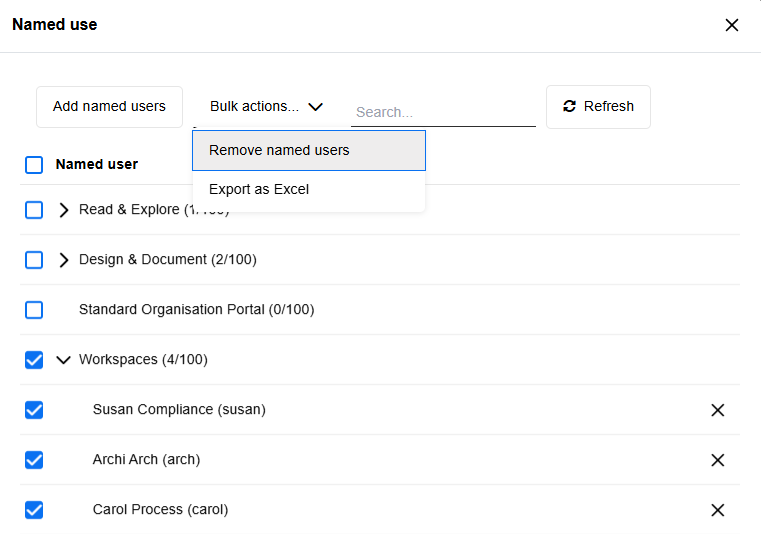
For details, please refer to the section "Manage Named Users" in the Administration Help.
Corporate Identity: SVG Logos
ADOIT now supports uploading corporate logos for your organisation's CI scheme in SVG format, ensuring they remain crisp at any resolution or screen size. Previously, only JPEG, PNG, BMP and GIF were allowed.
For details, please refer to the section "Corporate Identity" in the Administration Help.
REST API Improvements
The ADOIT REST API has been significantly expanded in version 19.0 to provide more flexibility for integrations and more granular access to metamodel and repository data. Key updates include:
Enriched User Data: The
/usersendpoint now supports the?include=groupInfoparameter, allowing you to retrieve group IDs and names directly with the user profile.Unified Object Operations: Endpoints for creating and updating objects now support the full range of parameters available for object retrieval (e.g.,
richText,showAll,includeGroupPath).New Metamodel Endpoints: Dedicated endpoints for global attributes (
/metamodel/attributes) have been added, including support for retrieving technical info texts.Enhanced Class Metadata: The
/metamodel/classesendpoints now offer a powerfulincludeparameter to fetch attributes, properties configurations, relations, and detailed info texts in a single request.Direct Repository References: When fetching models, a new
repositoryObjectIdproperty is included for modelling instances and modelling relations of repository objects, simplifying the link between the model view and the underlying repository data.Enum Language Independence: It is now possible to fetch language-independent values for ENUM attributes when retrieving relation details.
For detailed technical specifications and endpoint documentation, please refer to the Swagger API Reference on the BOC Developer Portal.
Migration from an Earlier Version of ADOIT to ADOIT 19.0
Changes to Software Requirements
Please note the following changes to the software requirements for running ADOIT when migrating from previous versions.
No longer supported
Tomcat 8 and Tomcat 9
Java 8 and Java 11
Oracle Database
Added support for
Tomcat 10.1 and Tomcat 11
Java 17, Java 21 and Java 25
Compiler Runtime Update (Visual C++ Redistributable)
ADOIT 19.0 now requires the Microsoft Visual C++ Redistributable for Visual Studio 2015–2022 (v14) to run the application server. If it is not already present on your system, the installer will prompt you to download and install it automatically during setup.
Upgrade ADOIT
The Installation Manual contains a number of migration guides that will help you upgrade ADOIT from an older version to version 19.0. Each guide contains all the steps that need to be taken, with everything explained in detail:
Upgrade from ADOIT 18.0 – 18.1 to ADOIT 19.0 (ArchiMate Library)
Upgrade from ADOIT 17.0 – 17.6 to ADOIT 19.0 (ArchiMate Library)
Migration from ADOIT 14.0 or Earlier to ADOIT 19.0 (ArchiMate Library)
If you are using ADOIT 14.0 or earlier with the ArchiMate Application Library, please contact your ADOIT consultant for assistance with the required steps.
Switch from Standard Library to ArchiMate Library
With ADOIT 16.0, the ADOIT Standard Application Library has been discontinued and is no longer supported. Are you using ADOIT 15.0/15.1 or earlier with the ADOIT Standard Application Library? To upgrade to ADOIT 19.0, you need to switch to the ArchiMate Application Library. Please contact your ADOIT consultant for assistance with the migration.
Install Hotfix
You are already using ADOIT 19.0 and want to install a hotfix? Here are step-by-step instructions: