New Features in ADOIT 17.6
ADOIT 17.6 brings a host of improvements for administrators, focusing on security, authentication, user provisioning, and integration capabilities. This release enhances existing services, adds new options for configuring OAuth 2.0 and OIDC, and simplifies user management, helping your organisation manage its architecture more efficiently.
Read on to discover what’s new in ADOIT 17.6!
New Features for ADOIT Administrators
MCP Services: Enhanced Authentication and Security Options
We continue to expand the Model Context Protocol (MCP) server introduced in ADOIT 17.5, which enables AI systems to connect to ADOIT.
MCP Services Decoupled from REST API
To provide clearer separation, the MCP services are now fully decoupled from the ADOIT REST API. The REST API no longer needs to be active, and no authentication mechanism has to be configured for it for the MCP server to function properly. Instead, all required authentication settings can be configured directly in the MCP Services settings.
OIDC Support
In addition to Basic Authentication and OAuth 2.0, you can now configure OIDC authentication as an additional method for authenticating requests to the MCP server.
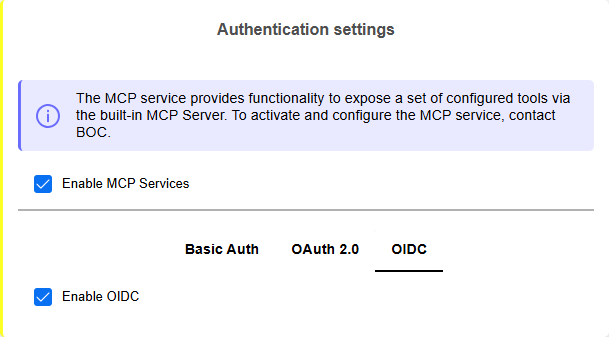
Extended MCP Security Settings
The MCP tab in the Security Settings now includes two separate IP restriction settings that exclusively control which IP addresses may send requests to the MCP server:
MCP Basic Authentication IP Restrictions: Applies to all Basic Authentication requests.
MCP IP Restrictions: Applies to all other requests (OAuth 2.0 and OIDC authentication).
If no restrictions are configured, all IP addresses are allowed.
For details on enabling the MCP services, please refer to the section "MCP Services" in the Administration Help.
Guidance on using the MCP services and a reference implementation in Python for creating an agent is available via the BOC Developer Portal.
SCIM: User Defaults
Automated user and group provisioning becomes more robust and flexible in ADOIT 17.6. The SCIM settings now also include options for settings defaults for provisioned users.
You can specify certain user groups, system roles and other properties that should apply to all users provisioned via SCIM. These defaults apply only if no specific assignments are provided in SCIM POST requests.

For details, please refer to the section "Configure General SCIM Settings" in the Administration Help.
OAuth 2.0 & OIDC: Generate Tokens & First-Party Applications
ADOIT can act as an OAuth 2.0 Authorization Server and OpenID Provider (OP). In this role, it authenticates users for external applications (OAuth 2.0 or OpenID Connect clients), allowing them to sign in with their ADOIT credentials. ADOIT 17.6 introduces the following enhancements in this area:
Generate Access Tokens and Identity Tokens
For testing purposes, you can now generate access tokens for client authentication and, for OIDC, identity tokens that provide information about the authenticated user, directly in the ADOIT Administration.
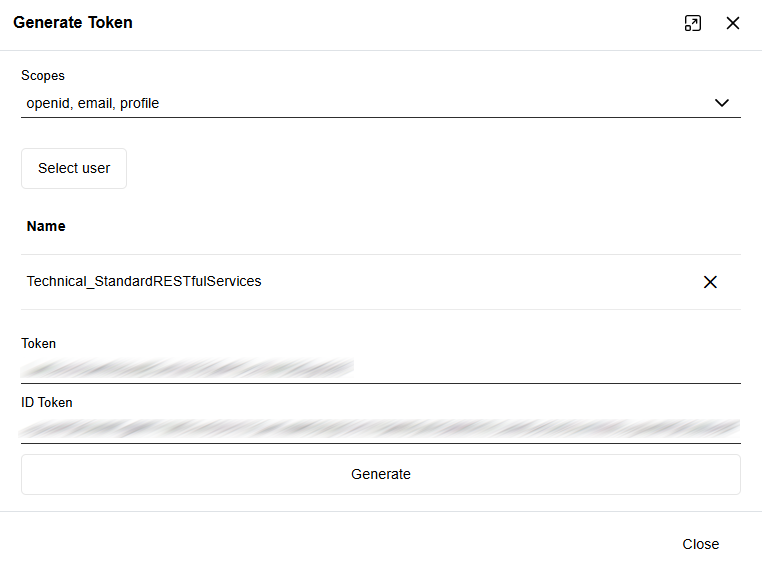
First-Party Applications
It is now possible to mark OAuth 2.0 and OpenID Connect clients as first-party applications. Requests from these applications will still require authentication (either an active session or user login), but the user will not need to explicitly grant access.
This setting is intended for applications that are owned and controlled by your organisation (first-party or public clients), where seamless access without repeated authorization is desired.
For details, please refer to the sections "Authentication > OAuth 2.0" and "Authentication > OIDC" in the Administration Help.
OAuth 2.0: "No Scope Provided" Setting
When configuring OAuth 2.0 authentication in ADOIT for the REST API, SCIM services, or MCP services, at least one scope is usually required. The optional No scope provided setting allows ADOIT to accept tokens from clients using the Client Credentials Flow without sending a scope parameter. If enabled, these clients are mapped to the technical user specified in the configuration.
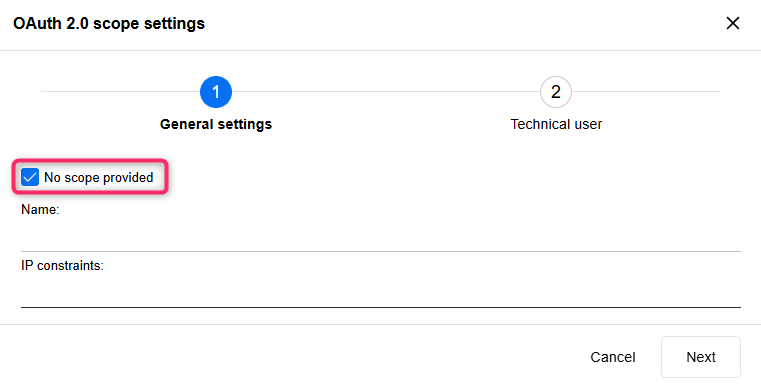
For details, please refer to the sections "MCP Services > Configure OAuth 2.0 Authentication", "SCIM Services > Configure OAuth 2.0 Authentication" and "REST API > Configure OAuth 2.0 Authentication" in the Administration Help.
Extended CORS Security Settings
The Security Settings for Cross-Origin Resource Sharing (CORS) have been extended. Whether you configure CORS at the General, REST or MCP level, you can now not only allow or block CORS for all browser-based requests from other domains, but also define a whitelist of trusted domains.
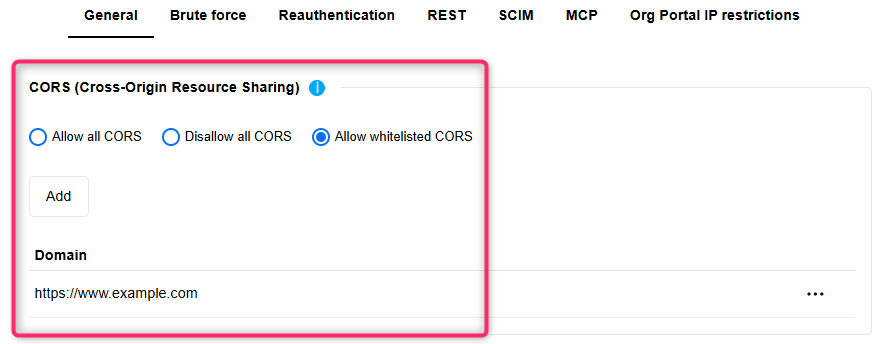
For details, please refer to the section "Security Settings" in the Administration Help.
Edit Info Texts of Relations, Object & Model Types
Starting with ADOIT 17.6, you can edit the info texts of relations, object types and model types directly on the Properties page. These texts can be adapted in all languages supported by ADOIT, helping your users better understand the purpose and meaning of these metamodel elements.
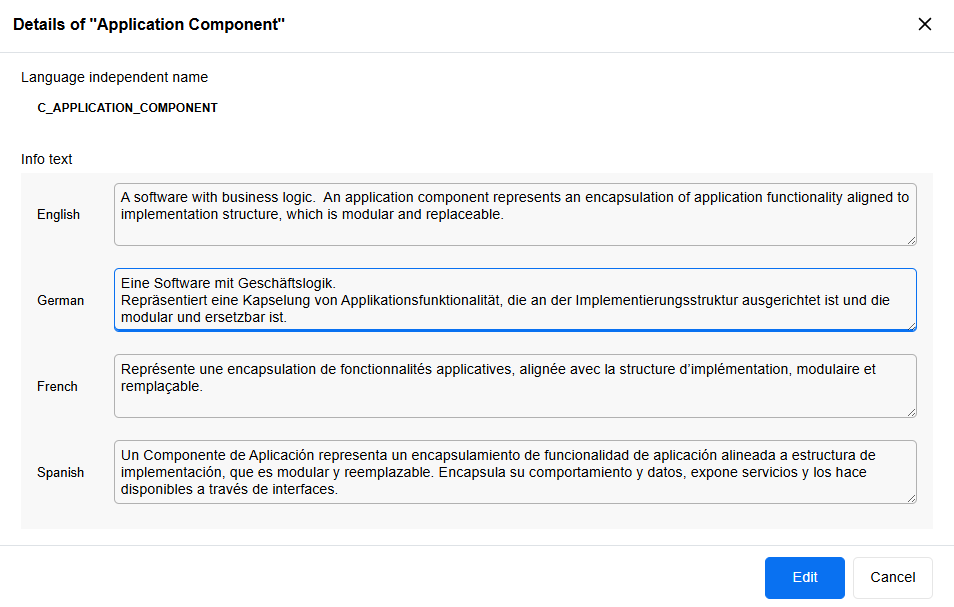
For details, please refer to the sections "Edit Relation Info Text" and "View and Manage Element Details" in the Administration Help.
Clone User: Random Password
When using Clone User, you can create an exact copy of an existing user. Previously, the cloned user received the same password as the original user. Starting with ADOIT 17.6, cloned users are now assigned a random password instead.

For details, please refer to the section "Clone User" in the Administration Help.
Export Named Users Information to Excel
A new feature allows administrators to export all named users from selected application scenarios (for example, Design & Document) as an Excel file (XLSX format) for use in other applications. The export contains one column per scenario, with rows listing the assigned users.
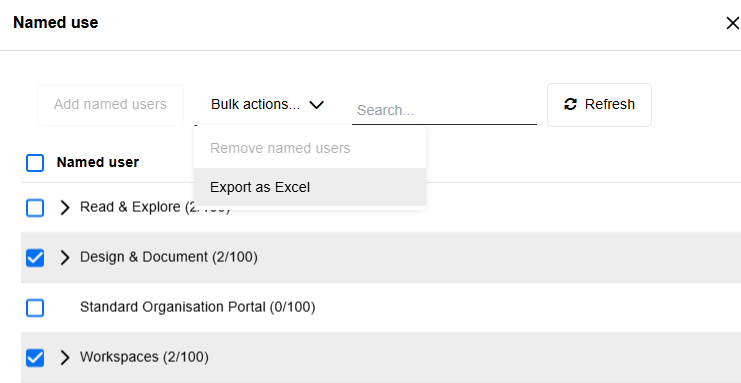
For details, please refer to the section "Manage Named Users" in the Administration Help.
View Users: Information about Disabled Accounts
A small but helpful enhancement on the Users page adds the option to display the Account disabled column. This column shows whether a user account is disabled and therefore unable to sign in to ADOIT. The same information is also included when exporting user data to Excel.
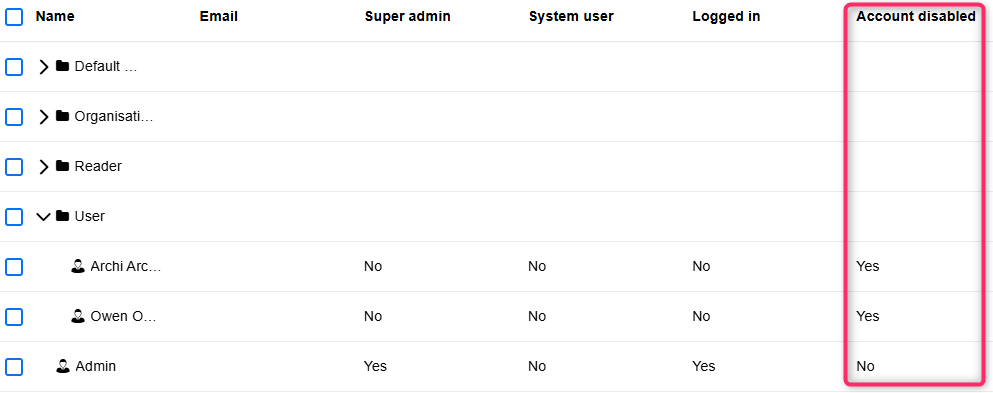
For details, please refer to the section "View Users" in the Administration Help.
Migration from an Earlier Version of ADOIT to ADOIT 17.6
Changes to Software Requirements
Please note the following changes to the software requirements for running ADOIT when migrating from previous versions.
No longer supported
Tomcat 8 and Tomcat 9
Java 8 and Java 11
Oracle Database
Added support for
Tomcat 10.1 and Tomcat 11
Java 17, Java 21 and Java 25
Compiler Runtime Update (Visual C++ Redistributable)
ADOIT 17.6 now requires the Microsoft Visual C++ Redistributable for Visual Studio 2015–2022 (v14) to run the Application Server. If it is not already present on your system, the installer will prompt you to download and install it automatically during setup.
Upgrade ADOIT
The Installation Manual contains a number of migration guides that will help you upgrade ADOIT from an older version to version 17.6. Each guide contains all the steps that need to be taken, with everything explained in detail:
Upgrade from ADOIT 17.0 – 17.5 to ADOIT 17.6 (ArchiMate Library)
Upgrade from ADOIT 15.0/15.1 to ADOIT 17.6 (ArchiMate Library)
Migration from ADOIT 14.0 or Earlier to ADOIT 17.6 (ArchiMate Library)
If you are using ADOIT 14.0 or earlier with the ArchiMate Application Library, please contact your ADOIT consultant for assistance with the required steps.
Switch from Standard Library to ArchiMate Library
With ADOIT 16.0, the ADOIT Standard Application Library has been discontinued and is no longer supported. Are you using ADOIT 15.0/15.1 or earlier with the ADOIT Standard Application Library? To upgrade to ADOIT 17.6, you need to switch to the ArchiMate Application Library. Please contact your ADOIT consultant for assistance with the migration.
Install Hotfix
You are already using ADOIT 17.6 and want to install a hotfix? Here are step-by-step instructions: